

Lynx × Rspack 2.0: Faster, Smaller, Closer to the Web
← All Posts






Lynx built its toolchain Rspeedy on top of Rstack, Rsbuild and Rspack, so every Lynx app gets the performance and capabilities of the upstream toolchain as soon as they land.
With Rspack 2.0 and Rsbuild 2.0 now out, Lynx picks up the upstream improvements for free: 18–39% faster builds, 3–9% smaller bundles, and config aligned with web conventions like resolve.alias and top-level splitChunks. On top of them, we've shipped a series of optimizations tailored to Lynx: more flexible code splitting and dynamic loading, PrimJS-tuned output, ES2017 by default, parallel Lynx Bundle encoding, and precise error de-mapping. And one more thing: an Agent Skill for bundle-size optimization, to help you systematically shrink an app.
These features are available from Rspeedy 0.15. We expect most projects to get them without any config changes; for the rest, see the upgrade guide.
Rspack 2.0
Rspack is the bundler at the bottom of the stack. Upgrading to 2.0 brings the most direct performance and size wins, and most projects get them with no config changes. For the full set of changes Rspack 2.0 brings, see the Rspack 2.0 announcement.
18–39% faster builds
Across a set of production Lynx apps, we measured build-time reductions of 18–39% with no config changes:
The core speedup comes from Rspack 2.0's engine optimizations; multi-page apps benefit further from parallel Lynx Bundle encoding.
3–9% smaller bundles
Bundle size shrank as well. Across the intermediate main-thread.js, background.js, and the final Lynx Bundle, main-thread.js and the Lynx Bundle dropped by 3–9%.
Sizes are per-page totals of DEBUG-mode intermediate artifacts, before → after.
This comes from Rspack 2.0's stronger tree-shaking, plus the background output target moving to ES2017.
Node.js requirement raised
The minimum is now Node.js 20.19+ or 22.12+; Node.js 18 is no longer supported.
@lynx-js/*-webpack-plugin drops webpack support
Now that Rspack is mature, we're dropping webpack support in the underlying @lynx-js/*-webpack-plugin packages: they're Rspack-only, with public types coming uniformly from @rspack/core. Most projects use them indirectly through Rspeedy and need no changes; if you depend on these plugins directly, you'll need to adjust accordingly.
Rsbuild 2.0
Rsbuild provides the out-of-the-box build configuration on top of Rspack. 2.0 moves that configuration closer to the web ecosystem's common conventions; the changes at this layer are mostly renames and relocations of config options, with unchanged semantics. For the full set of changes, see the Rsbuild 2.0 announcement.
source.alias → resolve.alias
Move aliases from source.alias to resolve.alias:
performance.chunkSplit → splitChunks
Move performance.chunkSplit.strategy to the top-level splitChunks.preset:
Default decorators version 2023-11
source.decorators.version now defaults to 2023-11 (was 2022-03); set it explicitly to keep the old behavior.
Optimizations for Lynx
On top of Rspack and Rsbuild, Rspeedy layers a series of optimizations targeting Lynx's dual-thread runtime and artifact format.
More flexible code splitting and dynamic loading
Lynx supports three increasingly powerful ways to split an app, each with a counterpart in the web ecosystem, adapted by Rspeedy to Lynx's artifact format:
Build-time splitting with splitChunks is common (its config moved, see performance.chunkSplit → splitChunks), so we won't expand on it here; below we focus on Lazy Bundle and External Bundle.
Lazy Bundle
Lazy Bundle defers part of a single app, loaded on demand with ReactLynx's lazy(), just like dynamic import() on the web:
On top of this, we're adding per-import control over when a lazy bundle loads: powered by Rspack 2.0's import attribute support, you'll be able to specify per import whether it loads synchronously (for IFR) or asynchronously (background-driven, the default). The usage will look roughly like:
This is in progress and will land in a future release.
External Bundle
External Bundle is a separately built Lynx Bundle that another app can fetch and render at runtime, enabling cross-app reuse. The producer side is built with Rslib via defineExternalBundleRslibConfig; the consumer side uses the Rsbuild plugin pluginExternalBundle.
PrimJS-tuned output: lowering let / const to var
Beyond build time, we also made the output parse faster in Lynx's runtime. On Android, Lynx's background thread runs on the PrimJS engine, and we found PrimJS parses var noticeably faster than block-scoped let / const. So Rspeedy 0.15 enables SWC's transform-block-scoping on both the main- and background-thread layers by default, lowering let / const to var, and sets output.environment.const to false so the bundler's own runtime code uses var too.
Background target raised to ES2017
We raised the background-thread output target from ES2015 to ES2017 (the main thread stays at ES2019). As low-end devices age out, a higher baseline means less down-leveling and smaller, faster output. If you still need to down-level specific syntax, add the matching transform to tools.swc's env.include:
Parallel Lynx Bundle encoding
For multi-page apps, the speedup isn't only from Rspack 2.0: Rspeedy runs each entry's tasm encode (@lynx-js/tasm) in a parallel worker pool, parallelizing what used to be serial Lynx Bundle encoding to cut build time further.
Precise error de-mapping
Rspeedy 0.15 lets production errors resolve precisely back to your source: it generates a unified debug-metadata.json per Lynx entry that brings the JS, CSS, and UI source maps together, so both main-thread and background-thread errors can find the right de-mapping info. See Map Production Errors to Source for how it works.
One More Thing: an Agent Skill for Bundle-Size Optimization
Pinpointing where the bytes are is often harder than the optimization itself. It takes understanding Lynx's artifact format and Rspeedy's dual-thread build. rspeedy-bundle-size encodes that knowledge into an Agent skill: it teaches the AI how a Lynx dual-thread bundle's size breaks down, measures first, then ranks the biggest wins (assets, background JS, redundant code that leaked into the main thread).
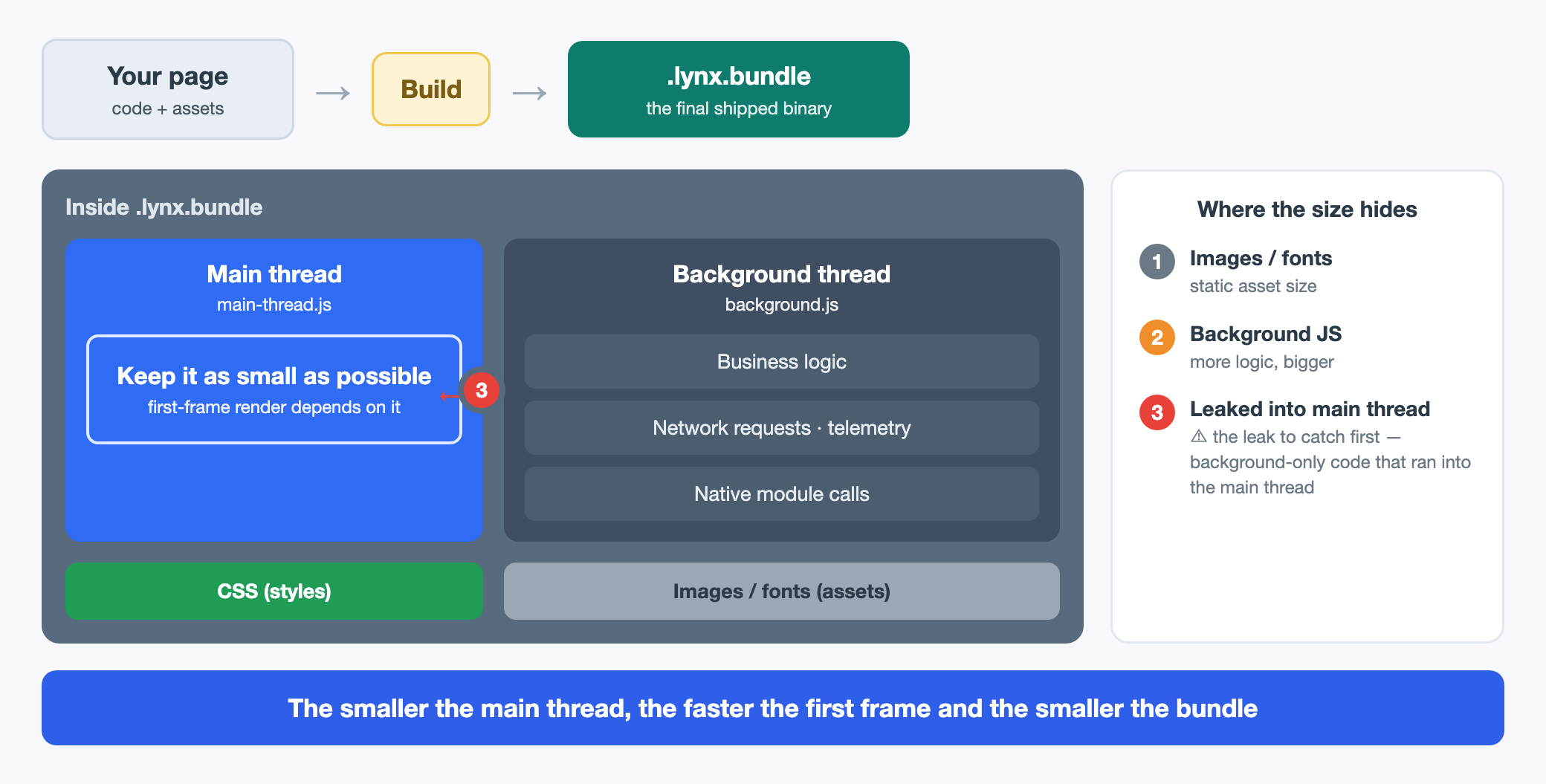
Install it into your agent (Claude Code, Codex, etc.):
Then just describe the goal in natural language, e.g. "break down this app's bundle and tell me where it's big and how to shrink it." The skill runs Rsdoctor, reports the per-layer breakdown, and hands back a prioritized plan; code only changes once you confirm. In real projects, this workflow has cut page size by 10–13%, mainly by correctly marking background-only code (logging, network requests, telemetry) that had leaked into the main-thread render path and moving it out, plus de-duplicating packages via aliases.
Migration
For migration steps, see the Rspeedy upgrade guide. The breaking changes listed by layer above mostly come with the Rspack 2.0 / Rsbuild 2.0 upgrade. To check them off one by one, see the Rspeedy CHANGELOG, the Rsbuild v1 → v2 guide, and the Rspack v1 → v2 migration guide.
What's next
We'll keep working with the Rstack team on both build performance and output performance, and make more mature web capabilities work out of the box on Lynx, such as Module Federation.
You may have also noticed the Rspack → Rsbuild → Rspeedy layering above and found it confusing. We did too. We'll explore how to retire the Rspeedy layer by pushing Lynx specifics like the dual-thread model upstream into Rstack, reducing Lynx-only config, concepts, and documentation, so that long term you can configure and build a Lynx project directly with Rsbuild.
Try it on an existing project. If you hit anything or have suggestions, open an Issue or join the discussion on GitHub.