

Deep Dive into ReactLynx: From Background Rendering to Instant First-Frame Rendering
← All Posts



 +2
+2Many developers wonder: how does ReactLynx run React across two threads, and how does it enable capabilities like Instant First-Frame Rendering (IFR) and Main Thread Script? To answer these questions, we are launching a series of blog posts diving into the technical details behind the scene. If you prefer video, you can also watch our talk from last year's React Universe Conf: “React for Two Threads”.
In React on the Web, render and commit happen on the same thread: after React finishes re-rendering, it directly updates the DOM using DOM references.
In cross-platform frameworks like ReactLynx, however, we want the main thread to focus as much as possible on rendering native views without being blocked by React or JavaScript business logic. We therefore run them on an independent background thread. But this also means the background thread cannot access Element references on the main thread and cannot commit directly. This is why ReactLynx needs a different commit pipeline, one that bridges from the background thread to the main thread.
Background Rendering
Background rendering, more formally known as "background-driven rendering", makes ReactLynx's update path a cross-thread asynchronous commit.
ReactLynx's background runtime builds on Preact, which provides the component model, Hooks, and the render and diff pipeline. The background thread, however, has no DOM and cannot access native views on the main thread. ReactLynx therefore intercepts Preact's host operations on the background thread: element creation, attribute changes, and structural updates produced during render and diff don't touch views directly. Instead, they are recorded as a Patch and sent to the main thread during commit.
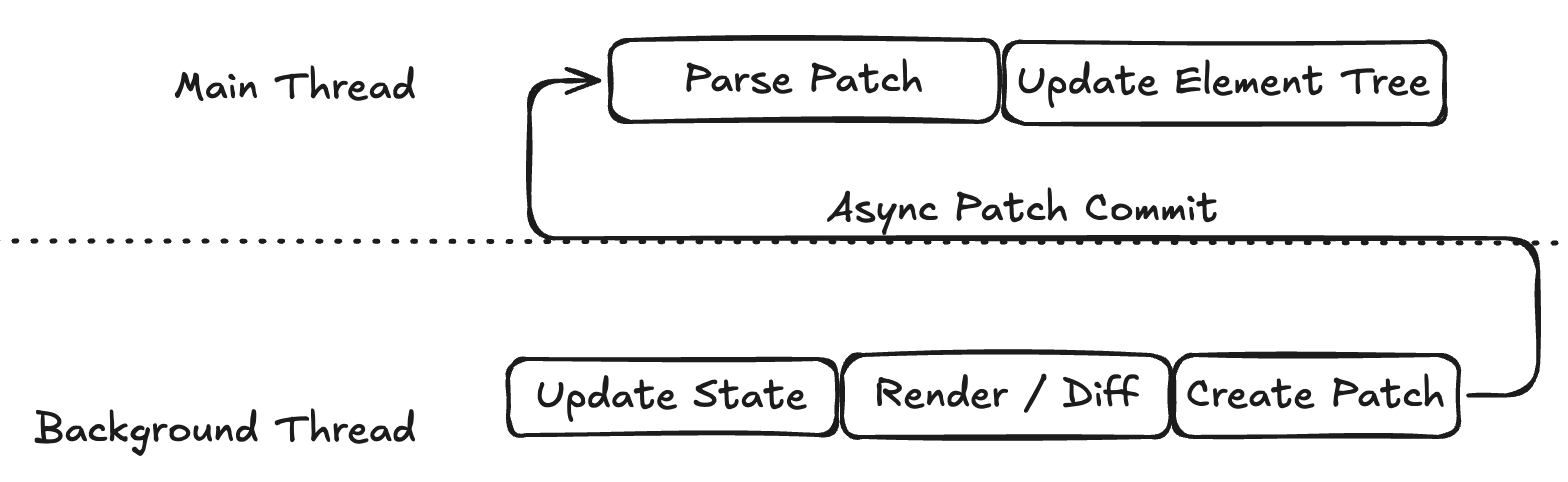
Next, we'll use the typical counter app below to walk through how ReactLynx renders and updates. In practice the first frame flashes past, so here we use __MAIN_THREAD__ on purpose to simulate the difference between the app at two points in time. What happens between those two results is what the rest of this post is about.
Serializable Changes (Patch)
A Patch describes "what changed this time."
To be suitable for cross-thread transfer, a Patch is structured as a flat stream of opcodes: the main thread scans it from left to right with a cursor, reading an opcode first, then consuming subsequent arguments according to their format, executing them one by one.
The enum definitions of Patch opcodes can be simplified into a few main categories:
Let's start with the minimal state update: in the card component above, tapping it updates count from 0 to 1. The background thread can encode this text change into a compact stream of numbers:
With slot indices assigned at compile time, ReactLynx doesn't need to send the entire node description every time; it only needs to tell the main thread that "the new value at this slot is 1."
Patches can also express structural changes. Consider the previous conditional branch: if the same slot needs to switch from the old child corresponding to the main branch to the new child corresponding to the background branch, these operations are still carried out within the same number stream.
From Patch to Element PAPI
When the main thread receives a Patch, it first decodes the opcodes, and then, using local instance maps and compile-time slot rules, locates which Element, attribute, or child position the update actually targets. It then invokes Element PAPI, the low-level Element APIs provided by the Lynx main-thread runtime for frontend frameworks, such as __CreateElement, __SetAttribute, __AppendElement, __InsertElementBefore, and __RemoveElement.
Reading the source
In the ReactLynx runtime, the patch application entry point is in snapshotPatchApply.ts, and the Element PAPI global declarations are in types.d.ts.
The main thread translates opcodes into Element PAPI calls roughly like this:
Main-Thread Instant First-Frame Rendering
During steady-state execution, this Patch mechanism updates the UI rapidly. But the first frame cannot rely on this mechanism alone. The main thread cannot yet obtain the first-screen view structure, even though it is already capable of native rendering. It must wait for the background thread to initialize, execute application code, perform the initial render/diff, and send back the first batch of initial Patches. This weakens the benefits of Lynx's dual-threaded architecture:
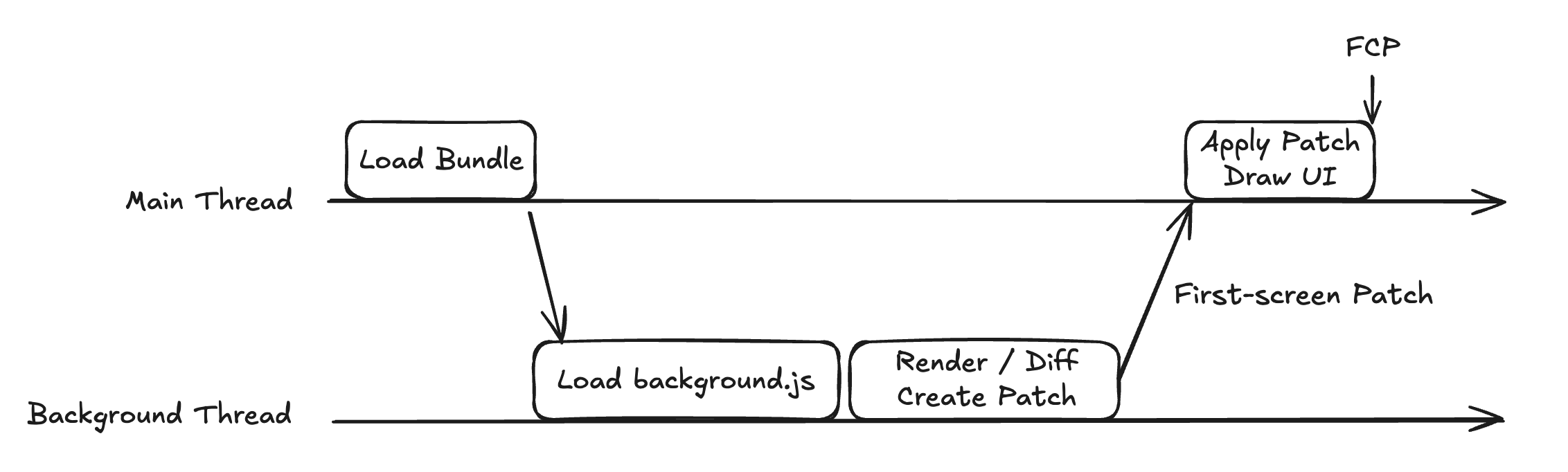
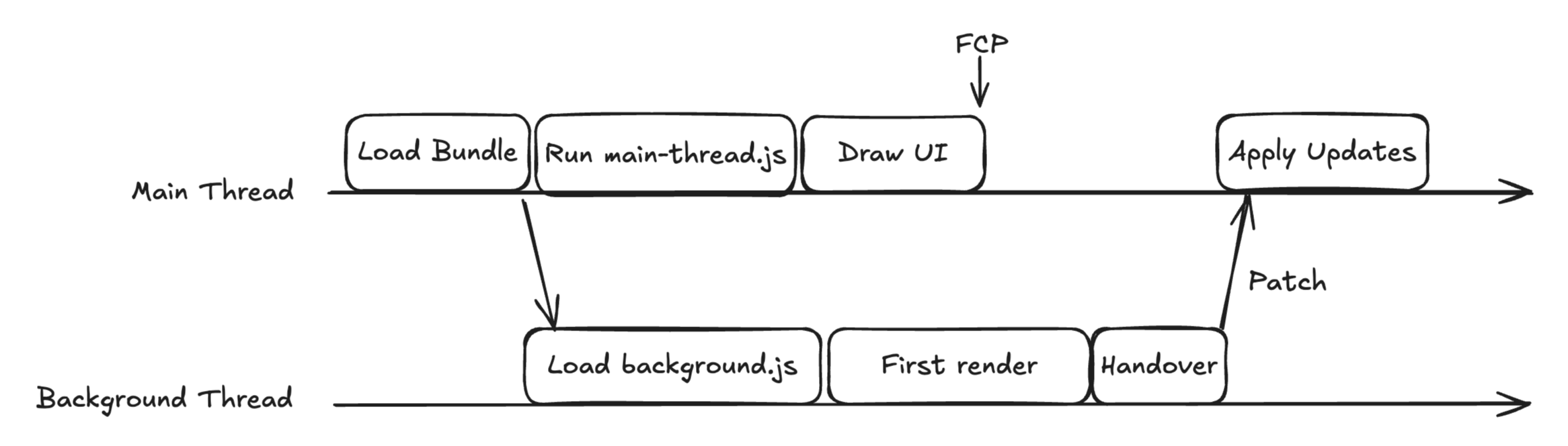
ReactLynx's Instant First-Frame Rendering (IFR) optimizes precisely this startup wait time. It splits out a fast path for the first frame that the main thread can execute immediately: the main thread runs the pruned main-thread artifact to create the initial native views right away, while the background thread concurrently boots the full React runtime and continues handling subsequent business logic. Once the initial background render is ready, ReactLynx performs a cross-thread handover to associate the background result with the main thread's existing views. Subsequent updates then return to the background-driven Patch -> Element PAPI pipeline.
Dual-Thread Build Artifacts and Code Pruning
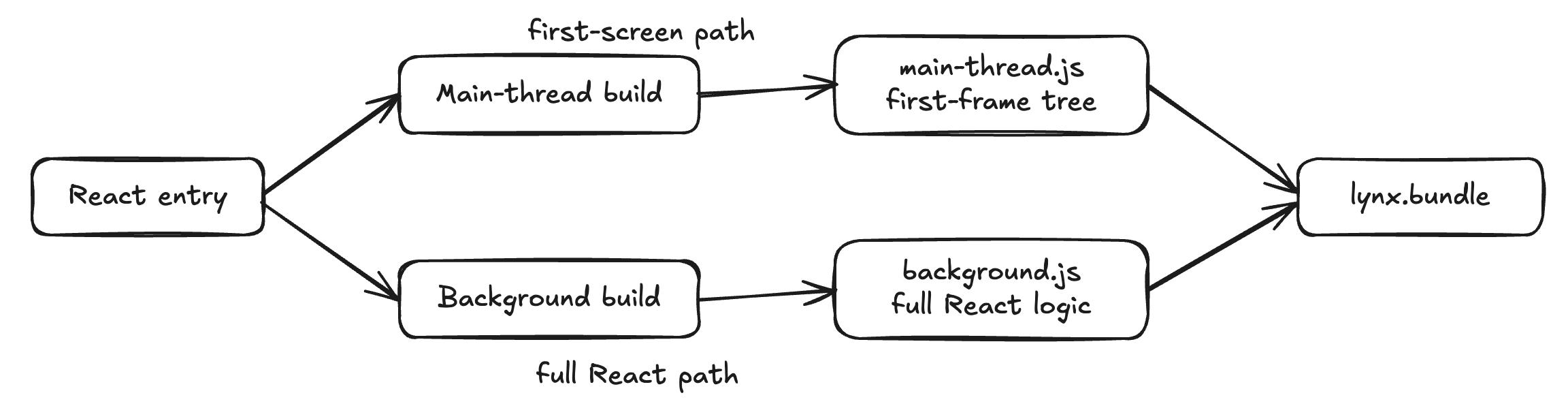
With responsibilities split across two threads, a single React entry module can no longer emit just one piece of code. ReactLynx's build toolchain, Rspeedy, compiles each entry into dual-threaded artifacts: main-thread.js on the main thread, which creates the Elements of the first frame along the first-screen path; and background.js on the background thread, preserving the complete React logic. In default development builds, these two files can typically be found under dist/.lynx/[name]/. Ultimately, they are packaged together into the same lynx.bundle and loaded per thread by the Lynx engine.
Using the earlier App component that contains side effects, event handlers, dynamic text, and __MAIN_THREAD__ branches, the main-thread artifact after ReactLynx compilation looks roughly like this:
The main-thread artifact serves only the first frame, which allows ReactLynx to prune user code for that path. During the two builds, each __MAIN_THREAD__ conditional is folded to the branch for that thread, while useEffect callbacks and functions marked with 'background only' are excluded from the main-thread path. What remains is primarily the initial values and view structure needed for the first frame.
The main-thread runtime is also smaller. It omits the reconciliation and scheduling paths needed for continuous background updates. Instead, a dedicated JSX runtime and a synchronous traversal adapted from preact-render-to-string evaluate the first frame, while Hooks retain only the behavior needed for that pass.
In contrast, the background artifact does not participate in main-thread first-frame tree construction. It preserves the complete React logic needed for subsequent execution:
You may have noticed that the background artifact has a __card too. It is only an identifier, used during rendering and Patch updates to find the structure on the main thread that actually creates the Elements.
Compiler-Informed Rendering
The pipeline above relies on help from the compiler throughout: pruning the first frame down to a short path, and sending only a slot index in a Patch, both build on the structure the compiler analyzed ahead of time. For this part of the mechanism, see Compiler-Informed Rendering; we will also explore it in subsequent posts in this series.
Handing Over Existing Views
While the main thread renders the first frame, background React finishes its own initial render in parallel. The same UI now exists as two trees, one per thread: the main-thread tree owns the real Elements, while the background tree holds the nodes it has just rendered. So how do the Patches that the background thread produces next reach the Elements the main thread has already drawn?
The Web has run into a similar problem with SSR hydration: server-rendered HTML creates a host node tree ahead of time, and the client adopts those existing DOM nodes as it builds its first VNode tree. Handover takes the same adoption approach, connecting two renders from different environments through an ID mapping.
In practice, the main-thread first-frame tree uses negative IDs, whereas nodes created during the initial background render use temporary positive IDs. During handover, ReactLynx recursively matches the two trees using compile-time dynamic slot positions and child node structures. Taking the counter app from the beginning of this post:
Matched background nodes reuse the main-thread IDs (1 -> -1, 2 -> -2), while differences in dynamic values and subtrees, such as the $1 branch that differs across the two threads, go into the initial correction Patch. Nothing there has to be rebuilt; updating it in place is enough. When count then updates from 0 to 1, the Patch generated by the background thread targets the native text node behind -2.
Dynamic values and events also reuse this mapping. If text or attributes differ, the background thread sends a standard attribute Patch. Events that reach the background thread before handover completes are buffered, then dispatched to the corresponding handleTap through the ID mapping.
When and where this adoption happens is a strategy choice. ReactLynx currently waits until both trees have been rendered, then has the main thread send its first-frame tree back to the background thread to do the matching, so that the main thread is not blocked by that work and the initial background render never waits on the main-thread result. The division of labor after adoption differs too. On the Web, the server output is done as soon as hydration finishes, and the page belongs entirely to the client. In ReactLynx, the main-thread artifact still holds the Elements, every later Patch lands through it, and main thread scripts run on this side as well.
Takeaways
To sum up, at startup the main thread first draws the first frame along the pruned first-screen path, and ReactLynx then hands the existing views over to the background runtime. Once the page is running, the background thread computes updates and sends Patches across the thread boundary, and the main thread updates the Lynx Element tree through Element PAPI.
The ReactLynx compiler and architecture are both built to express the first screen as initial data and directly creatable views, keeping the path on the main thread as short as possible. Requests, side effects, real event handling, and later state updates simply stay with background React. To push further, you can prepare the first-screen data on the host platform ahead of time to save a round trip, and use ideas such as 'background only' to shrink the main-thread artifact.
Here's to instant first frames in your ReactLynx apps!