


LazyComponent
A LazyComponent for ReactLynx. It defers the loading of non-critical UI elements.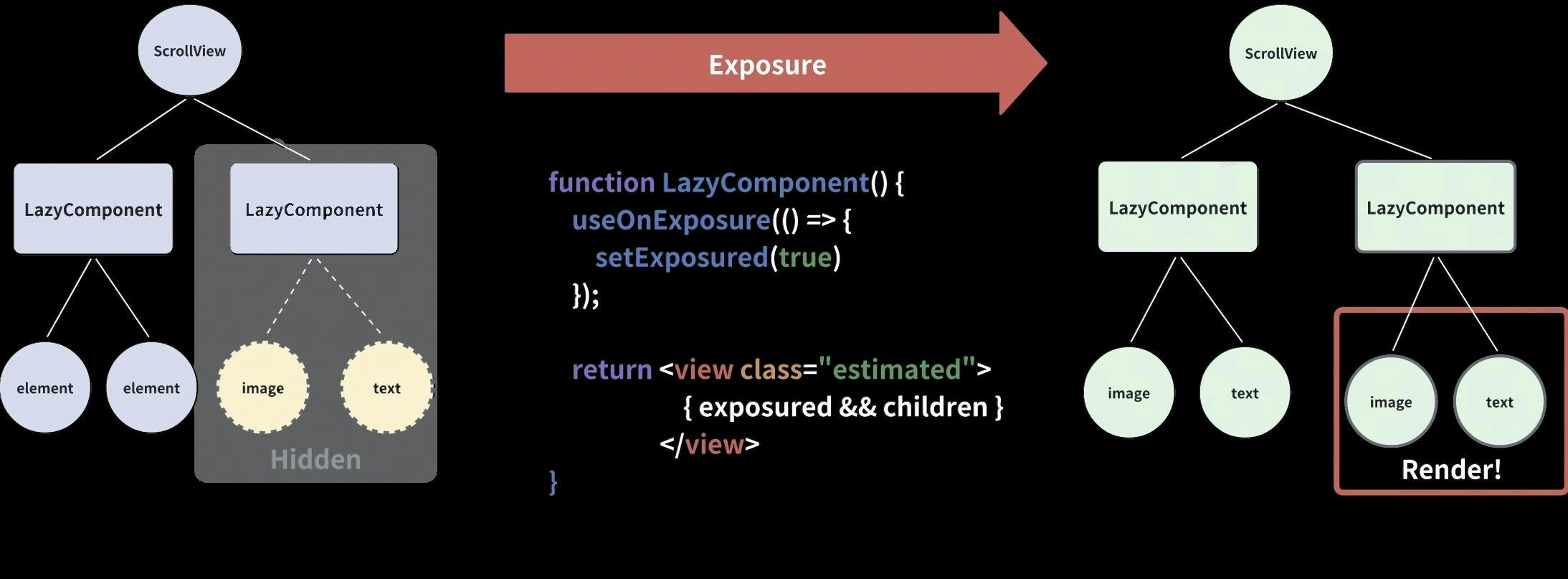
Info
You can check the source code to understand how it works, and you're welcome to submit MRs to enhance its capabilities.
Basic Usage
<LazyComponent> renders its content after it's exposed, optimizing initial screen rendering performance
Examples
Adjust Visibility Margin
Adjust the visibility margin to render <LazyComponent> content earlier, optimizing the visual experience of scrolling and animations.
Structure
Component API
LazyComponent
bottomiOSAndroid
To change the viewport size of the target node itself during exposure. >0 means extending the lower boundary of the node, <0 means shrinking the lower boundary of the node.
childreniOSAndroid
Children
estimatedStyleiOSAndroid
Estimated height and width need to be set
leftiOSAndroid
To change the viewport size of the target node itself during exposure. >0 means extending the left boundary of the node, <0 means shrinking the left boundary of the node.
pidiOSAndroid
Be used to mark the exposure timing of lazy loading. Please ensure that it is unique throughout the page.
rightiOSAndroid
To change the viewport size of the target node itself during exposure. >0 means extending the right boundary of the node, <0 means shrinking the right boundary of the node.
sceneiOSAndroid
Be used to mark the exposure timing of lazy loading. Please ensure that it is unique throughout the page.
topiOSAndroid
To change the viewport size of the target node itself during exposure. >0 means extending the upper boundary of the node, <0 means shrinking the upper boundary of the node.
unloadableiOSAndroid
Unload child when dis-exposure to save mem-usage
unmountOnExitiOSAndroid
Unmount child when dis-exposure to save mem-usage