For AI agents: the complete documentation index is available at /next/zh/llms.txt, the full documentation bundle is available at /next/zh/llms-full.txt, and this page is available as Markdown at /next/zh/rspeedy/runtime-profiling.md.
Rspeedy logo
Rspeedy
  • 简体中文
  • 运行时性能分析

    分析 Lynx 性能

    按照录制 Trace 的指引来分析 Lynx 性能。

    分析框架性能

    你可以采用构建配置和JS Profile两种方式来分析框架性能。

    通过构建配置启用

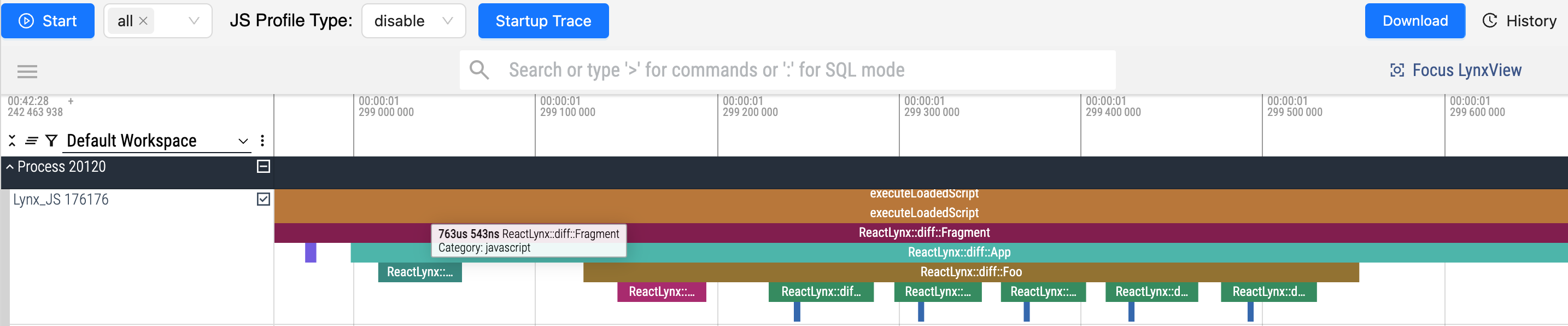
    我们为框架(如 ReactLynx组件的 renderdiff )提供了内置的 Trace 点。

    react profile

    • 在开发环境(rspeedy dev):默认情况下会添加 ReactLynx 相关的 Trace 点。
    • 在生产环境(rspeedy build):默认情况下会移除 ReactLynx 相关的 Trace 点。

    这些 Trace 点显示了组件如何渲染和比较差异。

    在生产环境中运行性能分析

    可以通过在构建时设置 performance.profiletrue 来启用 Trace 点。

    import { defineConfig } from '@lynx-js/rspeedy';
    
    export default defineConfig({
      performance: {
        profile: true,
      },
    });
    Tip

    您可以使用 rspeedy preview 在本地预览输出结果。

    这在尝试优化应用程序性能时非常有用。

    Warning

    不要部署使用 performance.profile: true 构建的输出。它们不适用于生产环境。

    在开发环境中禁用性能分析

    可以通过在开发时设置 performance.profilefalse 来禁用 Trace 点。

    import { defineConfig } from '@lynx-js/rspeedy';
    
    export default defineConfig({
      performance: {
        profile: false,
      },
    });

    使用 JS Profile 动态采样

    使用 JS Profile 工具在运行时采集调用堆栈数据,无需修改构建配置。

    除非另有说明,本项目采用知识共享署名 4.0 国际许可协议进行许可,代码示例采用 Apache License 2.0 许可协议进行许可。