


Announcing Lynxtron
← All Posts


Lynx is moving onto desktop.
Lynxtron is an Electron-like app framework powered by Lynx. In a Lynxtron application, the host process keeps the Node.js capabilities desktop apps need, while LynxWindow hosts Lynx UI through a light-weight renderer instead of a browser page.
That gives developers a way to build desktop applications with the Lynx UI model, while keeping the runtime lightweight, making native extension a first-class part of the app, and organizing UI code across desktop, web, and mobile-native targets.
What Lynxtron Is For
Desktop application development often forces a practical choice: move fast with web technology, or spend more native engineering effort to get smaller binaries, better runtime behavior, and deeper system integration. Lynxtron is a third path: use Lynx for UI, use a desktop host process for system capabilities, and use native extensions where native code is the right tool.
Lynxtron centers on three features: Light-weight and Fast, Multiplatform, and Natively Extensible. Here is how those ideas map to desktop application development.
Explore with Lynxtron Go
Lynxtron Go is the official playground for Lynxtron, and is itself a desktop application built with the Lynxtron framework. It provides templates, a built-in example gallery, an editor, and a console for running and inspecting small Lynxtron applications without first setting up a full project. The runnable examples below can also be opened directly in Lynxtron Go.
The examples in this article come from the Lynxtron Go 0.1.18 release and use Lynxtron runtime 0.0.28. The desktop examples support macOS on Apple silicon and Intel, and Windows on x64. The Notes example also supports Web. Lynxtron projects require Node.js ^22.18.0 || ^24.0.0 || ^26.0.0.
Light-weight and Fast
Lynxtron is Electron-like in the application model, but it does not ship a browser as the UI runtime. LynxWindow hosts UI through the light-weight Lynx renderer, which keeps the desktop runtime smaller and gives startup, window creation, and memory usage a more direct path.
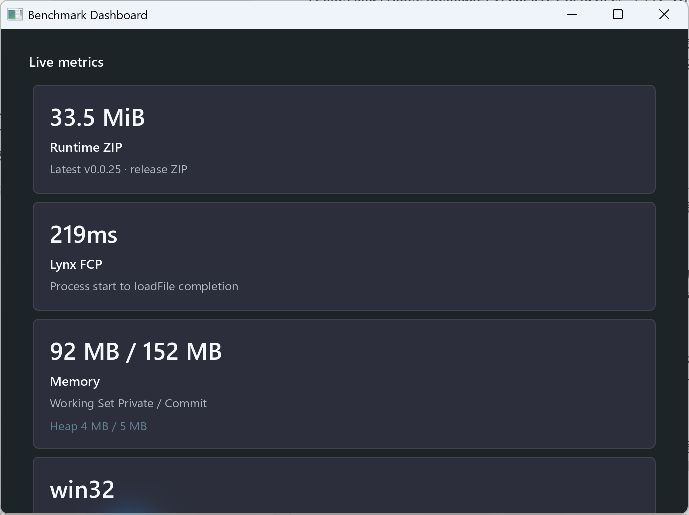
The benchmark reports Lynxtron's baseline package size, startup time, physical memory, JS heap, platform information, and the memory delta after opening a second
LynxWindow, covering startup and memory use with one or two windows. The screenshot shows a cold launch, excluding the first launch after installation, of the Benchmark example v0.0.6 running on Lynxtron 0.0.28 and Windows 11 x64 (Core Ultra 7 155H with Intel Arc); startup spans process creation through the first content appearing on screen and is not an average.
Natively Extensible
Lynxtron extends the renderer through LynxExtensionModule, the Desktop C++ extension API backed by the public Lynx Native API. This reference covers the native-view lifecycle, registration, and texture APIs used by this example. Native modules use the C++ extension-module wrapper and expose their JavaScript interface through Node-API, while native UI and texture surfaces use the native-view wrappers. In desktop development, it is common for part of an application to need native-rendered graphics or native UI: a camera preview, video surface, map view, drawing canvas, platform control, or any surface that needs hardware access, deeper GPU integration, or system-provided rendering. Lynxtron can combine those native surfaces or native UI with the Lynx runtime, so native-rendered parts stay native while interaction and UI logic can still be built and iterated with Lynx UI.
Lynx UI controls a native texture surface through a registered native module, keeping native rendering and front-end-style interaction in one component tree.
Multiplatform
Lynxtron does not lock Lynx to desktop. With Lynx, UI code can run across platforms, including the Web, and can be ported to new hosts with minimal effort.
The same Lynx UI consumes one notes API. At build time, the desktop and Web targets wire that API to a Node preload bridge and a browser-side bridge, respectively.
This is the Lynxtron cross-platform engineering model: keep the Lynx UI layer shareable, isolate host-specific logic behind platform adapters, and port the renderer model to new hosts when needed.
Engineering Boundaries
What matters is the inspectable source boundary: the host process owns desktop capabilities, Lynx UI owns interface and interaction, and native extensions own the platform-specific pieces. Lynxtron's design is not about pushing every capability into one layer. It is about letting each layer own the work it is best suited for.
Get Started
Follow Lynxtron Getting Started to create and run your first project.