For AI agents: the complete documentation index is available at /next/zh/llms.txt, the full documentation bundle is available at /next/zh/llms-full.txt, and this page is available as Markdown at /next/zh/lynxtron/learn/Communication-Between-Node-And-Lynx.md.
  • 简体中文
  • Lynxtron 中 Node.js 与 Lynx 的通信

    如果你熟悉 Electron,可以先把 Lynxtron 中的通信需求理解为两类:

    1. Node 主进程与 UI 双向消息通信:类似 Electron 中主进程与 BrowserWindow renderer 之间的 IPC。
    2. 在 UI 中直接使用 Node.js 能力:Electron 技术上支持通过 nodeIntegration 在 Web 中直接调用 Node.js 能力,但通常不推荐直接开启;Lynxtron 则通过增强 preload scripts,使其能在隔离 context 中使用 Node.js,并将 JS 对象暴露给 Lynx UI 调用。

    Lynxtron 对这两类需求分别提供了对应能力:

    和 Electron 的能力对照

    需求ElectronLynxtron
    UI 使用 Node.js 能力preload scripts / contextBridge.exposeInMainWorld() / nodeIntegrationlynxPreference.preload + contextBridge.exposeInLynxBTS() + NativeModules.nodejs.exposed
    Node 主进程向 UI 推送消息webContents.send()LynxWindow.sendGlobalEvent()
    UI 调用 Node 主进程并等待结果ipcRenderer.invoke() + ipcMain.handle()NativeModules.bridge.call() + lynxBridge.handle()
    UI 向 Node 主进程发送单向消息ipcRenderer.send() + ipcMain.on()NativeModules.bridge.send() + lynxBridge.on()

    使用 Preload Scripts

    Lynxtron 的 preload scripts 可以理解为 Electron preload scripts / contextBridge 模式面向 Lynx BTS 的能力增强:preload script 可以直接使用 Node.js API,并把方法或对象暴露给 Lynx UI 调用。

    Electron 中,preload script 与 Web 页面处于隔离的 JS context;preload script 与 Web 最终需要通过 contextBridge 或 IPC 做跨 context 的序列化/代理通信,Web 侧不能直接使用 preload script context 中的原始 JS 对象。

    Lynxtron 中,Lynx BTS 与 preload scripts 都运行在 Node.js 中,但处于隔离的 JS context;preload script context 有 Node.js 能力,可以通过 contextBridge.exposeInLynxBTS() 将 JS 对象暴露给 Lynx BTS 直接访问。

    配置 preload scripts

    创建窗口时,通过 lynxPreference.preload 指定 preload script 文件:

    // main.ts
    import { app, LynxWindow } from '@lynx-js/lynxtron';
    import path from 'path';
    
    app.whenReady().then(() => {
      const win = new LynxWindow({
        width: 800,
        height: 600,
        lynxPreference: {
          preload: path.join(__dirname, 'preload.js'),
        },
      });
    
      win.loadFile('main.lynx.bundle');
    });

    在 preload script 中暴露 Node.js API

    preload script 中可以直接使用 Node.js API,然后通过 contextBridge.exposeInLynxBTS() 暴露给 Lynx:

    // preload.ts
    import { contextBridge } from '@lynx-js/lynxtron/context-bridge';
    import fs from 'fs';
    import path from 'path';
    
    type ExposedNodeApi = {
      readTextFileWithTransform: (
        filePath: string,
        transform: (content: string) => string,
      ) => Promise<string>;
      createReader: (baseDir: string) => {
        read: (relativePath: string) => Promise<string>;
      };
    };
    
    const nodeApi: ExposedNodeApi = {
      readTextFileWithTransform: async (filePath, transform) => {
        const content = await fs.promises.readFile(filePath, 'utf8');
        return transform(content);
      },
    
      createReader: (baseDir: string) => {
        return {
          read: (relativePath: string) => {
            return fs.promises.readFile(path.join(baseDir, relativePath), 'utf8');
          },
        };
      },
    };
    
    contextBridge.exposeInLynxBTS(nodeApi);

    在 Lynx 中调用暴露的 API

    Lynx BTS 通过 NativeModules.nodejs.exposed 访问这些 API:

    暴露的 JS 对象可以包含函数;函数的入参也可以是函数;函数可以使用 preload script context 中的闭包,也可以返回 Promise。Lynx UI 侧按普通异步 JS API 调用即可。

    // App.tsx
    const api = NativeModules.nodejs.exposed;
    
    const title = await api.readTextFileWithTransform(
      '/Users/example/notes.txt',
      (text) => text.split('\n')[0],
    );
    
    const reader = api.createReader('/Users/example');
    const todo = await reader.read('todo.txt');

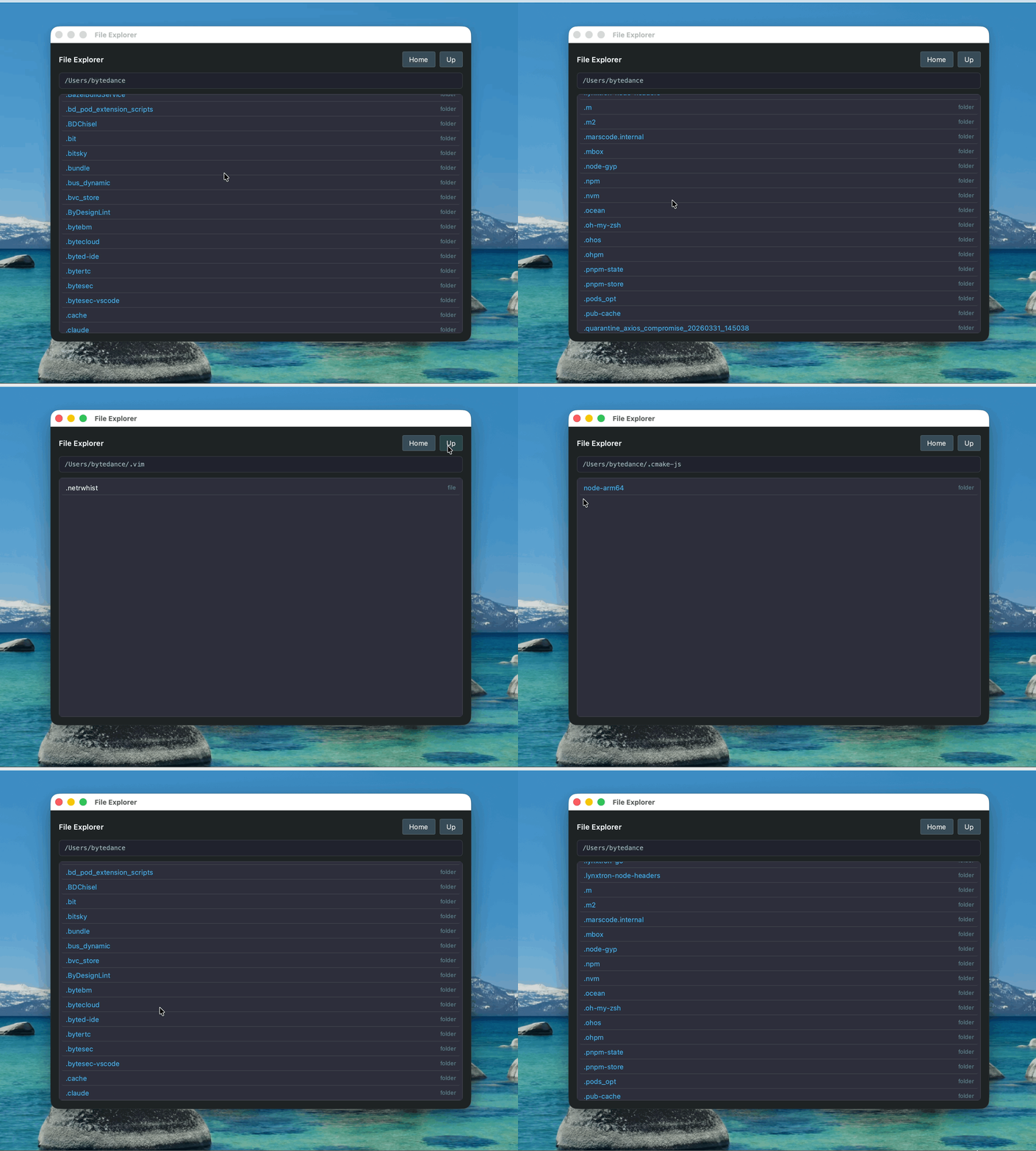
    示例:文件浏览器

    这个示例演示在 Lynx UI 中使用 preload script 暴露的 Node.js 能力:

    Node 主进程与 Lynx 双向消息通信

    这种方式适合窗口控制、系统服务、数据库访问、主进程状态管理等场景。Node.js 能力保留在主进程,Lynx 通过消息调用。

    Node.js 向 Lynx 推送消息

    Node 主进程可以通过 LynxWindow.sendGlobalEvent() 主动向 Lynx 发送事件:

    // main.ts
    import { LynxWindow } from '@lynx-js/lynxtron';
    
    const win = new LynxWindow();
    
    win.sendGlobalEvent('systemInfoUpdate', {
      cpuUsage: 32,
      memoryUsage: 68,
    });

    Lynx 侧通过 GlobalEventEmitter 监听事件:

    // App.tsx
    import { useEffect, useState } from '@lynx-js/react';
    
    export function App() {
      const [systemInfo, setSystemInfo] = useState(null);
    
      useEffect(() => {
        const emitter = lynx.getJSModule('GlobalEventEmitter');
        const handleUpdate = (data) => {
          setSystemInfo(data);
        };
    
        emitter.addListener('systemInfoUpdate', handleUpdate);
        return () => {
          emitter.removeListener('systemInfoUpdate', handleUpdate);
        };
      }, []);
    
      return <view>{/* render systemInfo */}</view>;
    }

    Lynx 调用 Node.js 并等待返回值

    使用 bridge.call 发起调用,因为需要等待 Node.js 返回数据。

    // App.tsx
    const info = await NativeModules.bridge.call('getSystemInfo', {
      includeCpuDetail: true,
    });
    setSystemInfo(info);

    Node 主进程通过 lynxBridge.handle() 注册处理器来响应 bridge.call 调用。handler 的返回值(或返回的 Promise)会自动通过 event.sendReply 回传给 Lynx,行为等同于 Electron 中的 ipcMain.handle()

    // main.ts
    import { app, lynxBridge } from '@lynx-js/lynxtron';
    
    app.whenReady().then(() => {
      lynxBridge.handle('getSystemInfo', (event, params) => {
        return getSystemInfo(params);
      });
    });

    对于异步逻辑,请返回一个 Promise,让运行时在 Promise resolve 后自动回复。不要在通过 handle 注册的处理器中手动调用 event.sendReply():运行时已经会用 handler 的返回值调用一次 sendReply,再显式调用一次会产生重复回复。

    lynxBridge.handle('getSystemInfo', (event, params) => {
      return new Promise<SystemInfo>((resolve) => {
        fetchAsync(params, resolve);
      });
    });

    Lynx 向 Node.js 发送单向消息

    通过 bridge.send 通知 Node.js(单向通知,不需要返回值)。

    // App.tsx
    NativeModules.bridge.send('refreshIntervalChanged', { interval: 1000 });

    Node 主进程通过 lynxBridge 上监听消息(它本身就是一个 Node.js EventEmitter),行为等同于 Electron 中的 ipcMain.on()

    // main.ts
    import { app, lynxBridge } from '@lynx-js/lynxtron';
    
    app.whenReady().then(() => {
      lynxBridge.on('refreshIntervalChanged', (params) => {
        console.log('refresh interval:', params.interval);
      });
    });

    lynxBridge API

    lynxBridge 是从 @lynx-js/lynxtron 导入的主进程单例,它是一个 Node.js EventEmitter,除下列 invoke 相关方法外,还可以使用 on / once / off / emit 等标准方法。在 Electron 中,lynxBridge 相当于 ipcMain

    方法说明
    lynxBridge.handle(method, handler)NativeModules.bridge.call(method, args) 注册处理器。handler 的返回值(或返回的 Promise)会自动回传给 Lynx。同一个 method 重复注册会抛错。
    lynxBridge.handleOnce(method, handler)handle 相同,但 handler 触发一次后会自动移除。
    lynxBridge.removeHandler(method)移除通过 handle / handleOnce 注册的处理器。
    lynxBridge.on(channel, listener)继承自 EventEmitter。用于接收 Lynx 通过 NativeModules.bridge.send(channel, args) 发送的单向消息,listener 的入参为 (args)

    handler 的签名为 (event: LynxBridgeInvokeEvent, args) => unknown | Promise<unknown>。运行时会用 handler 的返回值(在 Promise 场景下为其 resolve 后的值)自动调用一次 event.sendReply(),因此通过 handle / handleOnce 注册的处理器应当通过返回值(或 Promise)表达回复内容;再显式调用 event.sendReply() 会产生重复回复。sendReply 仅供直接监听底层 invoke 事件、绕过 handle 包装的低层调用者使用。

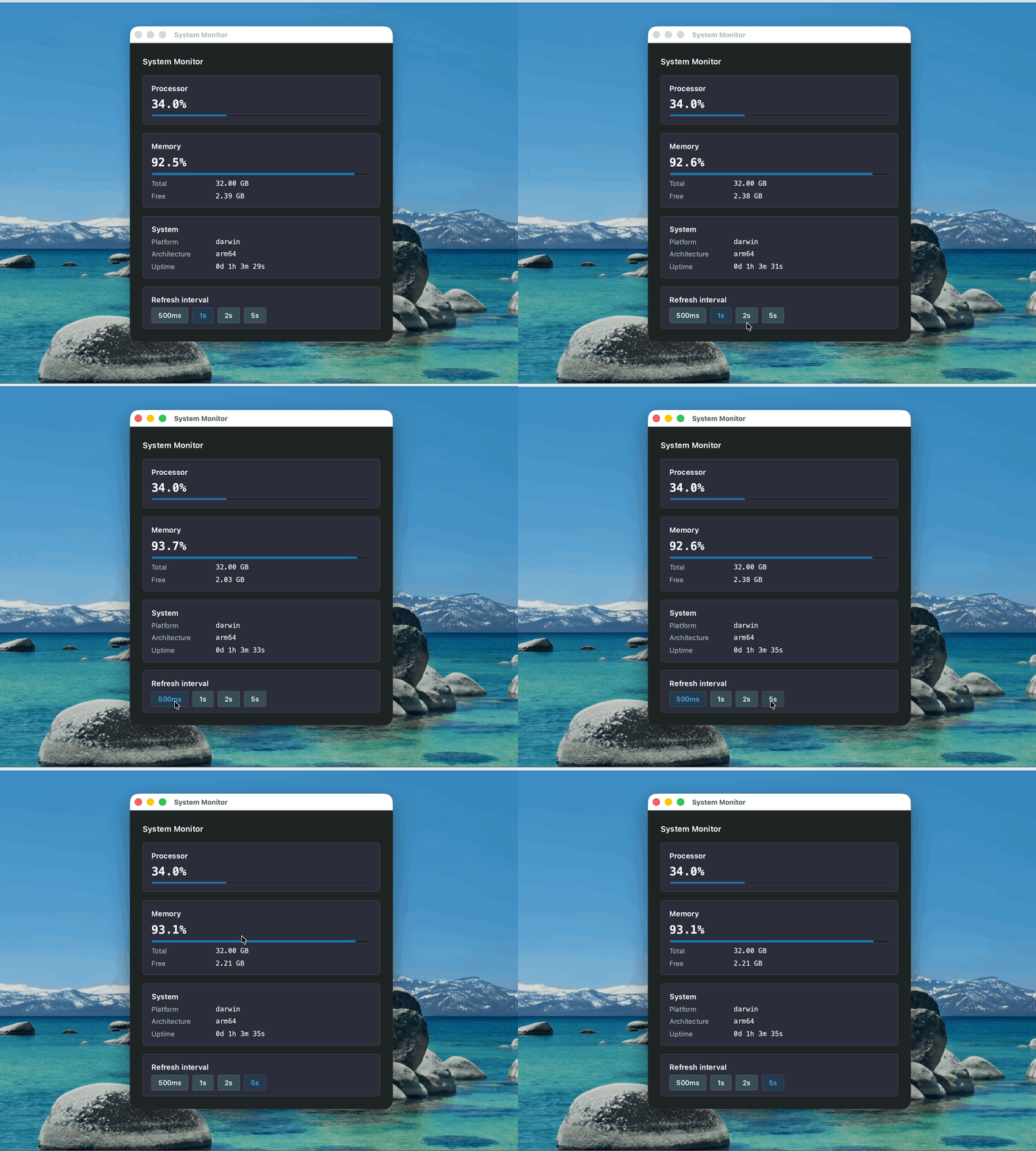
    示例:系统资源监控面板

    这个示例演示 Node 主进程与 Lynx 的双向消息通信:

    • Node.js 端使用 os 模块获取 CPU、内存等系统信息,并通过 LynxWindow.sendGlobalEvent() 推送给 Lynx。
    • Lynx 端通过 GlobalEventEmitter 接收更新,也可以通过 NativeModules.bridge.call() 主动请求最新数据。
    • 刷新间隔变化这类不需要返回值的通知,可以通过 NativeModules.bridge.send() 发送给 Node 主进程。

    能力参考

    能力API
    配置窗口级 preload scriptlynxPreference.preload
    从 preload scripts 向 Lynx 暴露 Node.js 方法或对象contextBridge.exposeInLynxBTS()
    从 Lynx UI 调用 preload scripts 暴露的方法或对象NativeModules.nodejs.exposed
    从 Node 主进程向 Lynx 推送事件LynxWindow.sendGlobalEvent()
    从 Lynx 调用 Node 主进程并等待返回值NativeModules.bridge.calllynxBridge.handle()
    从 Lynx 向 Node 主进程发送单向消息NativeModules.bridge.sendlynxBridge.on()

    为什么 Lynxtron 这样设计

    Lynxtron 用两条通道覆盖 Electron 中常见的两类能力,因为它们解决的问题不同:

    关键差异不是 API 挂在哪个全局对象上,而是 Lynxtron 为 Lynx BTS 提供了一条 JS 对象暴露路径。

    API 与规范

    API / 规范说明
    LynxWindow创建窗口、加载 Lynx bundle
    LynxWindowConstructorOptions配置 lynxPreference 等窗口参数
    contextBridge.exposeInLynxBTS()从 preload script 向 Lynx BTS 暴露 JS 对象
    LynxWindow.sendGlobalEvent()Node 主进程向 Lynx 推送全局事件
    lynxBridge主进程单例,用于处理来自 Lynx 的 bridge.call / bridge.send
    LynxBridgelynxBridge 的接口类型,提供 handle / handleOnce / removeHandler,并继承 EventEmitter API
    LynxBridgeInvokeEventlynxBridge.handle() 回调收到的事件对象,提供 sendReply()
    LynxtronNodejsNativeModules.nodejs 的类型
    GlobalEventEmitterLynx BTS 中监听全局事件
    lynx.getJSModule()获取 GlobalEventEmitter 等模块
    除非另有说明,本项目采用知识共享署名 4.0 国际许可协议进行许可,代码示例采用 Apache License 2.0 许可协议进行许可。