
Rspeedy logo
Rspeedy

Map Production Errors to Source

A production Lynx error reaches your monitoring as a minified, bundled stack. For example (large fields shown as ...):

{
  "error_code": 1101,
  "error": {
    // the `error` field is itself a JSON string; shown parsed here
    "message": "main-thread.js exception: Error: boom from main thread",
    "stack": "backtrace:\n    at <anonymous> (file:///main-thread.js:23:13)\n    ...",
    "sentry": {
      "exception": {
        "values": [
          {
            "stacktrace": {
              "frames": [
                // your code, tagged with the release; 23:13 is function_id:pc
                {
                  "filename": "file:///main-thread.js",
                  "lineno": 23,
                  "colno": 13,
                  "release": "debugmetadata:0a62b9f5435af49d34a238d276a986d1bb64b6d1",
                },
                // ... worklet-runtime frames
              ],
            },
          },
        ],
      },
    },
  },
}

Every position points into a bundle, never at the .tsx you wrote, and main-thread.js:23:13 is trickier than it looks. It is printed like a line:column, but the main thread runs as bytecode, so the two numbers are actually function_id:pc: function 23, program-counter offset 13. That is a location inside the bytecode, not a source line. (background.js:247:77 is a real line:column.) This guide maps both back to your source (file, line, column).

Lynx bundles everything needed for that into one debug-metadata.json per build: the source maps, bytecode debug info, UI source map, and build metadata. It is produced by @lynx-js/debug-metadata-rsbuild-plugin and auto-registered by @lynx-js/rspeedy (enabled by default; no config needed).

What lands on disk

One unified file per entry, under the entry's intermediate directory (.rspeedy/<entry> by default):

dist/.rspeedy/<entry>/debug-metadata.json
Production builds remove it by default

In a production build the file is emitted and then deleted from the output. It is not meant to ship with your app; it is just a debugging artifact. It stays on disk only in dev, or when DEBUG contains rspeedy (e.g. DEBUG=rspeedy pnpm build, handy for inspecting the file locally). To use it for production error mapping, upload and host it yourself (see Using it in production).

The DebugMetadata file

It matches the DebugMetadataAsset type from @lynx-js/debug-metadata:

interface DebugMetadataAsset {
  artifacts: Artifact[]; // one entry per JS / CSS / bytecode bundle
  uiSourceMap: UiSourceMapData; // compact UI source-map payload
  buildInfo: { git?: GitMetadata; rspeedy?: RspeedyMeta };
}

Each Artifact carries a debugSources[] array ordered for the decode chain:

  1. bytecode-debug-info (if present) maps a bytecode position back to encoded JS (line, column).
  2. source-map then maps that back to your authored source.

Abbreviated (large values shown as ...), a real file looks like this. Note the per-chunk source-map key, which is the release the runtime reports:

{
  "artifacts": [
    {
      "kind": "main-thread",
      "filename": "main-thread.js",
      "debugSources": [
        // function_id:pc → encoded main-thread.js (line, col)
        {
          "kind": "bytecode-debug-info",
          "debugInfo": { "lepusNG_debug_info": { "function_info": ["..."] } },
        },
        // encoded (line, col) → your source; `key` is this chunk's release
        {
          "kind": "source-map",
          "filename": "main-thread.js.map",
          "key": "0a62b9f5435af49d34a238d276a986d1bb64b6d1",
          "map": {
            "version": 3,
            "sources": [".../src/App.tsx", "..."],
            "mappings": "...",
          },
        },
      ],
    },
    {
      "kind": "background",
      "filename": "background.js",
      "debugSources": [
        {
          "kind": "source-map",
          "filename": "background.js.map",
          "key": "566b7d2bd791a6d9b5280f368223d729d8f57f9c",
          "map": {
            "version": 3,
            "sources": [".../src/App.tsx", "..."],
            "mappings": "...",
          },
        },
      ],
    },
    // ... css + hot-update artifacts
  ],
  "uiSourceMap": {
    "version": 1,
    "sources": ["..."],
    "mappings": ["..."],
    "uiMaps": ["..."],
  },
  "buildInfo": {
    "git": {
      "commit": "62a8e780...",
      "remoteUrl": "https://github.com/lynx-family/lynx-stack",
    },
    "rspeedy": {
      "entryFiles": ["src/index.tsx"],
      "bundlePath": "main/template.js",
    },
  },
}

What bytecode-debug-info is

Lynx runs your main thread script as PrimJS bytecode, not the JS text on disk. So when the main thread throws, the engine can only report where in the bytecode it happened: a function_id:pc pair (a function index plus a program-counter offset), not a line and column you'd recognize.

bytecode-debug-info is the lookup table that closes that gap. It maps a function_id:pc back to a (line, column) in the encoded main-thread.js. That position is still generated code, so the source-map then takes the second step to your original .ts / .tsx. The two steps (bytecode-debug-info and source-map) live in the same Artifact.

Background-thread JS runs normally, so its frames already carry real (line, column) positions and need only the source-map step, with no bytecode step.

Mapping a main-thread stack by hand

The community lynx-debug-info-remapping skill takes a function_id:pc backtrace plus this file and prints the original source positions with code context, so you don't have to write your own decoder.

Dev-server endpoints

During dev, the plugin serves the file and lets you query a single field without parsing the whole thing:

GET <publicPath>/.rspeedy/<entry>/debug-metadata.json
GET <publicPath>/.rspeedy/<entry>/debug-metadata.json?field=source-map&filename=main-thread.js.map
GET <publicPath>/.rspeedy/<entry>/debug-metadata.json?field=bytecode-debug-info&filename=main-thread.js

In dev the plugin also rewrites the bundle's sourceMappingURL trailers and the tasm templateDebugUrl / debugMetadataUrl to point at these dev-server endpoints, so devtools resolve sources automatically.

Queryable fields

field=query keysreturns
source-mappath / filename / keyinner SourceMap (v3)
bytecode-debug-infofilename (JS asset)inner LepusNGDebugInfo
artifactfilenamefull Artifact
artifactsnoneArtifact[]
ui-source-mapnoneUiSourceMapData
buildInfonone (or git / rspeedy)the buildInfo block

A match returns the field's content directly (e.g. ?field=source-map returns the raw v3 map, not a wrapper object). Unknown fields return 400; a registered field with no matching value returns 404.

Using it in production

Lynx defines the format and produces the file; it does not host it. There is no built-in upload, and the URL rewrites above only happen against the dev server. You wire up production yourself, and there are two models depending on how your stacks find their metadata:

  • Model A, backend keyed by release: upload the file to your own service at build time. The build already injects a release into the bundle (the runtime reports it on error) and embeds the same key in the file, so your backend indexes by it and maps release → file at error time. Nothing extra is injected into the bundle.
  • Model B, point the bundle at your host: also inject debugMetadataUrl / templateDebugUrl into the shipped template (and rewrite the JS sourceMappingURL trailers) so devtools or your error-monitoring service can fetch the file directly.

Model A: upload and store

The default plugin deletes debug-metadata.json at the very end of the build (PROCESS_ASSETS_STAGE_REPORT + 1). Tap one stage earlier to read it and hand it to your uploader:

plugins/upload-debug-metadata.ts
import type { RsbuildPlugin, Rspack } from '@rsbuild/core';

const ASSET = 'debug-metadata.json';

export function pluginUploadDebugMetadata(
  upload: (json: string, assetName: string) => Promise<void>,
): RsbuildPlugin {
  return {
    name: 'upload-debug-metadata',
    setup(api) {
      api.modifyBundlerChain((chain, { environment, isProd }) => {
        const isLynx =
          environment.name === 'lynx' || environment.name.startsWith('lynx-');
        if (!isProd || !isLynx) return;

        chain.plugin('upload-debug-metadata').use(
          class {
            apply(compiler: Rspack.Compiler) {
              const { Compilation } = compiler.webpack;
              compiler.hooks.thisCompilation.tap('upload', (compilation) => {
                compilation.hooks.processAssets.tapPromise(
                  // one stage before the default plugin's cleanup
                  {
                    name: 'upload',
                    stage: Compilation.PROCESS_ASSETS_STAGE_REPORT,
                  },
                  async (assets) => {
                    for (const name of Object.keys(assets)) {
                      if (name !== ASSET && !name.endsWith(`/${ASSET}`))
                        continue;
                      const json = compilation
                        .getAsset(name)
                        ?.source.source()
                        .toString();
                      if (json) await upload(json, name);
                    }
                  },
                );
              });
            }
          },
        );
      });
    },
  };
}

Wire it into lynx.config.ts. You upload the file as-is; the release your backend indexes by is the one the build injected and embedded, not something you pick here:

lynx.config.ts
import { defineConfig } from '@lynx-js/rspeedy';
import { pluginReactLynx } from '@lynx-js/react-rsbuild-plugin';
import { pluginUploadDebugMetadata } from './plugins/upload-debug-metadata.js';

export default defineConfig({
  plugins: [
    pluginReactLynx(),
    pluginUploadDebugMetadata(async (json) => {
      await fetch('https://your-monitoring.example.com/debug-metadata', {
        method: 'POST',
        headers: { 'content-type': 'application/json' },
        body: json,
      });
    }),
  ],
});

If you only need the file on disk for a one-off, build with DEBUG=rspeedy instead; that keeps it under dist/.rspeedy/<entry>/ without any plugin.

How the runtime release maps to the file

The runtime reports each chunk's release as debugmetadata:<key>, e.g. debugmetadata:0a62b9f5435af49d34a238d276a986d1bb64b6d1. Strip the debugmetadata: prefix and <key> is exactly an artifact's source-map key inside debug-metadata.json (one key per chunk: main-thread.js, background.js, ...). So your backend reads those keys out of the uploaded file and indexes by them; at error time it strips the prefix and looks the file up. You never assign a release yourself.

Model B: also point the bundle at your host

To make devtools / error-monitoring services fetch the file automatically you must write the URLs into the template before it is encoded. That means tapping LynxTemplatePlugin.beforeEncode, obtained via the exposure that DSL plugins publish:

  • Read the class with api.useExposed(Symbol.for('LynxTemplatePlugin')).
  • Order your plugin .after('lynx:debug-metadata'), otherwise your beforeEncode runs before the default plugin emits the file and reads empty.
plugins/host-debug-metadata.ts
import crypto from 'node:crypto';
import path from 'node:path';
import type { RsbuildPlugin, Rspack } from '@rsbuild/core';

const ASSET = 'debug-metadata.json';

export function pluginHostDebugMetadata(opts: {
  baseUrl: string;
  upload: (json: string, key: string) => Promise<void>;
}): RsbuildPlugin {
  const { baseUrl, upload } = opts;
  return {
    name: 'host-debug-metadata',
    setup(api) {
      api.modifyBundlerChain((chain, { environment, isProd }) => {
        const isLynx =
          environment.name === 'lynx' || environment.name.startsWith('lynx-');
        if (!isProd || !isLynx) return;

        const exposed = api.useExposed<{
          LynxTemplatePlugin: {
            getLynxTemplatePluginHooks: (c: Rspack.Compilation) => {
              beforeEncode: { tap: (n: string, fn: (a: any) => any) => void };
            };
          };
        }>(Symbol.for('LynxTemplatePlugin'));
        if (!exposed) return;
        const { LynxTemplatePlugin } = exposed;

        chain
          .plugin('host-debug-metadata')
          .after('lynx:debug-metadata')
          .use(
            class {
              apply(compiler: Rspack.Compiler) {
                const { Compilation, sources } = compiler.webpack;
                const keyByAsset = new Map<string, string>();

                compiler.hooks.thisCompilation.tap('host-dm', (compilation) => {
                  const hooks =
                    LynxTemplatePlugin.getLynxTemplatePluginHooks(compilation);

                  hooks.beforeEncode.tap('host-dm', (args) => {
                    const assetName = path.posix.format({
                      dir: args.intermediate,
                      base: ASSET,
                    });
                    const content = compilation
                      .getAsset(assetName)
                      ?.source.source()
                      .toString();
                    if (!content) return args; // not the lynx template

                    const key = crypto
                      .createHash('sha1')
                      .update(content)
                      .digest('hex');
                    keyByAsset.set(assetName, key);
                    const fileUrl = `${baseUrl}/${key}/${ASSET}`;

                    const root = args.encodeData.lepusCode.root?.name;
                    const mainThread = root
                      ? path.posix.basename(root.replace(/\\/g, '/'))
                      : 'main-thread.js';

                    // baked into the encoded template
                    args.encodeData.sourceContent.config.debugMetadataUrl =
                      fileUrl;
                    args.encodeData.compilerOptions.templateDebugUrl =
                      `${fileUrl}?field=bytecode-debug-info` +
                      `&filename=${encodeURIComponent(mainThread)}`;

                    // repoint each JS sourceMappingURL trailer at the host
                    for (const a of JSON.parse(content).artifacts ?? []) {
                      if (!a.path?.endsWith('.js')) continue;
                      const name = a.path.replaceAll('/./', '/');
                      const asset = compilation.getAsset(name);
                      if (!asset) continue;
                      const before = asset.source.source().toString();
                      if (!before.includes('//# sourceMappingURL=')) continue;
                      const after = before.replace(
                        /\/\/# sourceMappingURL=\S*/g,
                        `//# sourceMappingURL=${fileUrl}?field=source-map` +
                          `&path=${encodeURIComponent(`${name}.map`)}`,
                      );
                      compilation.updateAsset(
                        name,
                        new sources.RawSource(after),
                        asset.info,
                      );
                    }
                    return args;
                  });

                  compilation.hooks.processAssets.tapPromise(
                    {
                      name: 'host-dm',
                      stage: Compilation.PROCESS_ASSETS_STAGE_REPORT,
                    },
                    async (assets) => {
                      for (const name of Object.keys(assets)) {
                        if (name !== ASSET && !name.endsWith(`/${ASSET}`))
                          continue;
                        const json = compilation
                          .getAsset(name)
                          ?.source.source()
                          .toString();
                        const key = keyByAsset.get(name);
                        if (json && key) await upload(json, key);
                      }
                    },
                  );
                });
              }
            },
          );
      });
    },
  };
}

Wire it in with the base URL of wherever you serve the files:

lynx.config.ts
pluginHostDebugMetadata({
  baseUrl: 'https://your-cdn.example.com/dm',
  upload: async (json, key) => {
    await fetch(`https://your-cdn.example.com/dm/${key}/debug-metadata.json`, {
      method: 'PUT',
      headers: { 'content-type': 'application/json' },
      body: json,
    });
  },
});

The emitted Lynx bundle now carries two fields pointing at the host, and they are shaped differently. sourceContent.config.debugMetadataUrl is the bare link <baseUrl>/<key>/debug-metadata.json, which devtools or your own remap service fetch whole. compilerOptions.templateDebugUrl points at the same file but with a fetch query appended (?field=bytecode-debug-info&filename=<main-thread.js>).

The query on templateDebugUrl is deliberate: Lynx's built-in red-screen decode reads this field, so when the main thread throws it pulls bytecode-debug-info straight from that link and decodes the frame. Writing it into the template is all it takes to reuse Lynx's built-in debugging; the red screen shows source locations with nothing extra to wire up.

Each JS sourceMappingURL trailer is also rewritten to the same host. The key in the URL and the key you upload under are the same, so the links always resolve.

Remap at error time

When a production stack arrives, run the decode chain against the stored file: use resolveField to pull the right source-map / bytecode-debug-info (locate the file by release in Model A, or follow the in-bundle debugMetadataUrl in Model B), or the lynx-debug-info-remapping skill for a main-thread function_id:pc backtrace.

Reading the DebugMetadata file

You can JSON.parse it and use it directly:

import type { DebugMetadataAsset } from '@lynx-js/debug-metadata';

const metadata = JSON.parse(
  await readFile('debug-metadata.json', 'utf8'),
) as DebugMetadataAsset;

To resolve one field in code (the same dispatch the dev server uses):

import { resolveField } from '@lynx-js/debug-metadata';

const res = resolveField(metadata, 'source-map', {
  filename: 'main-thread.js.map',
});
// res === undefined  → unknown field
// res.found === false → no match
// res.payload        → the SourceMap itself
Treat unknown fields as opaque

The schema grows alongside the emitter. Consumers should ignore fields they don't recognize rather than rejecting the payload.

Walkthrough: map a real error

To see both paths end to end, examples/react's App.tsx throws in two places: once during render (background thread) and once in a main-thread tap handler:

src/App.tsx
function App() {
  const [crashRender, setCrashRender] = useState(false);

  if (crashRender) {
    throw new Error('boom from render (background thread)'); // line 15
  }
  // ...
  return (
    <text
      main-thread:bindtap={() => {
        'main thread';
        throw new Error('boom from main thread'); // line 65
      }}
    >
      Throw on main thread
    </text>
  );
}

Build and run it, then trigger each error. Below, metadata is this build's debug-metadata.json parsed with JSON.parse (fetched from your store by release, Model A).

Background error: one step

Tapping Throw in render throws on the background thread. The console frame points into background.js:
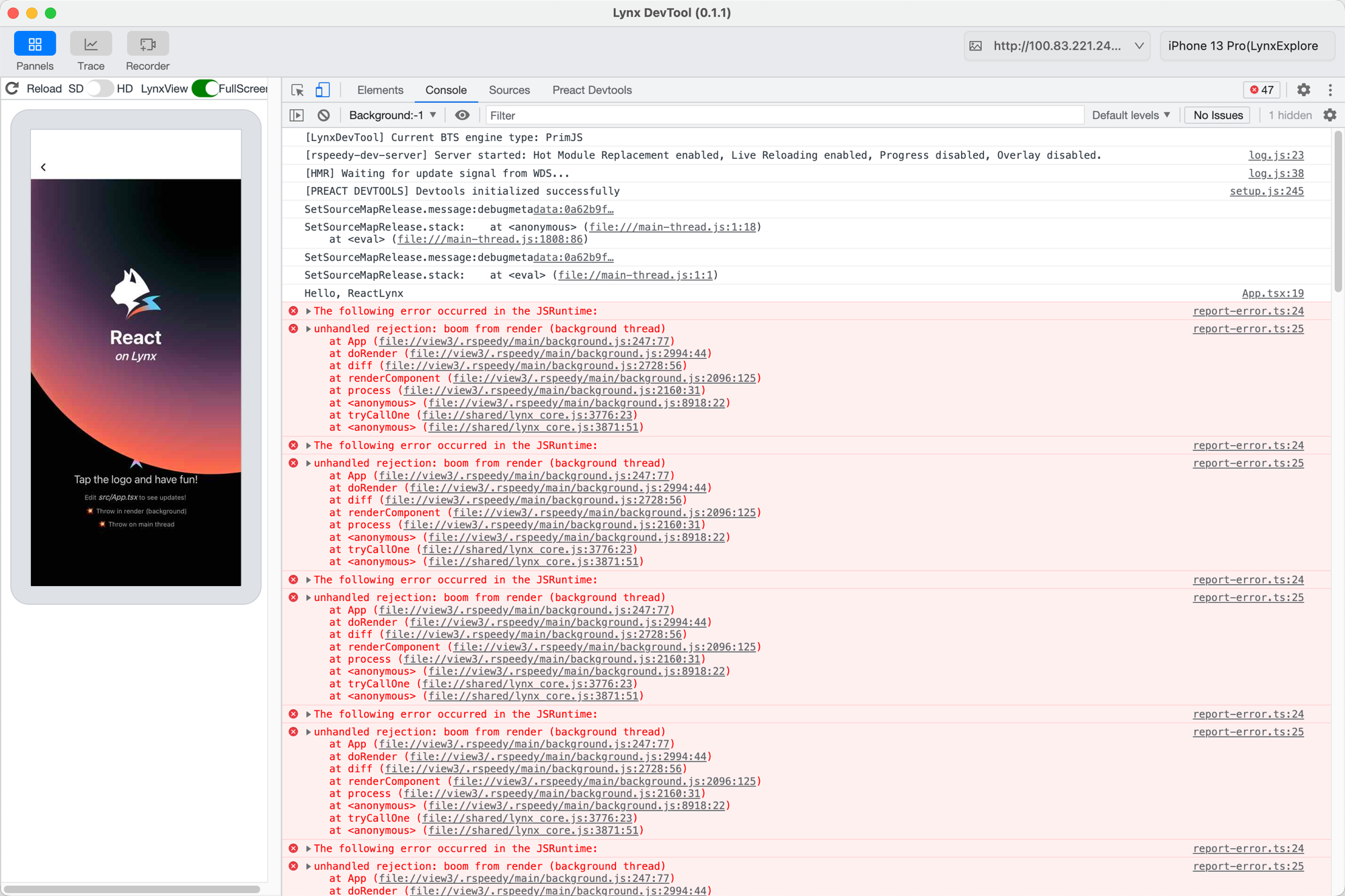
unhandled rejection: boom from render (background thread)
    at App (background.js:247:77)
    at doRender (background.js:2994:44)
    ...
The background-thread error in the devtool console, pointing into background.js

background.js:247:77 is a real (line, column), so a single source-map step maps it back:

import { resolveField } from '@lynx-js/debug-metadata';
// any v3 source-map library works; this uses @jridgewell/trace-mapping
import { TraceMap, originalPositionFor } from '@jridgewell/trace-mapping';

const map = resolveField(metadata, 'source-map', {
  filename: 'background.js.map',
}).payload;

originalPositionFor(new TraceMap(map), { line: 247, column: 77 });
// → { source: 'src/App.tsx', line: 14, column: 2 }

background.js:247:77 maps to src/App.tsx:14, the if (crashRender) line; the real throw is on line 15. Being one line off is source-map imprecision: the bundle collapses if (crashRender) { throw ... } onto a single line and only records a mapping for the start of that statement, so the decode lands on the outer if. The production red screen decodes to the same line, which is close enough to find the bug.

Main-thread error: two steps

Tapping Throw on main thread throws on the main thread. In the console:
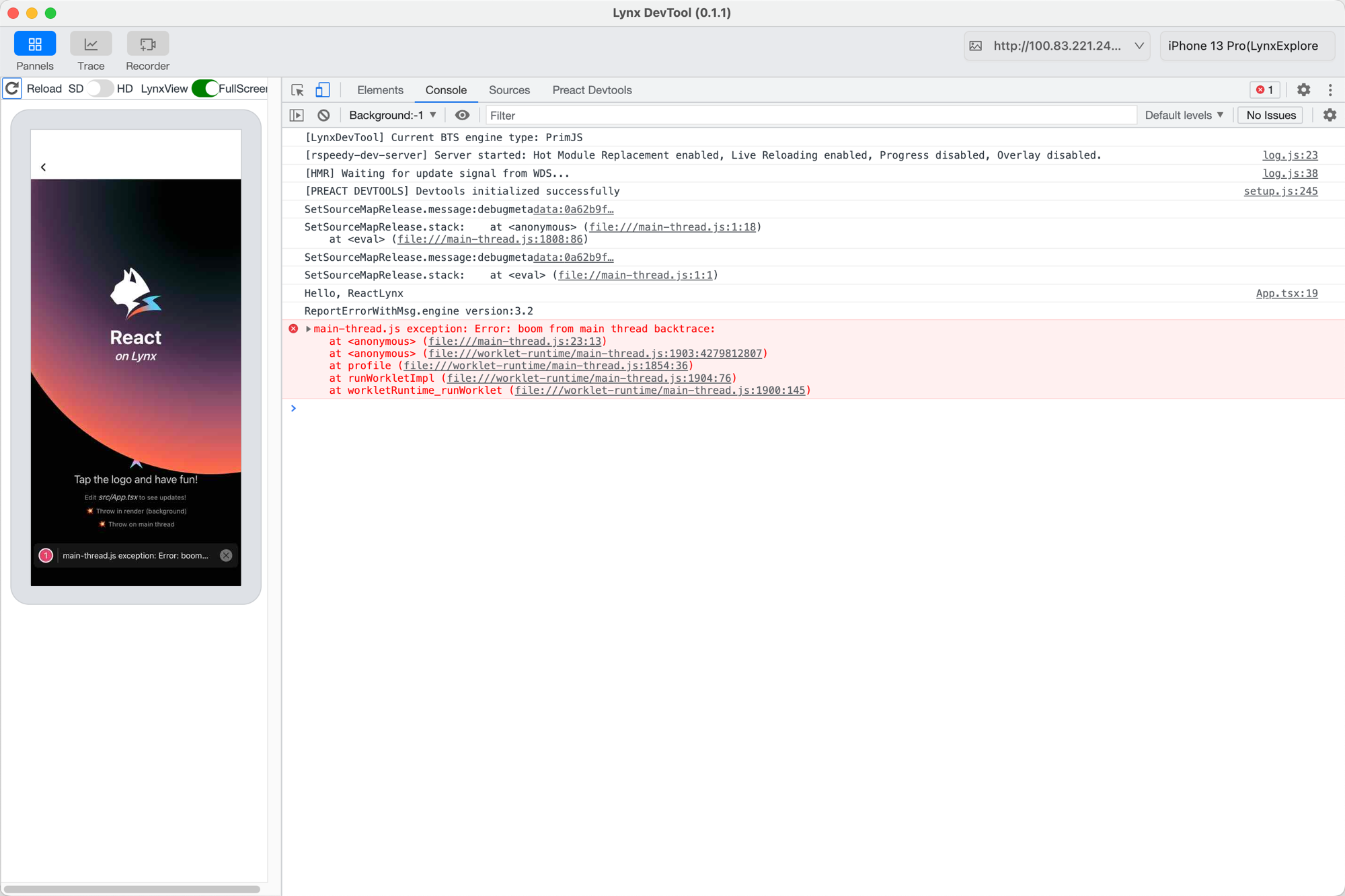
The main-thread error in the devtool console, a function_id:pc frame in main-thread.js

The report sent to your monitoring is the JSON from the top of this page; the frame that matters carries a release:

{
  "function": "<anonymous>",
  "filename": "file:///main-thread.js",
  "lineno": 23,
  "colno": 13,
  "release": "debugmetadata:0a62b9f5435af49d34a238d276a986d1bb64b6d1",
}

First, find the DebugMetadata by release. Strip the debugmetadata: prefix; the rest, 0a62b9f..., is a chunk's source-map key, so fetch that build's file from your store by it:

const release = frame.release.replace('debugmetadata:', '');
// '0a62b9f5435af49d34a238d276a986d1bb64b6d1'
const metadata = await fetchByKey(release); // your backend, indexed by source-map key

Then map the frame. 23:13 is function_id 23, pc 13 (not a line:column), in two steps:

main-thread.js:23:13 (function_id:pc)
  bytecode-debug-info → main-thread.js:238:45 (encoded JS line:col)
  source-map          → src/App.tsx:65:14

main-thread.js:23:13 maps to src/App.tsx:65, the main-thread throw. The lynx-debug-info-remapping skill runs this whole chain for you.

Except as otherwise noted, this work is licensed under a Creative Commons Attribution 4.0 International License, and code samples are licensed under the Apache License 2.0.