


Lynxtron 中 Node.js 与 Lynx 的通信
如果你熟悉 Electron,可以先把 Lynxtron 中的通信需求理解为两类:
- Node 主进程与 UI 双向消息通信:类似 Electron 中主进程与
BrowserWindowrenderer 之间的 IPC。 - 在 UI 中直接使用 Node.js 能力:Electron 技术上支持通过
nodeIntegration在 Web 中直接调用 Node.js 能力,但通常不推荐直接开启;Lynxtron 则通过增强 preload scripts,使其能在隔离 context 中使用 Node.js,并将 JS 对象暴露给 Lynx UI 调用。
Lynxtron 对这两类需求分别提供了对应能力:
- 使用
NativeModules.bridge通道,配合主进程侧的lynxBridge(lynxBridge.handle()处理需要回调的调用,lynxBridge.on()处理单向消息)和LynxWindow.sendGlobalEvent()实现 Node 主进程与 Lynx 的通信。 - 使用 Lynxtron preload scripts,在 preload script 中通过
contextBridge.exposeInLynxBTS()将 Node.js 的 JS 对象暴露给 Lynx UI 中的NativeModules.nodejs.exposed对象。
和 Electron 的能力对照
使用 Preload Scripts
Lynxtron 的 preload scripts 可以理解为 Electron preload scripts / contextBridge 模式面向 Lynx BTS 的能力增强:preload script 可以直接使用 Node.js API,并把方法或对象暴露给 Lynx UI 调用。
Electron 中,preload script 与 Web 页面处于隔离的 JS context;preload script 与 Web 最终需要通过 contextBridge 或 IPC 做跨 context 的序列化/代理通信,Web 侧不能直接使用 preload script context 中的原始 JS 对象。
Lynxtron 中,Lynx BTS 与 preload scripts 都运行在 Node.js 中,但处于隔离的 JS context;preload script context 有 Node.js 能力,可以通过 contextBridge.exposeInLynxBTS() 将 JS 对象暴露给 Lynx BTS 直接访问。
配置 preload scripts
创建窗口时,通过 lynxPreference.preload 指定 preload script 文件:
在 preload script 中暴露 Node.js API
preload script 中可以直接使用 Node.js API,然后通过 contextBridge.exposeInLynxBTS() 暴露给 Lynx:
在 Lynx 中调用暴露的 API
Lynx BTS 通过 NativeModules.nodejs.exposed 访问这些 API:
暴露的 JS 对象可以包含函数;函数的入参也可以是函数;函数可以使用 preload script context 中的闭包,也可以返回 Promise。Lynx UI 侧按普通异步 JS API 调用即可。
示例:文件浏览器
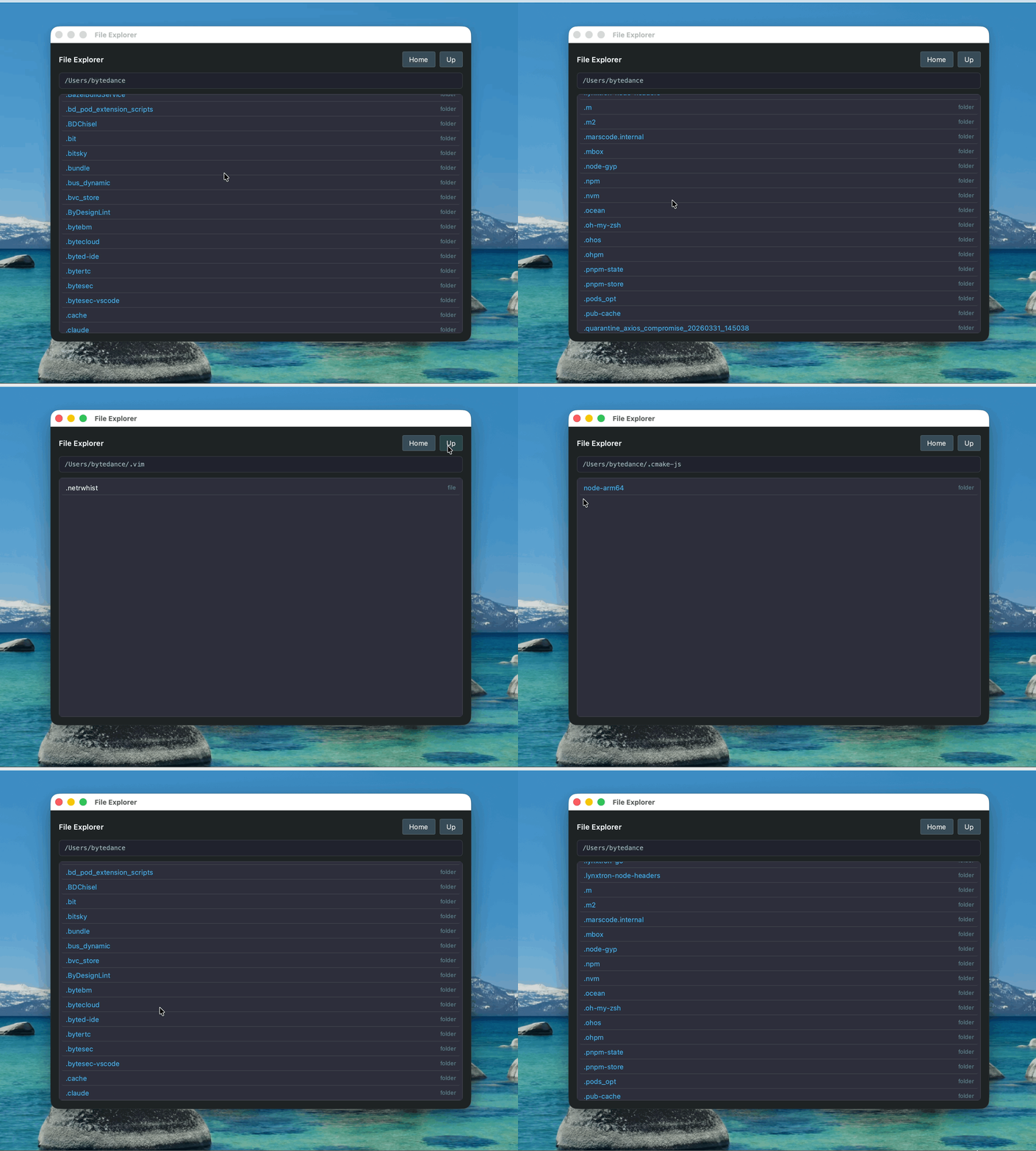
这个示例演示在 Lynx UI 中使用 preload script 暴露的 Node.js 能力:
- preload script 通过
contextBridge.exposeInLynxBTS()暴露readdir、homedir等 API。 - Lynx UI 通过
NativeModules.nodejs.exposed调用这些 API,实现目录浏览和文件内容查看。
Node 主进程与 Lynx 双向消息通信
这种方式适合窗口控制、系统服务、数据库访问、主进程状态管理等场景。Node.js 能力保留在主进程,Lynx 通过消息调用。
Node.js 向 Lynx 推送消息
Node 主进程可以通过 LynxWindow.sendGlobalEvent() 主动向 Lynx 发送事件:
Lynx 侧通过 GlobalEventEmitter 监听事件:
Lynx 调用 Node.js 并等待返回值
bridge.call(method, payload, callback) 返回 void,结果通过第三个参数回调返回,不能直接 await bridge.call(...)。需要使用 await 时,请像 System Monitor 示例一样用 Promise 包装回调。
Node 主进程通过 lynxBridge.handle() 注册处理器来响应 bridge.call 调用。handler 的返回值(或返回的 Promise)会自动通过 event.sendReply 回传给 Lynx,行为等同于 Electron 中的 ipcMain.handle():
对于异步逻辑,请返回一个 Promise,让运行时在 Promise resolve 后自动回复。不要在通过 handle 注册的处理器中手动调用 event.sendReply():运行时已经会用 handler 的返回值调用一次 sendReply,再显式调用一次会产生重复回复。
Lynx 向 Node.js 发送单向消息
通过 bridge.send 通知 Node.js(单向通知,不需要返回值)。
Node 主进程通过 lynxBridge 上监听消息(它本身就是一个 Node.js EventEmitter),行为等同于 Electron 中的 ipcMain.on():
lynxBridge API
lynxBridge 是从 @lynx-js/lynxtron 导入的主进程单例,它是一个 Node.js EventEmitter,除下列 invoke 相关方法外,还可以使用 on / once / off / emit 等标准方法。在 Electron 中,lynxBridge 相当于 ipcMain。
handler 的签名为 (event: LynxBridgeInvokeEvent, args) => unknown | Promise<unknown>。运行时会用 handler 的返回值(在 Promise 场景下为其 resolve 后的值)自动调用一次 event.sendReply(),因此通过 handle / handleOnce 注册的处理器应当通过返回值(或 Promise)表达回复内容;再显式调用 event.sendReply() 会产生重复回复。sendReply 仅供直接监听底层 invoke 事件、绕过 handle 包装的低层调用者使用。
示例:系统资源监控面板
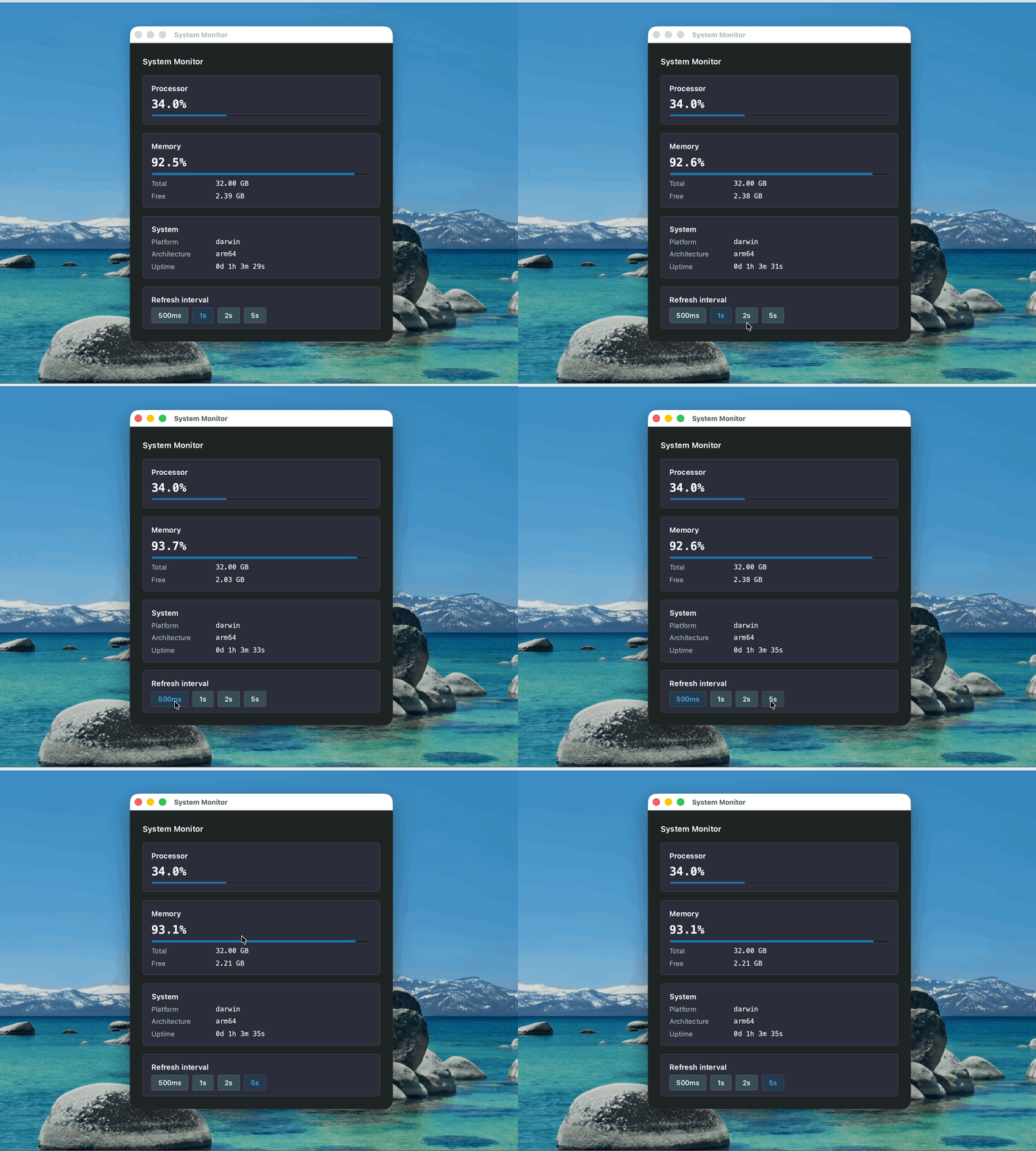
这个示例演示 Node 主进程与 Lynx 的双向消息通信:
- Node.js 端使用
os模块获取 CPU、内存等系统信息,并通过LynxWindow.sendGlobalEvent()推送给 Lynx。 - Lynx 端通过
GlobalEventEmitter接收更新,也可以通过NativeModules.bridge.call()主动请求最新数据。 - 刷新间隔变化这类不需要返回值的通知,可以通过
NativeModules.bridge.send()发送给 Node 主进程。
能力参考
为什么 Lynxtron 这样设计
Lynxtron 用两条通道覆盖 Electron 中常见的两类能力,因为它们解决的问题不同:
NativeModules.nodejs.exposed:Lynx BTS 直接访问 preload scripts 暴露的 JS 对象,对应通过 Electron preload scripts /nodeIntegration在 UI 中使用 Node.js 能力。NativeModules.bridge+lynxBridge:Lynx 与 Node 主进程之间的消息通信,对应 Electron 的ipcRenderer↔ipcMainIPC。
关键差异不是 API 挂在哪个全局对象上,而是 Lynxtron 为 Lynx BTS 提供了一条 JS 对象暴露路径。