


What is Lynxtron?
Lynxtron is a framework for building desktop applications with Lynx and Node.js. If you know Electron, you can think of Lynxtron as Electron with the Chromium rendering layer replaced by Lynx.
- The Main Process side is essentially Electron. Node.js controls the app lifecycle, windows, menus, tray, dialogs, and other OS-level APIs.
- The UI side is the Lynx runtime. You can use Lynx runtime DSLs such as ReactLynx and VueLynx to build UI, and it ultimately renders native elements such as
<view>,<text>, and<image>, not HTML.
Then you already know most of Lynxtron. This page covers the parts that only exist because Electron and Lynx are combined.
What Comes from Electron
The main process runs on Node.js; Lynxtron provides Electron-style desktop APIs such as windows, app lifecycle, menus, and tray. If you have used Electron, these common concepts are mostly the same:
What Comes from Lynx
The UI layer is standard Lynx. You can use runtime DSLs supported by Lynx, such as ReactLynx and VueLynx, to build UI:
Architecture: Single Process, Two Isolated Threads
Unlike Electron's multi-process model (Main Process + Renderer Process), Lynxtron runs in a single process and uses Main Thread + Lynx Background Thread as a thread-level dual of Electron's two-process model. The Lynx Background Thread can be shared by multiple windows, or windows can use independent background threads.
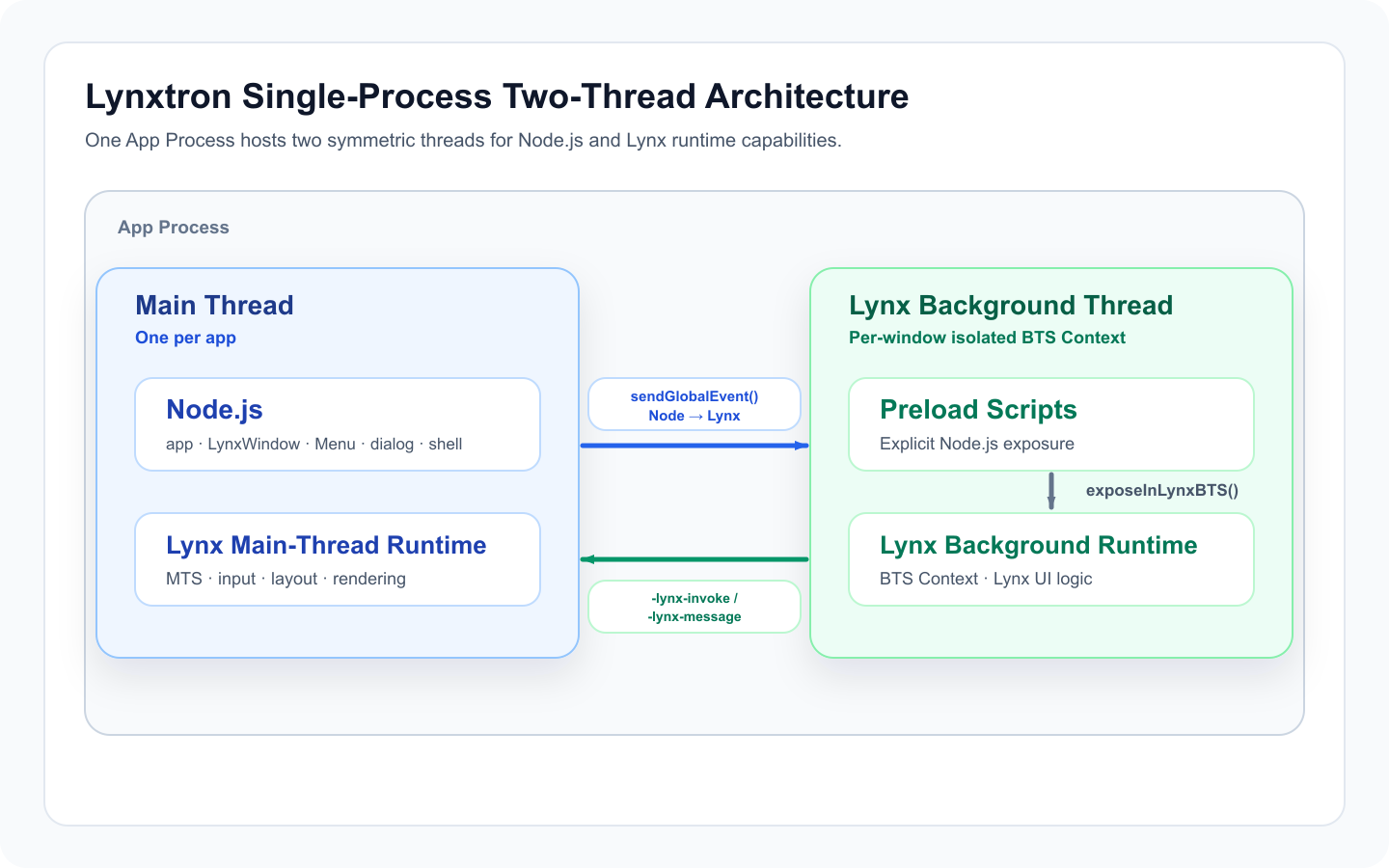
In a single process, Lynxtron puts the control plane and Lynx main-thread capabilities on the main thread, and puts Lynx UI business logic on the Lynx Background Thread. The Lynx Background Thread runs directly on Node.js, but each window's BTS Context is an isolated context, not the Node.js global environment, so it cannot directly use Node.js APIs. Multiple windows can share one background thread, or windows can be assigned independent background threads; either way, their BTS Contexts remain isolated. BTS can access Node.js only through NativeModules.bridge or allowlisted preload scripts.
Key Differences in Lynxtron
The following mechanisms connect the Electron-like main process model with the Lynx UI runtime, and are the parts that need extra attention compared with Electron or pure Lynx:
Desktop UI with Lynx Elements
Lynxtron adds desktop-specific capabilities to Lynx's UI system:
LynxWindowreplaces ElectronBrowserWindow: the window loads a Lynx bundle and renders UI with Lynx elements instead of loading an HTML page-x-app-region: drag: make a Lynx element act as a window drag handle, similar to Electron's-webkit-app-region: drag<title-bar-view>: a built-in Lynx element for custom title bars
-> Learn more: Building a Custom Window
Inter-Thread Communication
Lynxtron has three inter-thread communication patterns, corresponding to Electron IPC:
-> Learn more: Communication Between Node and Lynx
Node.js Integration via Preload Scripts
Preload scripts can be understood as an enhancement of Electron preload scripts / contextBridge model for Lynx BTS. A preload script runs in an isolated context with Node.js capabilities, then exposes explicitly allowed methods or objects to Lynx UI.
Unlike Electron, Lynxtron's preload scripts and BTS are isolated JS contexts in the same process. contextBridge.exposeInLynxBTS() does not expose only serializable message payloads. It exposes JS objects that BTS can call directly; those objects can contain functions, closures, and can return Promises.
The core flow is:
- Configure
lynxPreference.preloadonLynxWindowto specify the preload script. - The preload script uses Node.js APIs directly and exposes allowlisted capabilities through
contextBridge.exposeInLynxBTS(). - Lynx BTS calls the exposed objects through
NativeModules.nodejs.exposed.
The Lynx Background Thread that hosts BTS runs directly on Node.js, but BTS is still in an isolated context. It is not the Node.js global environment and cannot directly access Node.js APIs. All Node.js capabilities must be explicitly exposed through preload scripts.
-> Learn more: Node.js and Lynx Communication in Lynxtron
Next Steps
- Ready to code? -> Quick Start
- Learn by building -> Tutorial: Build Your Own Browser
- API Reference -> @lynx-js/lynxtron API