For AI agents: the complete documentation index is available at /next/llms.txt, the full documentation bundle is available at /next/llms-full.txt, and this page is available as Markdown at /next/api/elements/built-in/image.md.
Lynx
  • English
  • <image>

    Used to display different types of images, including web images, static resources, and locally stored images.

    Tip

    This feature depends on the image loading service provided by Lynx Service.

    Usage Guide

    <image> is an empty element and no longer supports child nodes.

    Note

    To display the image correctly, the non-empty src attribute must be set, and at least one of the following must be provided:

    The following examples show how the <image> element is used in different scenarios.

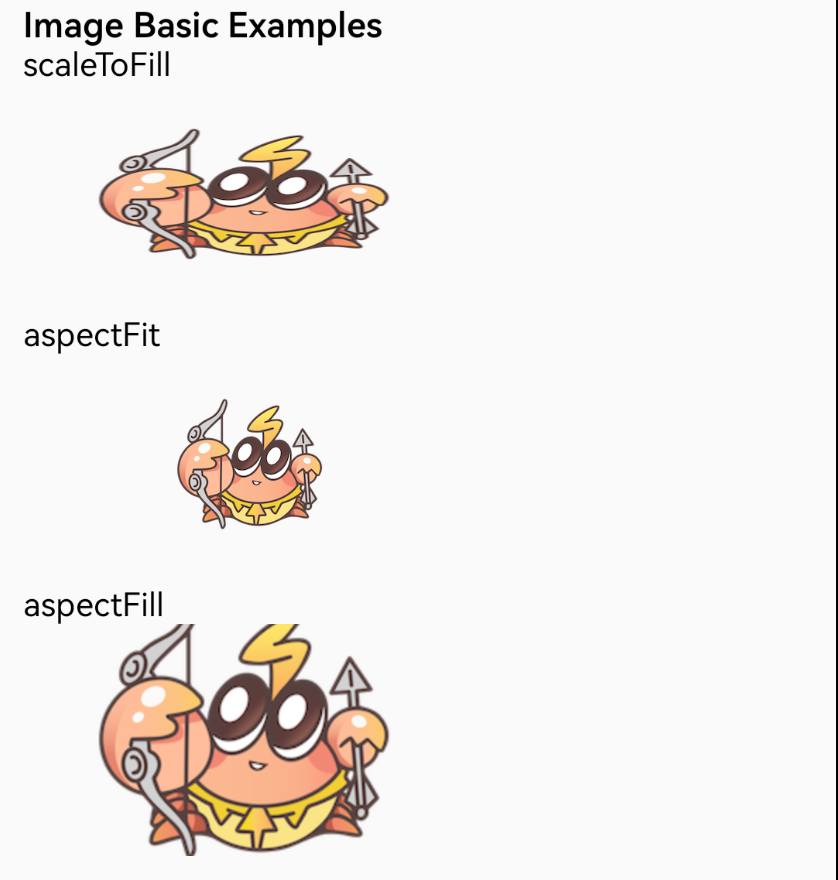
    Displaying images with different cropping/scaling modes

    Supports controlling the image cropping/scaling mode using mode.
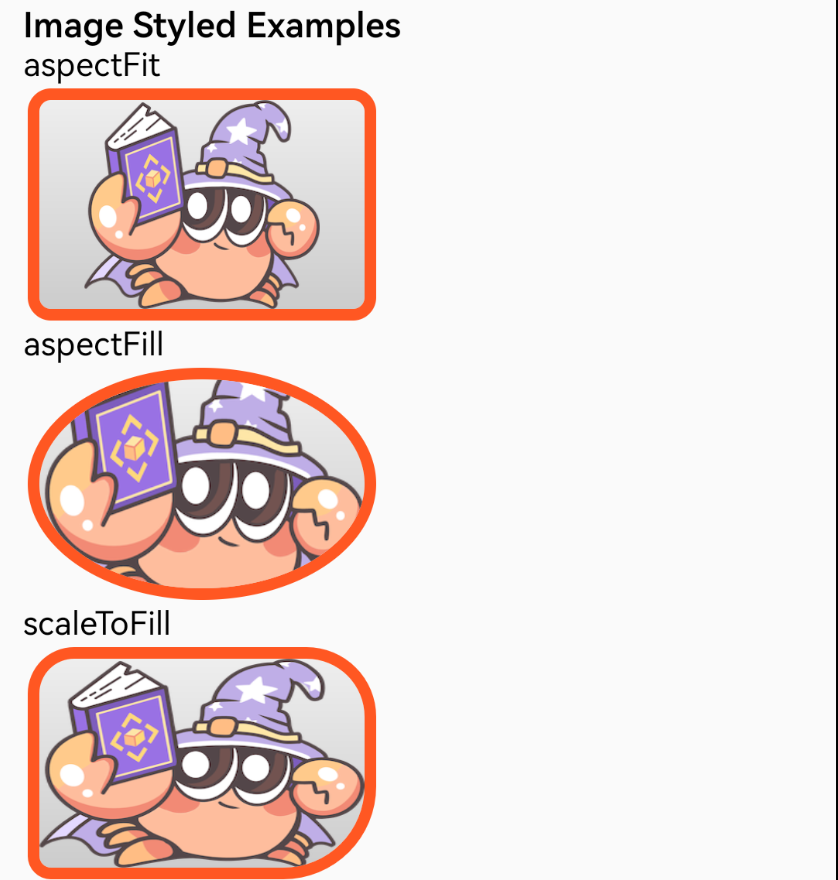
    Adding borders, rounded corners, and backgrounds to the image

    You can set the image's borders, rounded corners, and background colors using CSS styles.
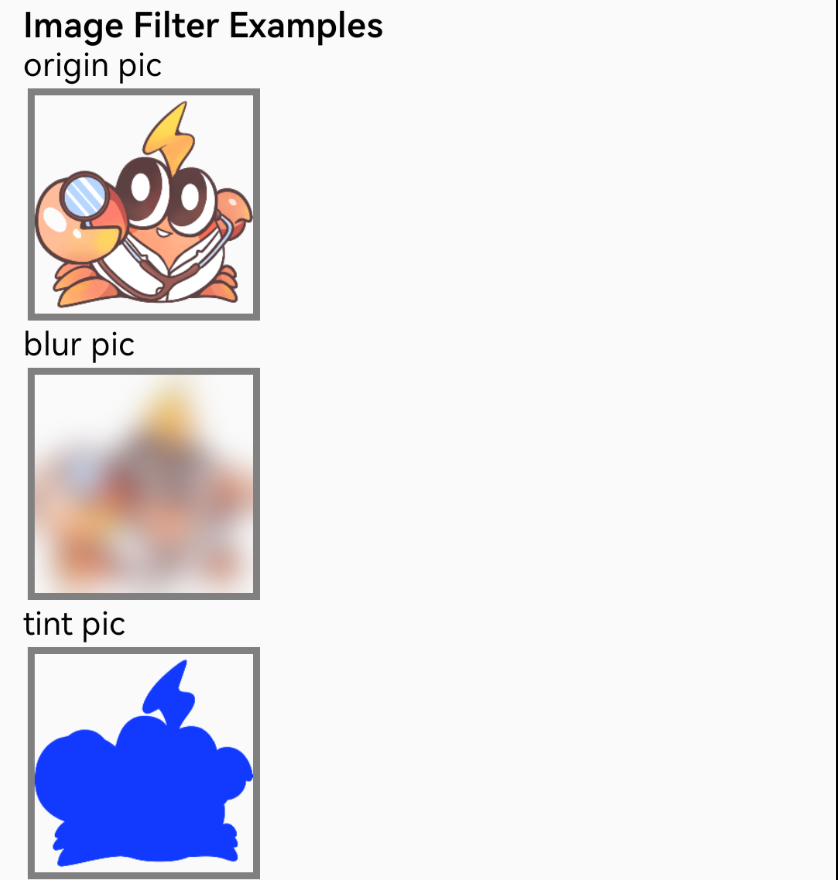
    Adding special drawing effects to the image

    Supports special drawing effects like Gaussian blur.
    Adapting to the original image aspect ratio

    Use auto-size to automatically adjust the <image> size to match the original image aspect ratio.

    Listening to image load success/failure

    You can bind events to listen for the image load state.

    Used to display images

    Attributes

    auto-size

    Android
    iOS
    Desktop
    Harmony
    2.6
    // @defaultValue: false
    'auto-size'?: boolean;

    When set to true and the <image> element has no width or height, the size of the <image> will be automatically adjusted to match the image's original dimensions after the image is successfully loaded, ensuring that the aspect ratio is maintained.

    autoplay

    Android
    iOS
    Desktop
    Harmony
    2.11
    // @defaultValue: true
    autoplay?: boolean;

    Specifies whether the animated image should start playing automatically once it is loaded.

    blur-radius

    Android
    iOS
    Desktop
    Harmony
    0.2
    'blur-radius'?: string;

    Image blur radius

    cap-insets

    Android
    iOS
    Desktop
    Harmony
    1.4
    'cap-insets'?: string;

    Stretchable area for 9patch images, in percentage or decimal, four values for top, right, bottom, left

    Note

    Using cap-insets does not require the original image to be a 9-patch image.

    cap-insets-scale

    Android
    iOS
    Desktop
    Harmony
    1.4
    // @defaultValue: 1
    'cap-insets-scale'?: number;

    Adjust the scale of stretchable area for 9patch images

    defer-src-invalidation

    Android
    iOS
    Desktop
    Harmony
    2.7
    // @defaultValue: false
    'defer-src-invalidation'?: boolean;

    When set to true, the <image> will only clear the previously displayed image resource after a new image has successfully loaded. The default behavior is to clear the image resource before starting a new load. This can resolve flickering issues when the image src is switched and reloaded. It is not recommended to enable this in scenarios where there is node reuse in views like lists.

    image-config

    Android
    Desktop
    1.4
    // @defaultValue: "ARGB_8888"
    'image-config'?: 'ARGB_8888' | 'RGB_565';

    ARGB_8888 : 32-bit memory per pixel, supports semi-transparent images.

    RGB_565 : 16-bit memory per pixel, reduces memory usage but loses transparency.

    Support PC platform since 3.5

    Note

    Affects the actual memory usage of the image bitmap.

    Taking an image with a resolution of 1024*768 as an example, the actual memory usage is (1024 * 768 * bits per pixel / 8) Bytes.

    The default is ARGB_8888. Frontend developers can optimize image memory usage by setting it to RGB_565.

    ARGB_8888 : Each pixel occupies 32 bits of memory and includes an alpha channel.

    RGB_565 : Each pixel occupies 16 bits of memory, which reduces memory usage but results in the loss of transparency.

    Setting RGB_565 may affect the display of <image> 's border-radius. You can set border-radius on the parent view of the <image> and add the clip-radius attribute to the parent view.

    It is not recommended to use RGB_565 when mode="aspectFit", as it may cause black borders in the cropped area.

    loop-count

    Android
    iOS
    Desktop
    Harmony
    1.4
    // @defaultValue: 0
    'loop-count'?: number;

    Number of times an animated image plays, 0 stands for infinite

    mode

    Android
    iOS
    Desktop
    Harmony
    0.2
    // @defaultValue: 'scaleToFill'
    mode?: 'scaleToFill' | 'aspectFit' | 'aspectFill' | 'center';

    Specifies image cropping/scaling mode

    scaleToFill : Scales the image without preserving the aspect ratio, stretching the image to fill the element.

    aspectFit : Scales the image while preserving aspect ratio so that the long side is fully visible.

    aspectFill : Scales the image while preserving aspect ratio, ensuring the short side fills the element.

    center : Does not scale the image; image is centered.

    placeholder

    Android
    iOS
    Desktop
    Harmony
    1.4
    placeholder?: string;

    Placeholder image, used same as src

    prefetch-height

    Android
    iOS
    1.4
    // @defaultValue: "0px"
    'prefetch-height'?: string;

    Image won't load if its size is 0, but will load if prefetch-height is set

    prefetch-width

    Android
    iOS
    1.4
    // @defaultValue: "0px"
    'prefetch-width'?: string;

    Image won't load if its size is 0, but will load if prefetch-width is set

    src

    Android
    iOS
    Desktop
    Harmony
    0.2
    // @defaultValue: undefined
    src?: string;

    Supports http/https/base64

    tint-color

    Android
    iOS
    Desktop
    Harmony
    2.12
    'tint-color'?: string;

    Changes the color of all non-transparent pixels to the tint-color specified. The value is a <color> .

    Events

    Frontend can bind corresponding event callbacks to listen for runtime behaviors of the element, as shown below.

    bindcurrentloopcomplete

    Android
    iOS
    Harmony
    3.7
    bindcurrentloopcomplete = (e: BaseEvent) => {};

    Triggered when one loop of the animated image finishes playing.

    binderror

    Android
    iOS
    Desktop
    Harmony
    0.2
    binderror = (e: ErrorEvent) => {};

    Image load error event

    bindfinalloopcomplete

    Android
    iOS
    Harmony
    3.7
    bindfinalloopcomplete = (e: BaseEvent) => {};

    Triggered when the animated image finishes playing all loop-count loops. If loop-count is not set, this callback will not be triggered.

    bindload

    Android
    iOS
    Desktop
    Harmony
    0.2
    bindload = (e: LoadEvent) => {};

    Image load success event

    bindstartplay

    Android
    iOS
    Harmony
    3.7
    bindstartplay = (e: BaseEvent) => {};

    Triggered when the animated image starts playing.

    Methods

    Frontend can invoke component methods via the SelectorQuery API.

    pauseAnimation

    Android
    iOS
    Desktop
    Harmony
    2.11
    
    lynx.createSelectorQuery()
         .select('#id')
         .invoke({
          method: 'pauseAnimation',
          success: function (res) {},
          fail: function (res) {},
        })
        .exec();
    

    Pauses the animation, without resetting the loop-count.

    resumeAnimation

    Android
    iOS
    Desktop
    Harmony
    2.11
    
    lynx.createSelectorQuery()
         .select('#id')
         .invoke({
          method: 'resumeAnimation',
          success: function (res) {},
          fail: function (res) {},
        })
        .exec();
    

    Resumes the animation, without resetting the loop-count.

    startAnimate

    Android
    iOS
    Desktop
    Harmony
    deprecated
    
    lynx.createSelectorQuery()
         .select('#id')
         .invoke({
          method: 'startAnimate',
          success: function (res) {},
          fail: function (res) {},
        })
        .exec();
    

    Restart the animation playback method controlled by the front end, and the animation playback progress and loop count will be reset.

    stopAnimation

    Android
    iOS
    Desktop
    Harmony
    2.11
    
    lynx.createSelectorQuery()
         .select('#id')
         .invoke({
          method: 'stopAnimation',
          success: function (res) {},
          fail: function (res) {},
        })
        .exec();
    

    Stops the animation, and it will reset the loop-count.

    Advanced Features

    Request URL Redirection Mapping

    Feature Description

    By implementing a URL redirection mechanism, developers can intercept specific image URLs and map them to specific resource paths. This ability is useful for the following scenarios:

    • Improving static resource loading speed
    • Supporting custom image protocol access schemes
    • Protecting sensitive resource access paths

    Implementation Principle

    This feature is implemented based on the MediaResourceFetcher interface, with the core process divided into two stages:

    1. Resource Type Detection (isLocalResource)

      • Determines if the request URL matches the custom protocol
      • Returns a boolean indicating whether to handle it locally
    2. Path Conversion (shouldRedirectUrl)

      • Parses the original URL
      • Converts it into a valid resource path
      • Returns the final accessible URL address

    The following example shows how to map a URL like http://localhost/xxx to an app's built-in resource path:

    /// Local resource handler header
    #import <LynxMediaResourceFetcher/LynxMediaResourceFetcher.h>
    
    @interface LocalMediaFetcher : NSObject <LynxMediaResourceFetcher>
    
    - (NSString *)shouldRedirectUrl:(LynxResourceRequest *)request;
    
    - (LynxResourceOptionalBool)isLocalResource:(NSURL *)url;
    
    @end
    /// Local resource handler implementation
    #import "LocalMediaFetcher.h"
    
    @implementation LocalMediaFetcher
    
    /**
     * Resource path conversion method
     * @param request Resource request object
     * @return Local file path or empty string
     */
    - (NSString *)shouldRedirectUrl:(LynxResourceRequest *)request {
      NSURL *url = [NSURL URLWithString:request.url];
      NSString *fileType = [url pathExtension];
      NSString *fileName = [[url URLByDeletingPathExtension] lastPathComponent];
      NSString *subdir = [[[url URLByDeletingLastPathComponent] absoluteString] stringByReplacingOccurrencesOfString:@"http://localhost" withString:@""];
      NSString *path = [[NSBundle mainBundle] pathForResource:fileName ofType:fileType inDirectory:subdir];
      return path ? [NSString stringWithFormat:@"file://%@", path] : @"";
    }
    
    /**
     * Local resource detection method
     * @param url The original request URL
     * @return LynxResourceOptionalBoolTrue indicates the request needs redirection
     */
    - (LynxResourceOptionalBool)isLocalResource:(NSURL *)url {
        return [url.absoluteString hasPrefix:@"http://localhost"] ?
               LynxResourceOptionalBoolTrue :
               LynxResourceOptionalBoolFalse;
    }
    
    @end
    import com.lynx.tasm.resourceprovider.LynxResourceRequest
    import com.lynx.tasm.resourceprovider.media.LynxMediaResourceFetcher
    import com.lynx.tasm.resourceprovider.media.OptionalBool
    
    /**
     * Custom media resource handler
     *
     * @property protocol The protocol to intercept "http://localhost"
     * @property scheme The target resource protocol "asset://"
     */
    class LocalMediaFetcher : LynxMediaResourceFetcher() {
    
        /**
         * Determines if the resource is local
         * @param url The original request URL
         * @return OptionalBool.TRUE indicates the request needs redirection
         */
        override fun isLocalResource(url: String?): OptionalBool {
            return if (url?.startsWith("http://localhost") == true) {
                OptionalBool.TRUE
            } else {
                OptionalBool.FALSE
            }
        }
    
        /**
         * Performs URL redirection
         * @param request The resource request object
         * @return The converted valid resource path
         */
        override fun shouldRedirectUrl(request: LynxResourceRequest?): String {
            return request?.url?.replace(
                oldValue = "http://localhost",
                newValue = "asset://",
                ignoreCase = true
            ) ?: ""
        }
    }
    import {
      LynxMediaResourceFetcher,
      LynxResourceRequest,
      LynxOptionalBool,
    } from '@lynx/lynx';
    
    // Local resource handler implementation
    export class ExampleMediaResourceFetcher extends LynxMediaResourceFetcher {
      // Resource path conversion method
      // @param request Resource request object
      // @return Local file path or empty string
      shouldRedirectUrl(request: LynxResourceRequest): string {
        return request.url?.replace('http://localhost', 'file://') ?? '';
      }
    
      // Determines if the resource is local
      // @param url The original request URL
      // @return LynxOptionalBool.TRUE indicates the request needs redirection
      isLocalResource(url: string): LynxOptionalBool {
        if (url.startsWith('http://localhost')) {
          return LynxOptionalBool.TRUE;
        }
        return LynxOptionalBool.FALSE;
      }
    }

    Read the API reference of MediaResourceFetcher for more details.

    Compatibility

    LCD tables only load in the browser

    Except as otherwise noted, this work is licensed under a Creative Commons Attribution 4.0 International License, and code samples are licensed under the Apache License 2.0.