For AI agents: the complete documentation index is available at /next/llms.txt, the full documentation bundle is available at /next/llms-full.txt, and this page is available as Markdown at /next/api/elements/built-in/textarea.md.
Lynx
  • English
  • <textarea> XElement

    <textarea> is used to create interactive input controls that allow users to input and edit multi-line text.

    Tip

    This feature requires the client to add additional dependencies. Please refer to More Elements for the integration method.

    Usage

    Basic

    Below is a basic usage example of the <textarea> component:
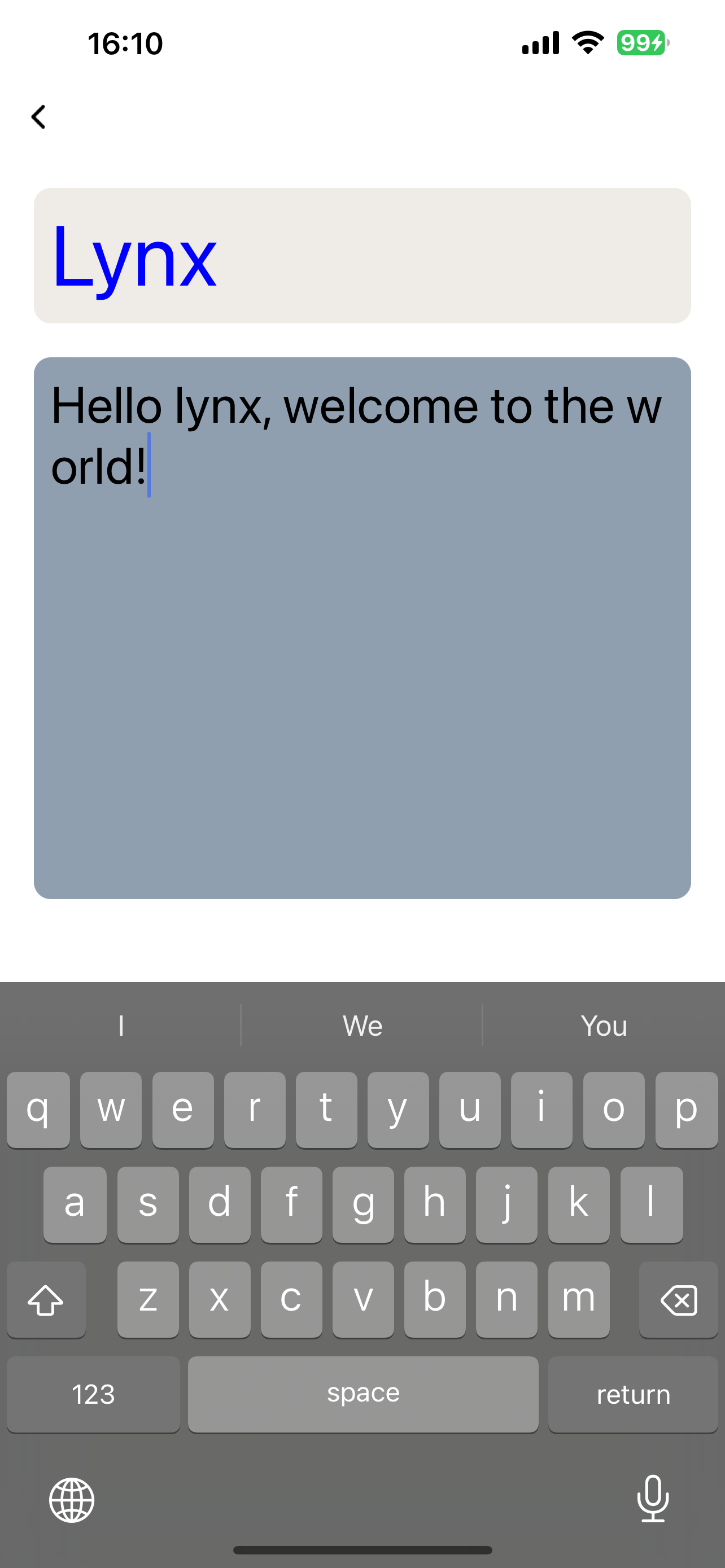
    Custom Placeholder Style

    <textarea> can customize its style using the ::placeholder pseudo-element:

    Attributes

    android-fullscreen-mode

    Android
    3.4
    // @defaultValue: true
    'android-fullscreen-mode'?: boolean;

    Whether to enter the full-screen input mode when in landscape screen, in which the keyboard and input box will take up the entire screen

    bounces

    iOS
    3.4
    // @defaultValue: true
    bounces?: boolean;

    Bounce effect for iOS

    confirm-type

    iOS
    Harmony
    3.4
    // @defaultValue: 'done'
    'confirm-type'?: 'search' | 'send' | 'go' | 'done' | 'next';

    The type of confirm button

    disabled

    Android
    iOS
    Harmony
    3.5
    // @defaultValue: false
    disabled?: boolean;

    Interaction enabled

    enable-scroll-bar

    Android
    iOS
    3.6
    // @defaultValue: false
    'enable-scroll-bar'?: boolean;

    Whether to show scroll bar, on HarmonyOS, the scroll bar will always be shown

    input-filter

    Android
    iOS
    Harmony
    3.4
    // @defaultValue: undefined
    'input-filter'?: string;

    Filter the input content and process it in the form of regular expressions

    ios-auto-correct

    iOS
    3.4
    // @defaultValue: true
    'ios-auto-correct'?: boolean;

    Auto correct input content on iOS

    ios-spell-check

    iOS
    3.4
    // @defaultValue: true
    'ios-spell-check'?: boolean;

    Check spelling issue on iOS

    line-spacing

    Android
    iOS
    3.4
    // @defaultValue: undefined
    'line-spacing'?: number | any | any;

    Line spacing

    maxlength

    Android
    iOS
    Harmony
    3.4
    // @defaultValue: 140
    maxlength?: number;

    Max input length

    maxlines

    Android
    iOS
    Harmony
    3.4
    // @defaultValue: undefined
    maxlines?: number;

    Max input lines

    placeholder

    Android
    iOS
    Harmony
    3.4
    placeholder?: string;

    Placeholder

    readonly

    Android
    iOS
    Harmony
    3.4
    // @defaultValue: false
    readonly?: boolean;

    Readonly

    show-soft-input-on-focus

    Android
    iOS
    3.4
    // @defaultValue: true
    'show-soft-input-on-focus'?: boolean;

    Show soft input keyboard while focused

    type

    Android
    iOS
    Harmony
    3.4
    // @defaultValue: "text"
    type?: 'number' | 'text' | 'digit' | 'tel' | 'email';

    Input content type

    Events

    Frontend can bind corresponding event callbacks to listen for runtime behaviors of the element, as shown below.

    bindblur

    Android
    iOS
    Harmony
    3.4
    bindblur = (e: TextAreaBlurEvent) => {};
    FieldTypeOptionalDefaultPlatformsSinceDescription
    valuestringNo
    Android
    iOS
    Harmony
    3.4
    3.4Input content

    Blurred

    bindconfirm

    Android
    iOS
    Harmony
    3.4
    bindconfirm = (e: TextAreaConfirmEvent) => {};
    FieldTypeOptionalDefaultPlatformsSinceDescription
    valuestringNo
    Android
    iOS
    Harmony
    3.4
    3.4Input content

    Confirm button clicked, only work when confirm-type is defined

    bindfocus

    Android
    iOS
    Harmony
    3.4
    bindfocus = (e: TextAreaFocusEvent) => {};
    FieldTypeOptionalDefaultPlatformsSinceDescription
    valuestringNo
    Android
    iOS
    Harmony
    3.4
    3.4Input content

    Focused

    bindinput

    Android
    iOS
    Harmony
    3.4
    bindinput = (e: TextAreaInputEvent) => {};
    FieldTypeOptionalDefaultPlatformsSinceDescription
    isComposingbooleanYes
    Android
    iOS
    Harmony
    3.4
    3.4Is composing or not
    selectionEndnumberNo
    Android
    iOS
    Harmony
    3.4
    3.4The end position of the selection
    selectionStartnumberNo
    Android
    iOS
    Harmony
    3.4
    3.4The start position of the selection
    valuestringNo
    Android
    iOS
    Harmony
    3.4
    3.4Input content

    Input content changed

    bindselection

    Android
    iOS
    Harmony
    3.4
    bindselection = (e: TextAreaSelectionChangeEvent) => {};
    FieldTypeOptionalDefaultPlatformsSinceDescription
    selectionEndnumberNo
    Android
    iOS
    Harmony
    3.4
    3.4The end position of the selection
    selectionStartnumberNo
    Android
    iOS
    Harmony
    3.4
    3.4The start position of the selection

    Input selection changed

    Methods

    Frontend can invoke component methods via the SelectorQuery API.

    blur

    Android
    iOS
    Harmony
    3.4
    
    lynx.createSelectorQuery()
         .select('#id')
         .invoke({
          method: 'blur',
          success: function (res) {},
          fail: function (res) {},
        })
        .exec();
    

    Release focus

    focus

    Android
    iOS
    Harmony
    3.4
    
    lynx.createSelectorQuery()
         .select('#id')
         .invoke({
          method: 'focus',
          success: function (res) {},
          fail: function (res) {},
        })
        .exec();
    

    Require focus

    getValue

    Android
    iOS
    Harmony
    3.4
    
    lynx.createSelectorQuery()
         .select('#id')
         .invoke({
          method: 'getValue',
          success: Callback<{
            /**
             * Is composing or not, iOS only
             * @Android
             * @iOS
             * @Harmony
             * @Web
             * @since 3.4
             */
            isComposing: boolean;
            /**
             * End position of the cursor
             * @Android
             * @iOS
             * @Harmony
             * @Web
             * @since 3.4
             */
            selectionEnd: number;
            /**
             * Begin position of the cursor
             * @Android
             * @iOS
             * @Harmony
             * @Web
             * @since 3.4
             */
            selectionStart: number;
            /**
             * Input content
             * @Android
             * @iOS
             * @Harmony
             * @Web
             * @since 3.4
             */
            value: string;
          }>;
          fail: function (res) {},
        })
        .exec();
    

    Get input content

    setSelectionRange

    Android
    iOS
    Harmony
    3.4
    
    lynx.createSelectorQuery()
         .select('#id')
         .invoke({
          method: 'setSelectionRange',
          params: {
            /**
             * End position of the selection
             * @Android
             * @iOS
             * @Harmony
             * @Web
             * @since 3.4
             */
            selectionEnd: number;
            /**
             * Start position of the selection
             * @Android
             * @iOS
             * @Harmony
             * @Web
             * @since 3.4
             */
            selectionStart: number;
          };
          success: function (res) {},
          fail: function (res) {},
        })
        .exec();
    

    Set selection range

    setValue

    Android
    iOS
    Harmony
    3.4
    
    lynx.createSelectorQuery()
         .select('#id')
         .invoke({
          method: 'setValue',
          params: {
            /**
             * Input content
             * @Android
             * @iOS
             * @Harmony
             * @Web
             * @since 3.4
             */
            value: string;
          };
          success: function (res) {},
          fail: function (res) {},
        })
        .exec();
    

    Set input content

    Compatibility

    LCD tables only load in the browser

    Except as otherwise noted, this work is licensed under a Creative Commons Attribution 4.0 International License, and code samples are licensed under the Apache License 2.0.