

deprecated linear-cross-gravity
This API is deprecated.
Introduction
Set the position of the child element on the cross axis of the parent container in linear layout, is an style on the parent container. Similar to align-items in flexible box layout.
When using linear-layout-gravity, align-self, linear-cross-gravity, and align-items simultaneously in a linear layout, the priority decreases from the first to the last. A higher-priority style will override a lower-priority style.
Examples
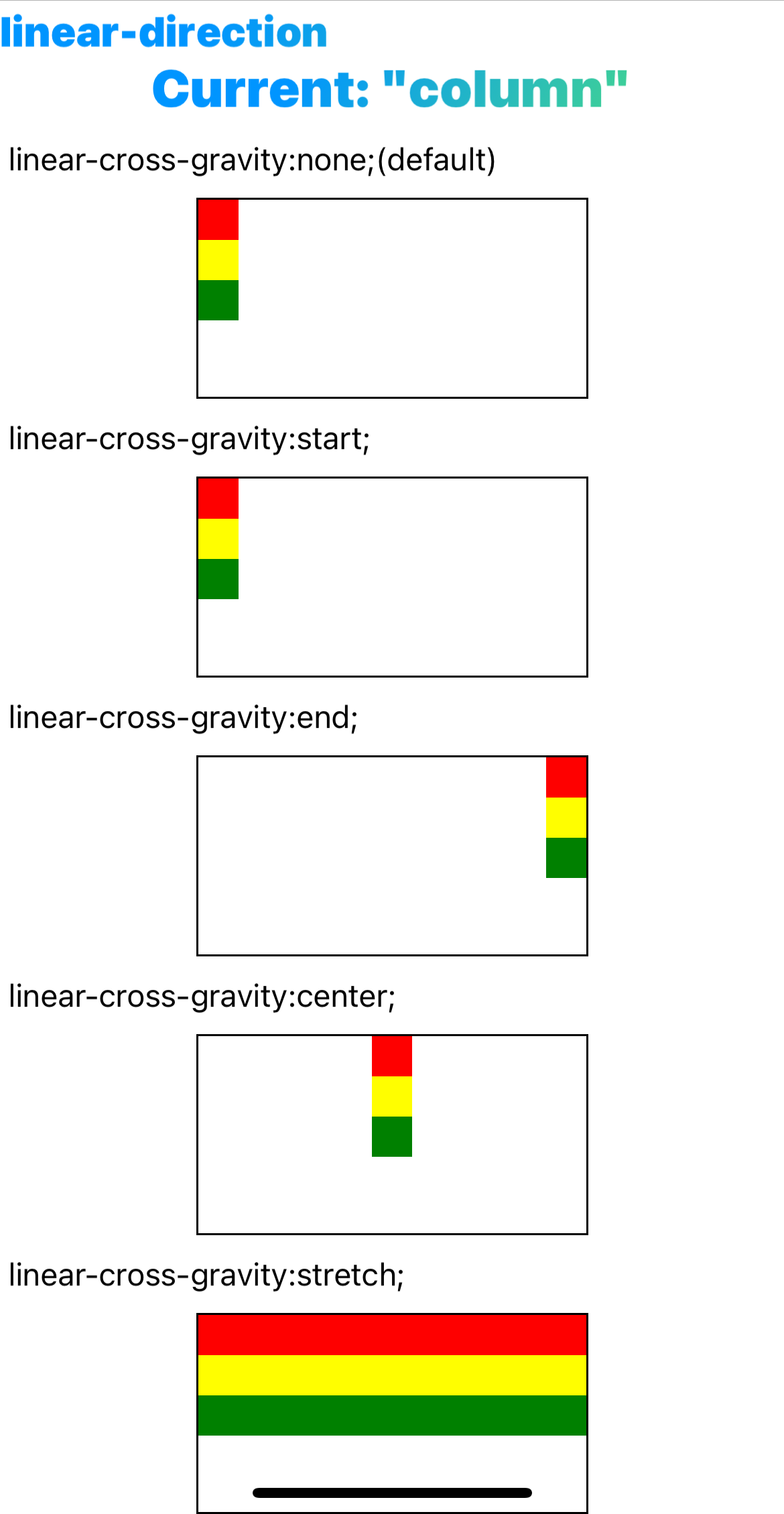
Syntax
Values
-
noneDefault value. When the size of the parent element cross axis size(such as the
widthwhenlinear-direction: column) is fixed, and the size of the child element in this direction is auto,nonewill be equivalent tostretch. In other cases it is equivalent tostart. -
startAlign the beginning of the parent element's cross axis.
-
endAlign the end of the parent element's cross axis.
-
centerAlign the center of the parent element's cross axis.
-
stretchFill the container's cross axis.
Formal definition
| Initial value | none |
| Applies to | linear containers |
| Inherited | no |
| Animatable |
Formal syntax
Difference between web
- No such style in Web.
Compatibility
LCD tables only load in the browser