For AI agents: the complete documentation index is available at /next/llms.txt, the full documentation bundle is available at /next/llms-full.txt, and this page is available as Markdown at /next/api/elements/built-in/webview.md.
Lynx
  • English
  • <webview> XElement

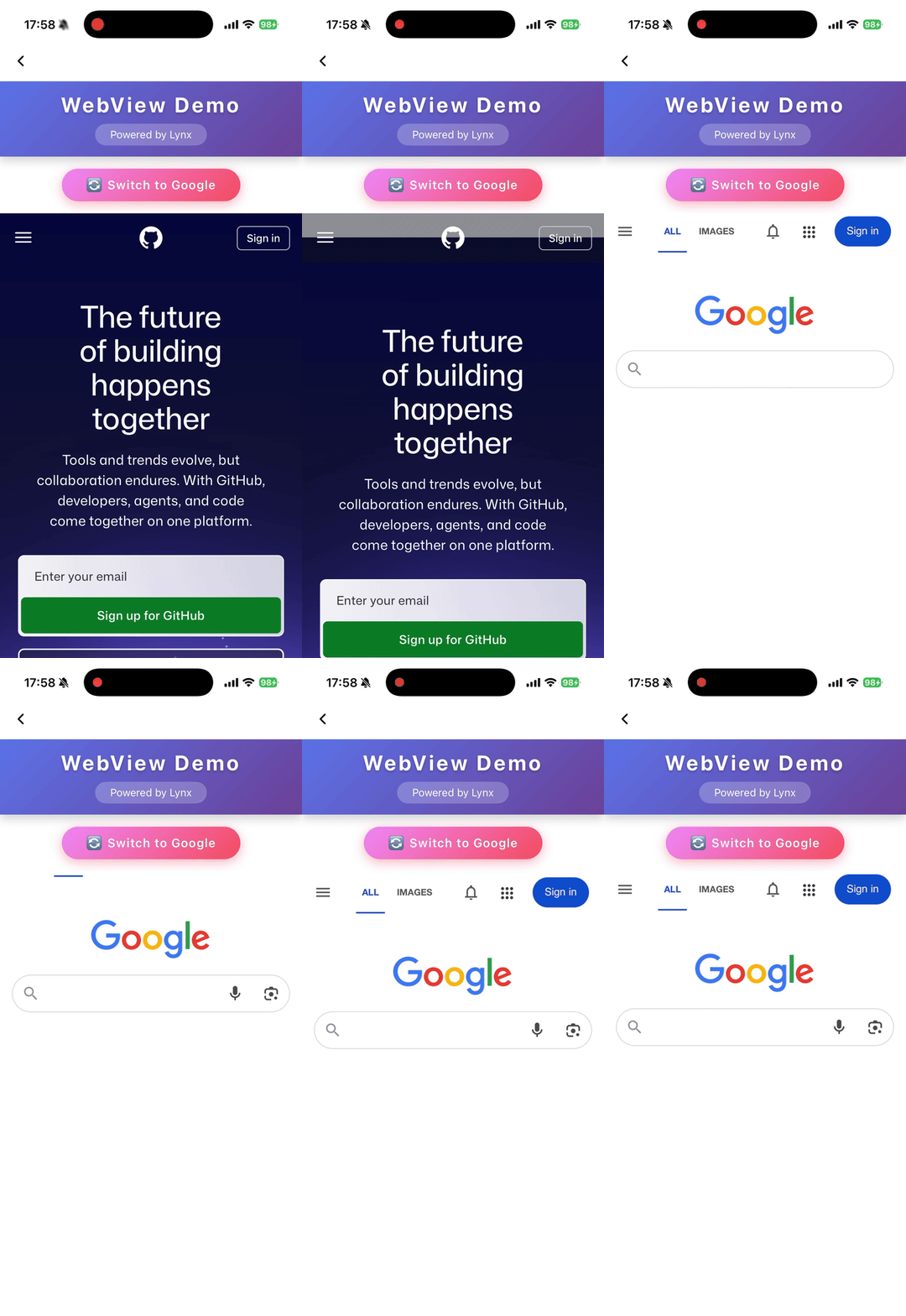
    Used to embed web pages in Lynx, providing a flexible way to integrate existing web resources and accelerate development.

    • <webview> acts as a viewport on the element side and must have a fixed width.
    • <webview> acts as a viewport on the element side and requires a fixed height.
    • After the web resource finishes rendering, use document.getElementById to obtain its height, then notify <webview> to adjust the height via message.
    • Unless native-interaction-enabled={false} is set on <webview />, interaction events of <webview> cannot pass through to other elements.
    • <webview> cannot be nested with other scrollable elements; if needed, wrap it with <scroll-view>.
    • To intercept click events, manually add catchtap={() => {}} to <webview />.

    Usage

    Load Web Content

    Load HTML String

    Attributes

    bounces

    iOS
    // @defaultValue: false
    bounces?: boolean;

    Enable bounce effect

    cookies

    Desktop
    Lynx 3.5
    cookies?: any;

    Preset cookies

    enable-debug

    Android
    iOS
    Desktop
    Harmony
    // @defaultValue: false
    'enable-debug'?: boolean;

    Enable WebView debugging in Android so that it can be debugged in Chrome DevTools

    html

    Android
    iOS
    Harmony
    3.6
    html?: string;

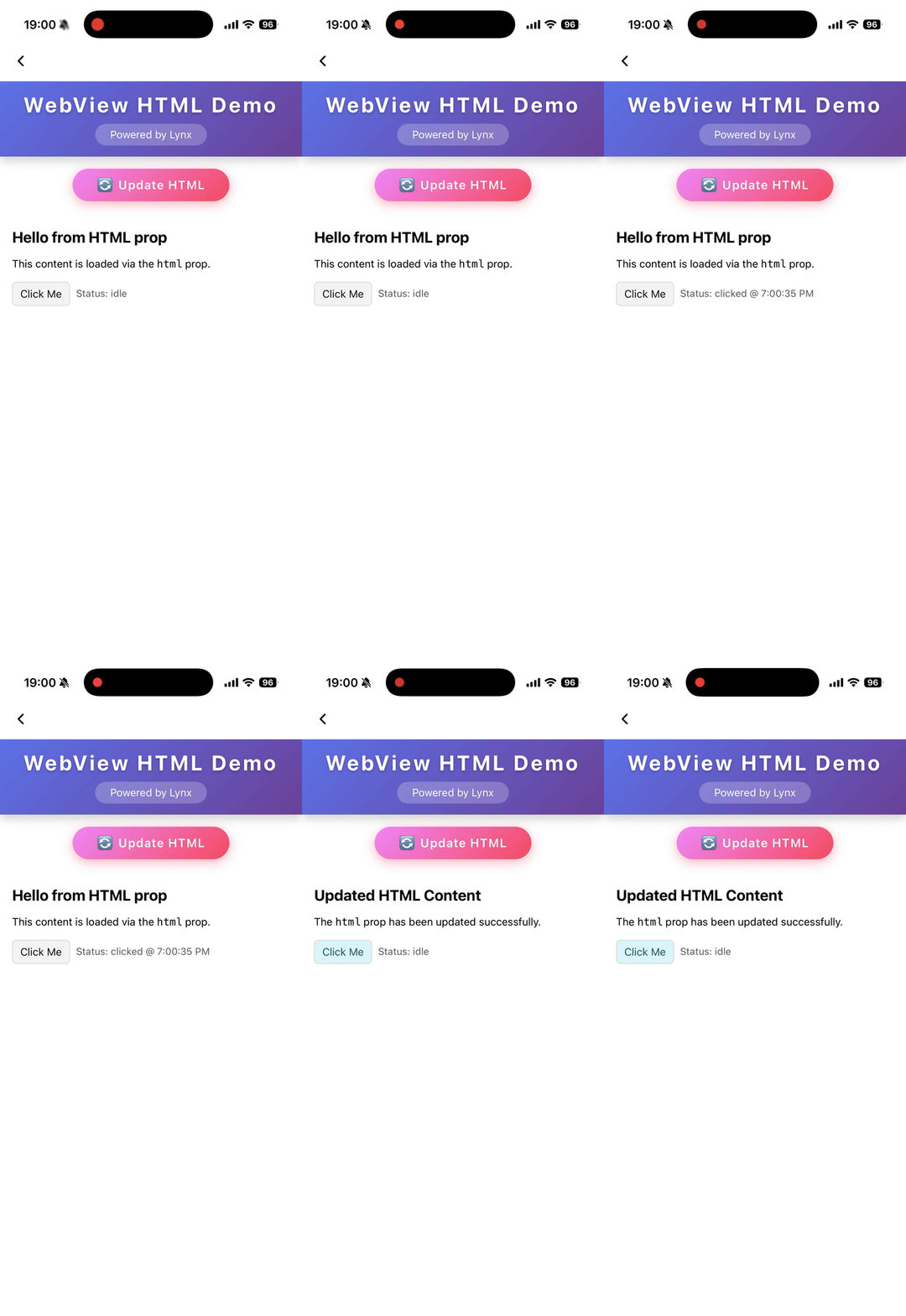
    A string that represents the html content to load. Automatically trigger content refresh when the html changes. Priority lower than src .

    initjs

    Desktop
    Lynx 3.5
    initjs?: string;

    Execute javascript when document ready

    params

    Android
    iOS
    params?: object;

    Params for external webview implementation

    scroll-bar-enable

    iOS
    // @defaultValue: false
    'scroll-bar-enable'?: boolean;

    Enable scrollbar

    src

    Android
    iOS
    Desktop
    Harmony
    src?: string;

    A string that represents the location of a resource on a remote server. Automatically trigger content refresh when the src changes

    use-osr

    Desktop
    Lynx 3.5
    // @defaultValue: false
    'use-osr'?: boolean;

    Whether enable offscreen rendering mode

    webview-type

    Android
    iOS
    Harmony
    // @defaultValue: 'default'
    'webview-type'?: string;

    Specify the type of webview, it could be a implementation of a webview inject from LynxService

    Events

    Frontend can bind corresponding event callbacks to listen for runtime behaviors of the element, as shown below.

    binderror

    Android
    iOS
    Desktop
    Harmony
    binderror = (e: WebviewErrorEvent) => {};
    FieldTypeOptionalDefaultPlatformsSinceDescription
    errorCodenumberNo
    Android
    iOS
    Desktop
    Harmony
    A number that represents the error code
    errorMsgstringNo
    Android
    iOS
    Desktop
    Harmony
    A string that represents the error message

    Error event

    bindload

    Android
    iOS
    Desktop
    Harmony
    bindload = (e: BaseEvent) => {};

    Load success event

    bindlocationchange

    Desktop
    Lynx 3.5
    bindlocationchange = (e: WebviewUrlEvent) => {};
    FieldTypeOptionalDefaultPlatformsSinceDescription
    urlstringNo
    Desktop
    A string that represents the target url

    location change event

    bindmessage

    Android
    iOS
    Desktop
    Harmony
    bindmessage = (e: WebviewMessageEvent) => {};
    FieldTypeOptionalDefaultPlatformsSinceDescription
    msgstringNo
    Android
    iOS
    Desktop
    Harmony
    A string that represents the message

    Message post from javascript

    bindopenwindow

    Desktop
    Lynx 3.5
    bindopenwindow = (e: WebviewUrlEvent) => {};
    FieldTypeOptionalDefaultPlatformsSinceDescription
    urlstringNo
    Desktop
    A string that represents the target url

    open window event

    Methods

    Frontend can invoke component methods via the SelectorQuery API.

    cookies.flushStore

    Desktop
    Lynx 3.5
    
    lynx.createSelectorQuery()
         .select('#id')
         .invoke({
          method: 'cookies.flushStore',
          success: function (res) {},
          fail: function (res) {},
        })
        .exec();
    

    Write any unwritten cookies data to disk for webview

    cookies.get

    Desktop
    Lynx 3.5
    interface CookiesGetParams {
      /**
       * Retrieves cookies whose domains match or are subdomains of domains
       * @PC
       */
      domain?: string;
      /**
       * Filters cookies by httpOnly
       * @PC
       */
      httpOnly?: boolean;
      /**
       * Filters cookies by name
       * @PC
       */
      name?: string;
      /**
       * Retrieves cookies whose path matches path
       * @PC
       */
      path?: string;
      /**
       * Filters cookies by their Secure property
       * @PC
       */
      secure?: boolean;
      /**
       * Filters out session or persistent cookies
       * @PC
       */
      session?: boolean;
      /**
       * Retrieves cookies which are associated with url. Empty implies retrieving cookies of all URLs
       * @PC
       */
      url?: string;
    }
    
    const params: CookiesGetParams = { domain: 'example.com', httpOnly: true, name: 'session', path: '/', secure: true, session: false, url: 'https://example.com' };
    
    lynx.createSelectorQuery()
         .select('#id')
         .invoke({
          method: 'cookies.get',
          params,
          success: function (res) {},
          fail: function (res) {},
        })
        .exec();
    

    Get cookies from webview

    cookies.remove

    Desktop
    Lynx 3.5
    interface CookiesRemoveParams {
      /**
       * The name of cookie to remove.
       * @PC
       */
      name?: string;
      /**
       * The URL associated with the cookie.
       * @PC
       */
      url: string;
    }
    
    const params: CookiesRemoveParams = { name: 'session', url: 'https://example.com' };
    
    lynx.createSelectorQuery()
         .select('#id')
         .invoke({
          method: 'cookies.remove',
          params,
          success: function (res) {},
          fail: function (res) {},
        })
        .exec();
    

    Removes the cookies matching url and name

    cookies.set

    Desktop
    Lynx 3.5
    interface CookiesSetParams {
      /**
       * The domain of the cookie. Empty by default if omitted
       * @PC
       */
      domain?: string;
      /**
       * The expiration date of the cookie as the number of seconds since the UNIX epoch
       * @PC
       */
      expirationDate?: number;
      /**
       * Whether the cookie should be marked as HTTP only
       * @PC
       * @defaultValue false
       */
      httpOnly?: boolean;
      /**
       * The name of the cookie
       * @PC
       */
      name: string;
      /**
       * The path of the cookie. Empty by default if omitted
       * @PC
       */
      path?: string;
      /**
       * The Same Site policy to apply to this cookie. Can be unspecified, no_restriction, lax or strict
       * @PC
       * @defaultValue 'lax'
       */
      sameSite?: string;
      /**
       * Whether the cookie should be marked as secure
       * @PC
       * @defaultValue false
       */
      secure?: boolean;
      /**
       * The URL to associate the cookie with
       * @PC
       */
      url: string;
      /**
       * The value of the cookie. Empty by default if omitted
       * @PC
       */
      value?: string;
    }
    
    const params: CookiesSetParams = { domain: 'example.com', expirationDate: Math.floor(Date.now() / 1000) + 60 * 60 * 24 * 30, httpOnly: true, name: 'session', path: '/', sameSite: 'lax', secure: true, url: 'https://example.com', value: 'hello' };
    
    lynx.createSelectorQuery()
         .select('#id')
         .invoke({
          method: 'cookies.set',
          params,
          success: function (res) {},
          fail: function (res) {},
        })
        .exec();
    

    Set a cookie to webview

    eval

    Android
    iOS
    Desktop
    Harmony
    
    lynx.createSelectorQuery()
         .select('#id')
         .invoke({
          method: 'eval',
          params: {
            /**
             * Name of the function: `javascriptFunc(arg1, arg2)`.
             * @Android
             * @iOS
             * @Harmony
             * @PC
             */
            func: 'javascriptFunc(1, 2)',
          },
          success: function (res) {},
          fail: function (res) {},
        })
        .exec();
    

    Call js function

    reload

    Android
    iOS
    Desktop
    Harmony
    
    lynx.createSelectorQuery()
         .select('#id')
         .invoke({
          method: 'reload',
          success: function (res) {},
          fail: function (res) {},
        })
        .exec();
    

    Reload the webview

    Compatibility

    LCD tables only load in the browser

    Except as otherwise noted, this work is licensed under a Creative Commons Attribution 4.0 International License, and code samples are licensed under the Apache License 2.0.