Lynx

<video>
4.1
experimental XElement

<video> is an experimental element for playing online video resources in Lynx. It supports playback controls through UIMethods and emits playback lifecycle events.

Warning

<video> is experimental and still in an early stage. Its API may change in future releases. Contributions and feedback are welcome in lynx_video_element_spec.md.

Usage

Basic
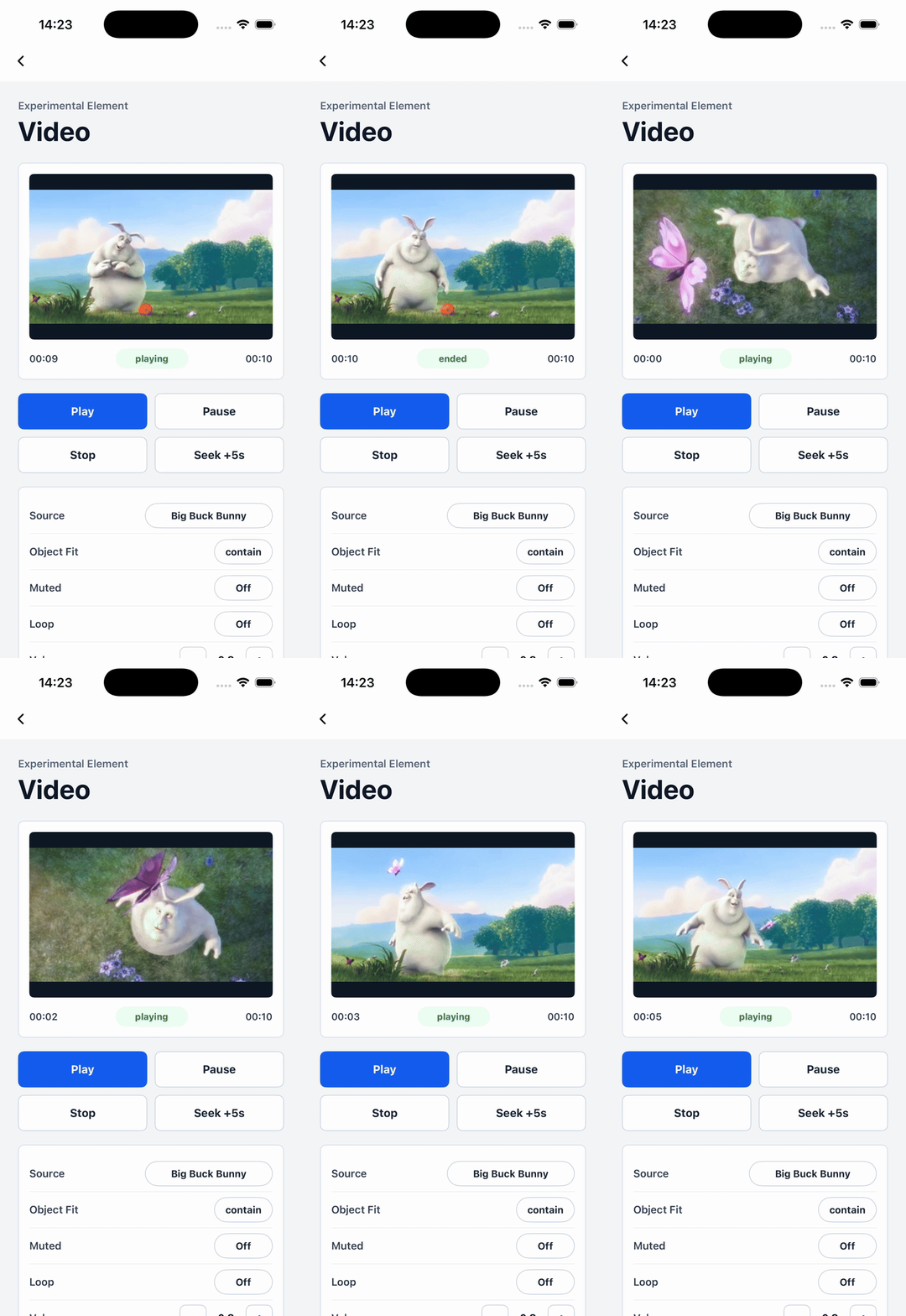
Attributes

src

Android
iOS
Harmony
4.1
experimental
src?: string;

Video source URL. Only online network URLs are supported.

loop

Android
iOS
Harmony
4.1
experimental
// @defaultValue: false
loop?: boolean;

Whether to loop playback.

volume

Android
iOS
Harmony
4.1
experimental
// @defaultValue: 1.0
volume?: number;

Playback volume from 0 to 1.

muted

Android
iOS
Harmony
4.1
experimental
// @defaultValue: false
muted?: boolean;

Whether the video is muted.

speed

Android
iOS
Harmony
4.1
experimental
// @defaultValue: 1.0
speed?: number;

Playback speed from 0.1 to 2.0.

object-fit

Android
iOS
Harmony
4.1
experimental
// @defaultValue: 'contain'
'object-fit'?: 'contain' | 'cover' | 'fill';

Video scaling strategy.

mode

Android
iOS
Harmony
4.1
experimental
// @defaultValue: 'queue'
mode?: 'queue' | 'direct' | 'latest';

UIMethod execution mode.

timeupdate-interval

Android
iOS
Harmony
4.1
experimental
// @defaultValue: 0.33
'timeupdate-interval'?: number;

Minimum interval for bindtimeupdate dispatch, in seconds.

Events

Frontend can bind corresponding event callbacks to listen for runtime behaviors of the element, as shown below.

bindfirstframe

Android
iOS
Harmony
4.1
experimental
bindfirstframe = (e: VideoFirstFrameEvent) => {};
FieldTypeOptionalDefaultPlatformsSinceDescription
durationnumberNo-
Android
iOS
Harmony
4.1
4.1Total video duration, in seconds.

Fired when the first video frame has loaded.

bindplaying

Android
iOS
Harmony
4.1
experimental
bindplaying = (e: VideoPlayingEvent) => {};

Fired when video playback starts or resumes.

bindpaused

Android
iOS
Harmony
4.1
experimental
bindpaused = (e: VideoPausedEvent) => {};

Fired when video playback pauses.

bindstopped

Android
iOS
Harmony
4.1
experimental
bindstopped = (e: VideoStoppedEvent) => {};

Fired when video playback is stopped by the stop UIMethod.

bindtimeupdate

Android
iOS
Harmony
4.1
experimental
bindtimeupdate = (e: VideoTimeUpdateEvent) => {};
FieldTypeOptionalDefaultPlatformsSinceDescription
currentnumberNo-
Android
iOS
Harmony
4.1
4.1Current playback position, in seconds.
durationnumberNo-
Android
iOS
Harmony
4.1
4.1Total video duration, in seconds.

Fired when the playback position updates.

bindended

Android
iOS
Harmony
4.1
experimental
bindended = (e: VideoEndedEvent) => {};

Fired when video playback fully ends.

bindlooped

Android
iOS
Harmony
4.1
experimental
bindlooped = (e: VideoLoopedEvent) => {};

Fired at the end of each loop iteration.

binderror

Android
iOS
Harmony
4.1
experimental
binderror = (e: VideoErrorEvent) => {};
FieldTypeOptionalDefaultPlatformsSinceDescription
errorCodenumberNo-
Android
iOS
Harmony
4.1
4.1Platform playback error code.
errorMsgstringNo-
Android
iOS
Harmony
4.1
4.1Platform playback error message.

Fired when a video playback error occurs.

bindbuffering

Android
iOS
Harmony
4.1
experimental
bindbuffering = (e: VideoBufferingEvent) => {};
FieldTypeOptionalDefaultPlatformsSinceDescription
bufferingnumberNo-
Android
iOS
Harmony
4.1
4.1Buffered end position on the media timeline, in seconds.

Fired while the video is buffering.

Methods

Frontend can invoke component methods via the SelectorQuery API.

Method callbacks may receive the following response fields:

FieldTypeOptionalDescription
successbooleanYesWhether the operation succeeded when provided by the platform callback.
errorCodenumberYesError code when the operation fails.
msgstringYesError message when the operation fails.
errorMsgstringYesError message when the operation fails on Harmony.

play

Android
iOS
Harmony
4.1
experimental
lynx
  .createSelectorQuery()
  .select('#id')
  .invoke({
    method: 'play',
    success(res) {},
    fail(res) {},
  })
  .exec();

Play the video.

pause

Android
iOS
Harmony
4.1
experimental
lynx
  .createSelectorQuery()
  .select('#id')
  .invoke({
    method: 'pause',
    success(res) {},
    fail(res) {},
  })
  .exec();

Pause video playback.

stop

Android
iOS
Harmony
4.1
experimental
lynx
  .createSelectorQuery()
  .select('#id')
  .invoke({
    method: 'stop',
    success(res) {},
    fail(res) {},
  })
  .exec();

Stop video playback.

seek

Android
iOS
Harmony
4.1
experimental
lynx
  .createSelectorQuery()
  .select('#id')
  .invoke({
    method: 'seek',
    params: {
      position: 2,
    },
    success(res) {},
    fail(res) {},
  })
  .exec();

Seek to the target playback position.

FieldTypeOptionalDefaultPlatformsSinceDescription
positionnumberNo-
Android
iOS
Harmony
4.1
4.1Target playback position, in seconds.

Compatibility

LCD tables only load in the browser

Except as otherwise noted, this work is licensed under a Creative Commons Attribution 4.0 International License, and code samples are licensed under the Apache License 2.0.