<textarea>
<textarea> is used to create interactive input controls that allow users to input and edit multi-line text.
TIP
This feature requires the client to add additional dependencies. Please refer to More Elements for the integration method.
Usage
Basic
Below is a basic usage example of the <textarea> component:
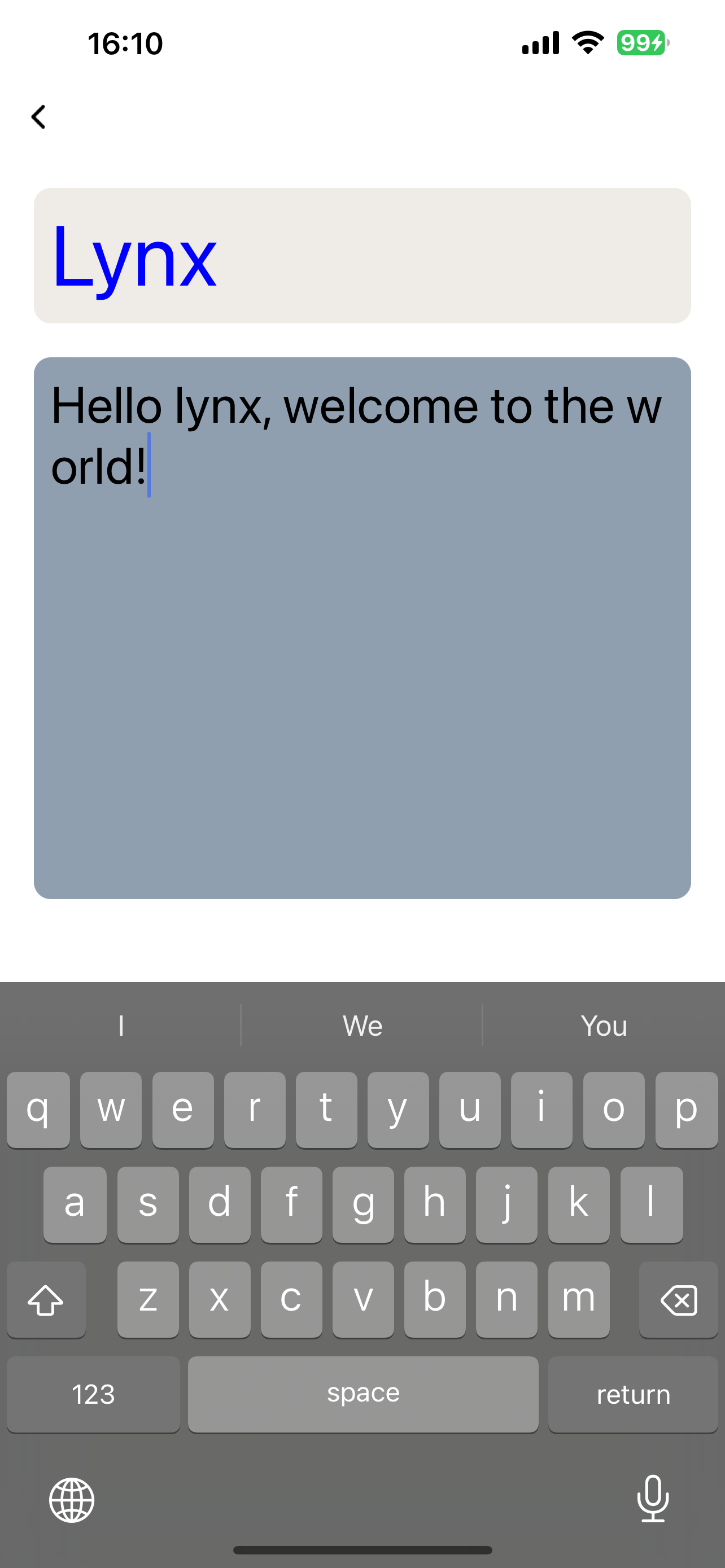
Custom Placeholder Style
<textarea> can customize its style using the ::placeholder pseudo-element:
Attributes
android-fullscreen-mode
Android only
3.4
// @defaultValue: true
'android-fullscreen-mode'?: boolean;
Whether to enter the full-screen input mode when in landscape screen, in which the keyboard and input box will take up the entire screen
bounces
iOS only
3.4
// @defaultValue: true
bounces?: boolean;
Bounce effect for iOS
confirm-type
iOS only
Harmony only
3.4
// @defaultValue: 'done'
'confirm-type'?: 'search' | 'send' | 'go' | 'done' | 'next';
The type of confirm button
disabled
Android only
iOS only
Harmony only
3.5
// @defaultValue: false
disabled?: boolean;
Interaction enabled
Android only
iOS only
3.6
// @defaultValue: false
'enable-scroll-bar'?: boolean;
Whether to show scroll bar, on HarmonyOS, the scroll bar will always be shown
Android only
iOS only
Harmony only
3.4
// @defaultValue: undefined
'input-filter'?: string;
Filter the input content and process it in the form of regular expressions
ios-auto-correct
iOS only
3.4
// @defaultValue: true
'ios-auto-correct'?: boolean;
Auto correct input content on iOS
ios-spell-check
iOS only
3.4
// @defaultValue: true
'ios-spell-check'?: boolean;
Check spelling issue on iOS
line-spacing
Android only
iOS only
3.4
// @defaultValue: undefined
'line-spacing'?: number | any | any;
Line spacing
maxlength
Android only
iOS only
Harmony only
3.4
// @defaultValue: 140
maxlength?: number;
Max input length
maxlines
Android only
iOS only
Harmony only
3.4
// @defaultValue: undefined
maxlines?: number;
Max input lines
placeholder
Android only
iOS only
Harmony only
3.4
Placeholder
readonly
Android only
iOS only
Harmony only
3.4
// @defaultValue: false
readonly?: boolean;
Readonly
Android only
iOS only
3.4
// @defaultValue: true
'show-soft-input-on-focus'?: boolean;
Show soft input keyboard while focused
type
Android only
iOS only
Harmony only
3.4
// @defaultValue: "text"
type?: 'number' | 'text' | 'digit' | 'tel' | 'email';
Input content type
Events
Frontend can bind corresponding event callbacks to listen for runtime behaviors of the element, as shown below.
bindblur
Android only
iOS only
Harmony only
3.4
bindblur = (e: TextAreaBlurEvent) => {};
| Field | Type | Optional | Default | Platforms | Since | Description |
|---|
| value | string | No | – | Android only iOS only Harmony only 3.4 | 3.4 | Input content |
Blurred
bindconfirm
Android only
iOS only
Harmony only
3.4
bindconfirm = (e: TextAreaConfirmEvent) => {};
| Field | Type | Optional | Default | Platforms | Since | Description |
|---|
| value | string | No | – | Android only iOS only Harmony only 3.4 | 3.4 | Input content |
Confirm button clicked, only work when confirm-type is defined
bindfocus
Android only
iOS only
Harmony only
3.4
bindfocus = (e: TextAreaFocusEvent) => {};
| Field | Type | Optional | Default | Platforms | Since | Description |
|---|
| value | string | No | – | Android only iOS only Harmony only 3.4 | 3.4 | Input content |
Focused
Android only
iOS only
Harmony only
3.4
bindinput = (e: TextAreaInputEvent) => {};
| Field | Type | Optional | Default | Platforms | Since | Description |
|---|
| isComposing | boolean | Yes | – | Android only iOS only Harmony only 3.4 | 3.4 | Is composing or not |
| selectionEnd | number | No | – | Android only iOS only Harmony only 3.4 | 3.4 | The end position of the selection |
| selectionStart | number | No | – | Android only iOS only Harmony only 3.4 | 3.4 | The start position of the selection |
| value | string | No | – | Android only iOS only Harmony only 3.4 | 3.4 | Input content |
Input content changed
bindselection
Android only
iOS only
Harmony only
3.4
bindselection = (e: TextAreaSelectionChangeEvent) => {};
| Field | Type | Optional | Default | Platforms | Since | Description |
|---|
| selectionEnd | number | No | – | Android only iOS only Harmony only 3.4 | 3.4 | The end position of the selection |
| selectionStart | number | No | – | Android only iOS only Harmony only 3.4 | 3.4 | The start position of the selection |
Input selection changed
Methods
Frontend can invoke component methods via the SelectorQuery API.
blur
Android only
iOS only
Harmony only
3.4
lynx.createSelectorQuery()
.select('#id')
.invoke({
method: 'blur',
success: function (res) {},
fail: function (res) {},
})
.exec();
Release focus
focus
Android only
iOS only
Harmony only
3.4
lynx.createSelectorQuery()
.select('#id')
.invoke({
method: 'focus',
success: function (res) {},
fail: function (res) {},
})
.exec();
Require focus
getValue
Android only
iOS only
Harmony only
3.4
lynx.createSelectorQuery()
.select('#id')
.invoke({
method: 'getValue',
success: Callback<{
/**
_ Is composing or not, iOS only
_ @Android
_ @iOS
_ @Harmony
_ @Web
_ @since 3.4
\*/
isComposing: boolean;
/**
_ End position of the cursor
_ @Android
_ @iOS
_ @Harmony
_ @Web
_ @since 3.4
_/
selectionEnd: number;
/\*\*
_ Begin position of the cursor
_ @Android
_ @iOS
_ @Harmony
_ @Web
_ @since 3.4
_/
selectionStart: number;
/\*\*
_ Input content
_ @Android
_ @iOS
_ @Harmony
_ @Web
_ @since 3.4
\*/
value: string;
}>;
fail: function (res) {},
})
.exec();
Get input content
setSelectionRange
Android only
iOS only
Harmony only
3.4
lynx.createSelectorQuery()
.select('#id')
.invoke({
method: 'setSelectionRange',
params: {
/**
* End position of the selection
* @Android
* @iOS
* @Harmony
* @Web
* @since 3.4
*/
selectionEnd: number;
/**
* Start position of the selection
* @Android
* @iOS
* @Harmony
* @Web
* @since 3.4
*/
selectionStart: number;
};
success: function (res) {},
fail: function (res) {},
})
.exec();
Set selection range
setValue
Android only
iOS only
Harmony only
3.4
lynx.createSelectorQuery()
.select('#id')
.invoke({
method: 'setValue',
params: {
/\*\*
_ Input content
_ @Android
_ @iOS
_ @Harmony
_ @Web
_ @since 3.4
\*/
value: string;
};
success: function (res) {},
fail: function (res) {},
})
.exec();
Set input content
Compatibility
Loading...