For AI agents: the complete documentation index is available at /next/zh/llms.txt, the full documentation bundle is available at /next/zh/llms-full.txt, and this page is available as Markdown at /next/zh/api/elements/built-in/webview.md.
Lynx
  • 简体中文
  • <webview> XElement

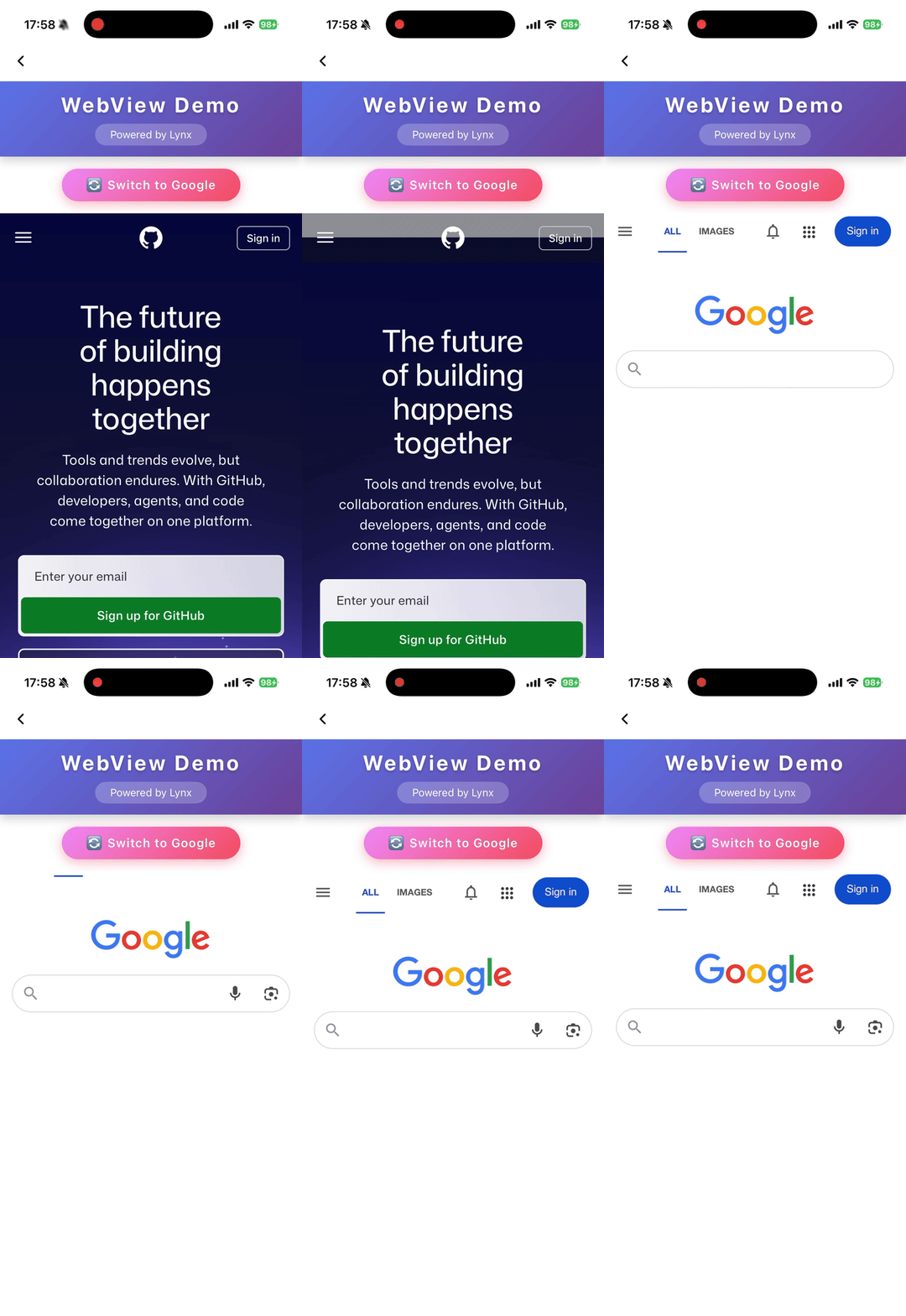
    用于在 Lynx 中嵌入网页,提供灵活的方式集成现有 Web 资源并加速开发。

    • <webview> 在元素侧作为视口,必须有确定的宽度。
    • <webview> 在元素侧作为视口,必须有确定的高度。
    • Web 资源渲染完成后,可使用 document.getElementById 获取自身高度,通过 message 通知 <webview> 修改高度。
    • 除非在 <webview /> 上设置 native-interaction-enabled={false},否则 <webview> 的交互事件无法穿透到其他元素。
    • <webview> 不能与其他可滚动元素嵌套使用,如有需要请使用 <scroll-view> 进行包裹。
    • 若需拦截点击事件,需在 <webview /> 上手动添加 catchtap={() => {}}

    使用指南

    加载 Web 内容

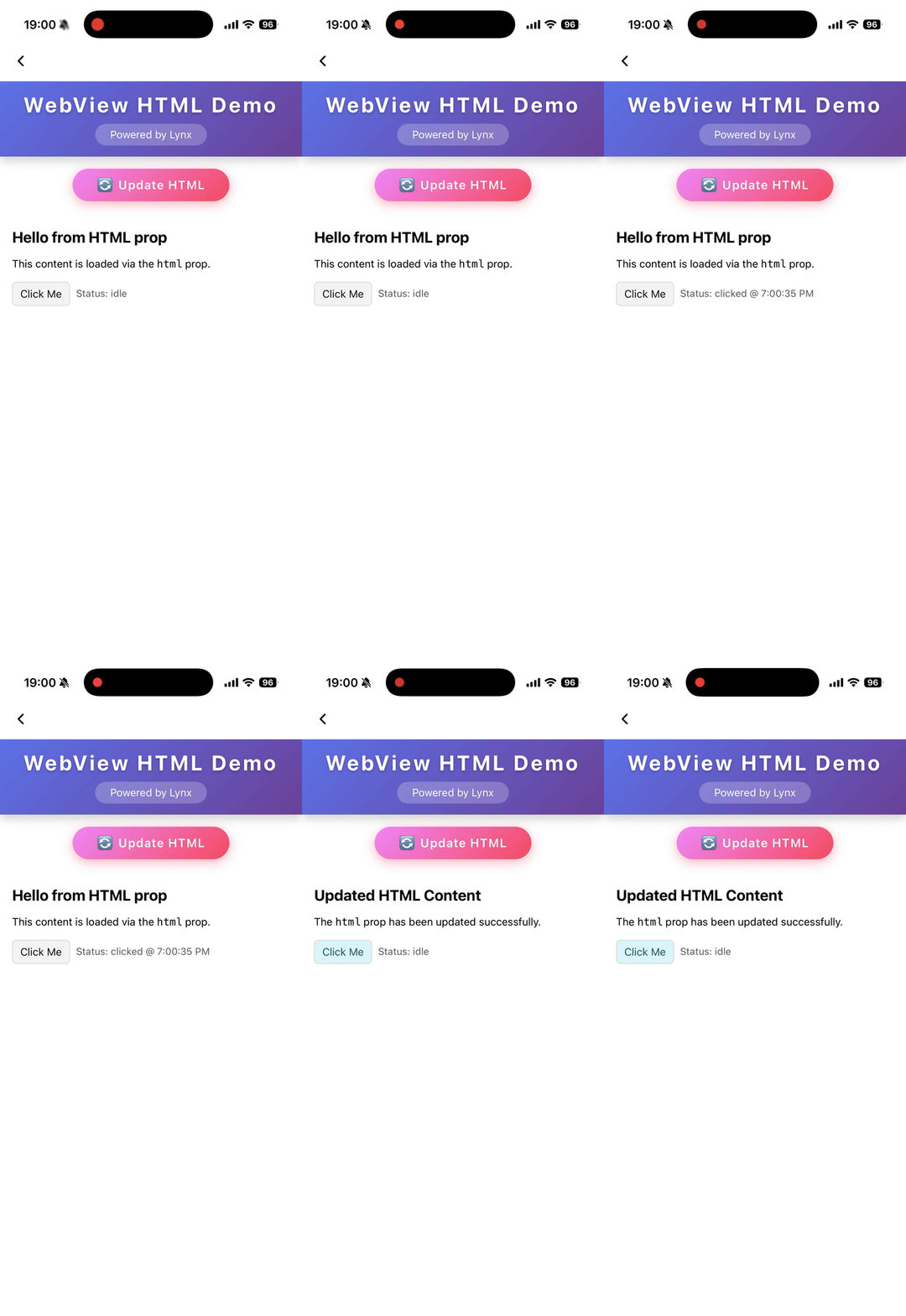
    加载 HTML 字符串

    属性

    bounces

    iOS
    // @defaultValue: false
    bounces?: boolean;

    启用弹性效果

    cookies

    Desktop
    Lynx 3.5
    cookies?: any;

    预设 cookies

    enable-debug

    Android
    iOS
    Desktop
    Harmony
    // @defaultValue: false
    'enable-debug'?: boolean;

    启用 WebView 调试,可在 Chrome DevTools 中进行调试

    html

    Android
    iOS
    Harmony
    3.6
    html?: string;

    表示要加载的 HTML 内容的字符串。当 html 变化时会自动触发内容刷新。优先级低于 src

    initjs

    Desktop
    Lynx 3.5
    initjs?: string;

    在文档就绪时执行的 JavaScript

    params

    Android
    iOS
    params?: object;

    外部 webview 实现的参数

    scroll-bar-enable

    iOS
    // @defaultValue: false
    'scroll-bar-enable'?: boolean;

    启用滚动条

    src

    Android
    iOS
    Desktop
    Harmony
    src?: string;

    表示远程服务器上资源位置的字符串。当 src 变化时会自动触发内容刷新。

    use-osr

    Desktop
    Lynx 3.5
    // @defaultValue: false
    'use-osr'?: boolean;

    是否启用离屏渲染模式

    webview-type

    Android
    iOS
    Harmony
    // @defaultValue: 'default'
    'webview-type'?: string;

    指定 webview 的类型,可以是通过 LynxService 注入的 webview 实现

    事件

    前端可以绑定对应的事件回调来监听元素的运行时行为,如下所示。

    binderror

    Android
    iOS
    Desktop
    Harmony
    binderror = (e: WebviewErrorEvent) => {};
    字段类型可选默认值平台起始版本描述
    errorCodenumber
    Android
    iOS
    Desktop
    Harmony
    表示错误码的数字
    errorMsgstring
    Android
    iOS
    Desktop
    Harmony
    表示错误信息的字符串

    加载错误事件

    bindload

    Android
    iOS
    Desktop
    Harmony
    bindload = (e: BaseEvent) => {};

    加载成功事件

    bindlocationchange

    Desktop
    Lynx 3.5
    bindlocationchange = (e: WebviewUrlEvent) => {};
    字段类型可选默认值平台起始版本描述
    urlstring
    Desktop
    表示目标 URL 的字符串

    页面地址变化事件

    bindmessage

    Android
    iOS
    Desktop
    Harmony
    bindmessage = (e: WebviewMessageEvent) => {};
    字段类型可选默认值平台起始版本描述
    msgstring
    Android
    iOS
    Desktop
    Harmony
    表示消息内容的字符串

    来自 JavaScript 的消息事件

    bindopenwindow

    Desktop
    Lynx 3.5
    bindopenwindow = (e: WebviewUrlEvent) => {};
    字段类型可选默认值平台起始版本描述
    urlstring
    Desktop
    表示目标 URL 的字符串

    打开新窗口事件

    方法

    前端可以通过 SelectorQuery API 调用组件方法。

    cookies.flushStore

    Desktop
    Lynx 3.5
    
    lynx.createSelectorQuery()
         .select('#id')
         .invoke({
          method: 'cookies.flushStore',
          success: function (res) {},
          fail: function (res) {},
        })
        .exec();
    

    将所有未写入的 cookies 数据刷新到磁盘

    cookies.get

    Desktop
    Lynx 3.5
    
    lynx.createSelectorQuery()
         .select('#id')
         .invoke({
          method: 'cookies.get',
          params: {
            /**
             * 获取域名匹配或为其子域名的 cookies
             * @PC
             */
            domain?: string;
            /**
             * 按 httpOnly 过滤 cookies
             * @PC
             */
            httpOnly?: boolean;
            /**
             * 按名称过滤 cookies
             * @PC
             */
            name?: string;
            /**
             * 获取路径匹配的 cookies
             * @PC
             */
            path?: string;
            /**
             * 按 Secure 属性过滤 cookies
             * @PC
             */
            secure?: boolean;
            /**
             * 过滤会话 cookie 或持久化 cookie
             * @PC
             */
            session?: boolean;
            /**
             * 获取与指定 URL 关联的 cookies。为空则获取所有 URL 的 cookies
             * @PC
             */
            url?: string;
          };
          success: function (res) {},
          fail: function (res) {},
        })
        .exec();
    

    从 webview 获取 cookies

    cookies.remove

    Desktop
    Lynx 3.5
    
    lynx.createSelectorQuery()
         .select('#id')
         .invoke({
          method: 'cookies.remove',
          params: {
            /**
             * 要删除的 cookie 名称
             * @PC
             */
            name?: string;
            /**
             * 与 cookie 关联的 URL
             * @PC
             */
            url: string;
          };
          success: function (res) {},
          fail: function (res) {},
        })
        .exec();
    

    删除匹配 url 和 name 的 cookies

    cookies.set

    Desktop
    Lynx 3.5
    
    lynx.createSelectorQuery()
         .select('#id')
         .invoke({
          method: 'cookies.set',
          params: {
            /**
             * cookie 的域名。省略时默认为空
             * @PC
             */
            domain?: string;
            /**
             * cookie 的过期时间,为 UNIX 纪元以来的秒数
             * @PC
             */
            expirationDate?: number;
            /**
             * cookie 是否标记为 HTTP only
             * @PC
             * @defaultValue false
             */
            httpOnly?: boolean;
            /**
             * cookie 的名称
             * @PC
             */
            name: string;
            /**
             * cookie 的路径。省略时默认为空
             * @PC
             */
            path?: string;
            /**
             * 应用于此 cookie 的 Same Site 策略。可为 unspecified、no_restriction、lax 或 strict
             * @PC
             * @defaultValue 'lax'
             */
            sameSite?: string;
            /**
             * cookie 是否标记为 secure
             * @PC
             * @defaultValue false
             */
            secure?: boolean;
            /**
             * 关联 cookie 的 URL
             * @PC
             */
            url: string;
            /**
             * cookie 的值。省略时默认为空
             * @PC
             */
            value?: string;
          };
          success: function (res) {},
          fail: function (res) {},
        })
        .exec();
    

    为 webview 设置 cookie

    eval

    Android
    iOS
    Desktop
    Harmony
    
    lynx.createSelectorQuery()
         .select('#id')
         .invoke({
          method: 'eval',
          params: {
            /**
             * 函数名称:`javascriptFunc(arg1, arg2)`。
             * @Android
             * @iOS
             * @Harmony
             * @PC
             */
            func: string;
          };
          success: function (res) {},
          fail: function (res) {},
        })
        .exec();
    

    调用 JavaScript 函数

    reload

    Android
    iOS
    Desktop
    Harmony
    
    lynx.createSelectorQuery()
         .select('#id')
         .invoke({
          method: 'reload',
          success: function (res) {},
          fail: function (res) {},
        })
        .exec();
    

    重新加载 webview

    兼容性

    LCD tables only load in the browser

    除非另有说明,本项目采用知识共享署名 4.0 国际许可协议进行许可,代码示例采用 Apache License 2.0 许可协议进行许可。