

<view>
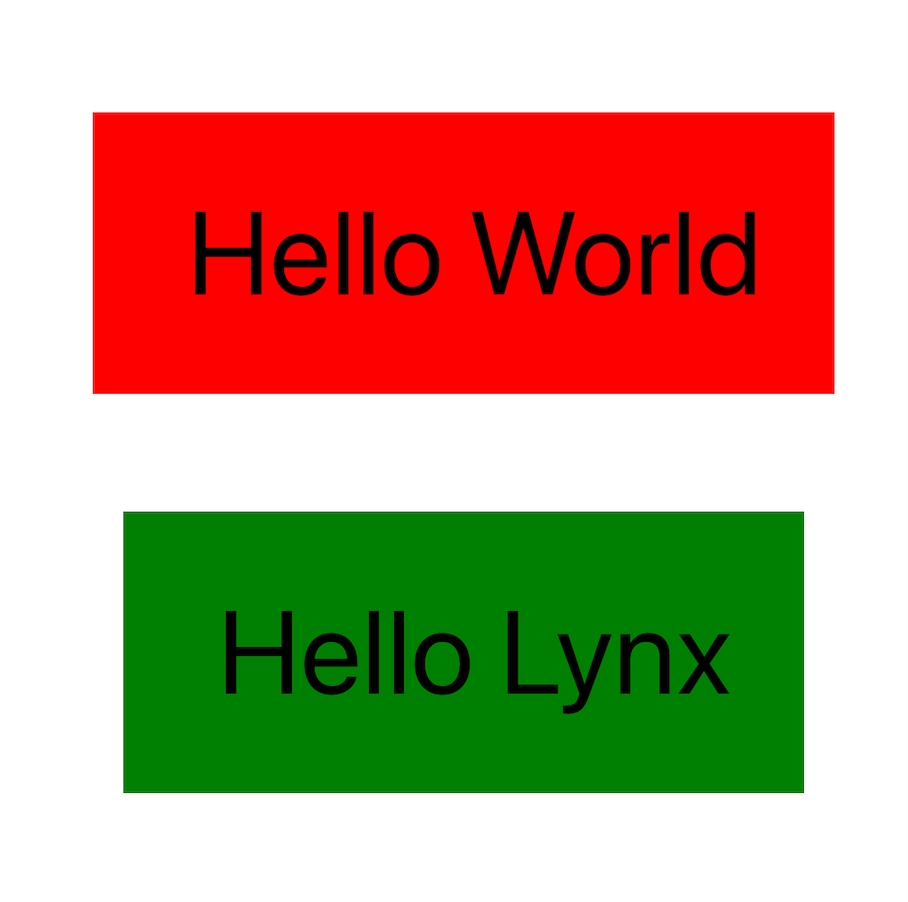
一个类似 HTML <div> 的容器元素。与 <div> 类似,<view> 是一个多功能的容器元素,可以容纳其他元素,并作为构建布局的基础。所有 <view> 上可用的属性、事件和方法都可以被其他元素使用。
使用指南
作为绘制容器

作为布局容器
属性
属性名和属性值用于描述元件的行为和外观。
name
用来指定组件的名字,一般是供 native 通过 findViewByName 来从 native 侧操作对应的节点。
id
用来指定组件唯一的身份标识,可供前端 API 来查找并操作对应的节点,比如 invoke。
style
用于在元件上应用行内(inline)样式。
class
用于为元件指定一个或多个类名,这些类名可以在 CSS 中使用来应用样式。
className ReactLynx
在 ReactLynx 中请使用 className 来设置 CSS 的类名,用法同 class。
data-*
用于为元件指定额外的信息,这些信息可以在 Event 中获取。
flatten Android
只有 Android 平台可以生效,用来强制将特定的节点创建对应的 Android View。
exposure-id
指定目标节点是否需要监听曝光/反曝光事件。
exposure-scene
指定目标节点的曝光场景,与 exposure-id 一起用于对需要监听曝光的节点进行唯一标识。
exposure-ui-margin-*
指定曝光检测中目标节点自身的边界缩放值,影响目标节点的视口交叉判断,每一个节点可以有自己的自身边界缩放值。
Android 和 iOS 平台都需要对当前节点设置 enable-exposure-ui-margin,否则不生效。HarmonyOS 平台不需要设置enable-exposure-ui-margin 即可生效。
exposure-screen-margin-*
指定曝光检测任务中目标节点参考的屏幕边界缩放值,影响目标节点的视口交叉判断,每一个节点可以有自己的屏幕边界缩放值。
Android 和 iOS 平台都需要对当前节点设置 enable-exposure-ui-margin,否则正值表示目标节点自身边界缩放值,负值表示屏幕边界缩放值。HarmonyOS 平台不需要设置enable-exposure-ui-margin 即可生效。
exposure-area
指定目标节点可以触发曝光事件的视口交叉比例,大于该比例时触发曝光事件,小于该比例时触发反曝光事件,默认目标节点露出即触发曝光事件。
enable-exposure-ui-margin
指定目标节点是否支持 exposure-ui-margin-* 属性。
设置为 true 会改变 Android 和 iOS 平台 exposure-screen-margin-* 的行为,可能导致可滚动容器的懒加载失效。
enable-exposure-ui-clip
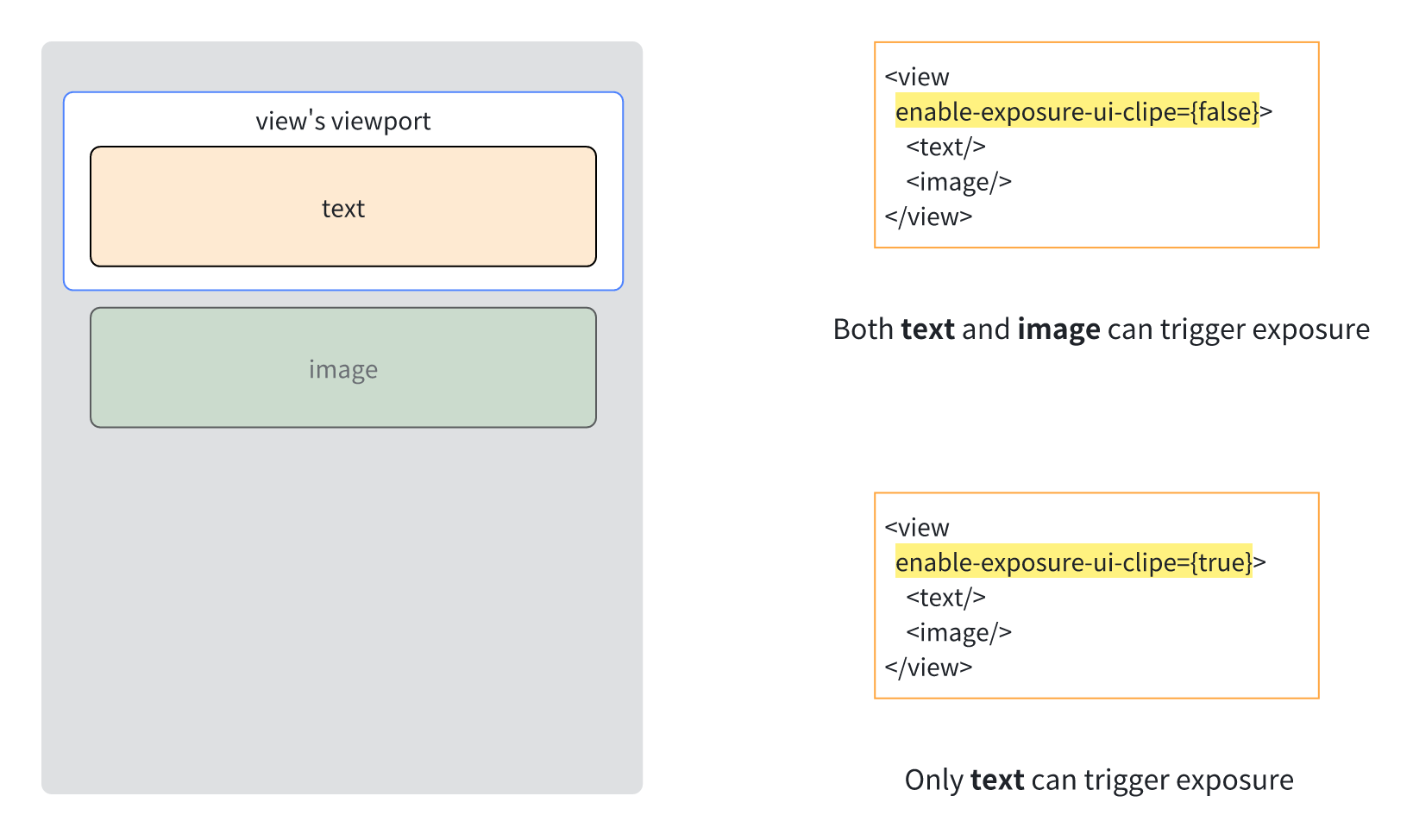
指定曝光检测任务中是否考虑父节点的视口裁剪。当设置为 true 时,父节点视口外的节点无法触发曝光,当设置为 false 时,父节点视口外的节点可以触发曝光。
默认情况下,曝光检测只考虑可滚动的父级节点的视口裁剪,其他有宽高且 overflow: visible 的父级节点视口裁剪对曝光检测无影响。通过给这些父级节点设置 enable-exposure-ui-clip 可以实现更加合理的视口裁剪判断。
accessibility-element
设置节点是否支持无障碍。
accessibility-label
设置节点语音播报的内容。
如果 <text/> 节点不设置该属性,则 <text/> 节点默认 accessibility-label 是 <text/> 的内容。
当一个节点开启 accessibility-element 属性后,建议同时设置 accessibility-label,这样可以更清楚地表达当前节点的含义。
accessibility-trait
设置节点的类型特征。系统对不同类型的节点,播放内容会有特定的补充。
accessibility-elements
自定义子节点的聚焦顺序。该属性设置在父节点上,其子节点的聚焦顺序会根据 accessibility-elements 属性指定子节点 id 的顺序进行聚焦。
如果父节点设置了 accessibility-elements 属性,那么仅可访问 accessibility-elements 属性指定 id 的子节点,其他子节点则不可以聚焦。
accessibility-elements-a11y
作用等同于 accessibility-elements, 但是对应的 id 是 a11y-id。
accessibility-elements-hidden
标记当前节点及其所有子节点都不会成为无障碍节点。
accessibility-exclusive-focus
该属性可以被任何节点设置,在无障碍模式下,顺序导航只会聚焦到这些节点下的子节点。
使用场景:解决弹窗蒙层焦点穿透问题:可以给蒙层节点设置该属性为 true,使得焦点在蒙层节点内部循环,不会穿透到蒙层下其他节点。
a11y-id
区别于 id,用于单独标识无障碍节点。
ios-platform-accessibility-id iOS
用于指定 iOS 中一个 UIView 的无障碍标识符,仅限平台层无障碍框架接入时才需使用。
user-interaction-enabled
指定目标节点及其子节点是否能够响应 Lynx 的触摸事件,该属性不会影响平台层手势(比如 scroll-view 的滚动)。
推荐使用 pointer-events 代替 user-interaction-enabled。
native-interaction-enabled
指定目标节点是否消费平台层的触摸事件,影响平台层手势(比如 scroll-view 的滚动),不影响 Lynx 的触摸事件,可以实现类似平台层手势穿透/拦截的效果。
Android 平台只支持在 view 元件上设置生效,并且需要节点创建对应的 Android View,可能需要同时设置 flatten 为 false 才能生效。
手势拦截效果只能作用于兄弟节点,不能作用于父子节点。
pan-intercept-direction Android iOS
指定阻止特定方向的平台层滑动手势,需配合 pan-intercept-scope 使用。当滑动方向和 pan-intercept-direction 一致时,会根据 pan-intercept-scope 来判断是否拦截对应节点上的平台层滑动手势。
比如 pan-intercept-direction 设置为 0 时,表示滑动方向为水平方向时,会根据事件响应链上距离用户最近的设置了 pan-intercept-direction 为 0 的节点的 pan-intercept-scope 来判断是否拦截对应节点上的平台层滑动手势。
Android 平台只支持在 view、scroll-view、list 元件上设置生效,并且需要节点创建对应的 Android View,可能需要同时设置 flatten 为 false 才能生效。
pan-intercept-scope Android iOS
指定阻止特定方向的平台层滑动手势生效的范围,需配合 pan-intercept-direction 使用。比如 pan-intercept-scope 设置为 0 时,表示仅拦截目标节点上的平台层滑动手势,设置为 1 时,表示拦截目标节点的所有祖先节点上的平台层滑动手势。
ios-pan-intercept-gesture-class iOS
指定需要通过 pan-intercept 拦截的其他平台层 UIGestureRecognizer 类名。需与 ios-pan-intercept-view-class、ios-pan-intercept-view-tag、pan-intercept-direction 和 pan-intercept-scope 配合使用。
ios-pan-intercept-view-class iOS
指定需要拦截的其他平台层手势所绑定的 UIView 类名。需与 ios-pan-intercept-gesture-class、ios-pan-intercept-view-tag、pan-intercept-direction 和 pan-intercept-scope 配合使用。
ios-pan-intercept-view-tag iOS
指定需要拦截的其他平台层手势所绑定的 UIView.tag。需与 ios-pan-intercept-gesture-class、ios-pan-intercept-view-class、pan-intercept-direction 和 pan-intercept-scope 配合使用。
该属性必须显式设置后才参与匹配。未设置时,即使目标视图的 tag 为 0,也不会命中该筛选条件。
当滑动方向与 pan-intercept-direction 一致,并且其他平台层手势绑定的视图位于 pan-intercept-scope 指定的范围内时,只有同时满足以下条件的其他平台层手势才会被拦截:
- 手势识别器是
ios-pan-intercept-gesture-class指定的类或其子类。 - 手势绑定的视图是
ios-pan-intercept-view-class指定的类或其子类。 - 手势绑定视图的
tag等于ios-pan-intercept-view-tag。
三个 iOS 属性必须全部显式设置,类名必须能够通过 Objective-C 运行时解析。例如:
block-native-event
指定目标节点在事件响应链上时是否阻止 Lynx 外的平台层手势,可以实现类似阻止平台层侧滑返回的效果。
block-native-event-areas
指定阻止 Lynx 外平台层手势生效的触摸区域,当目标节点在事件响应链上并且触摸在目标节点的指定区域时,平台层手势将被阻止,可以实现类似阻止平台层侧滑返回的效果。
该二维数组内是若干个包含 4 个元素的数组,4 个元素依次为 x、y、width、height,单位为 px 或 %,表示触摸区域在目标节点中的位置和宽高。
比如 [['0px', '0px', '50%', '50%'], ['50%', '50%', '50%', '50%']] 表示触摸在节点的左上和右下区域时,Lynx 外的平台层手势会被阻止。
consume-slide-event
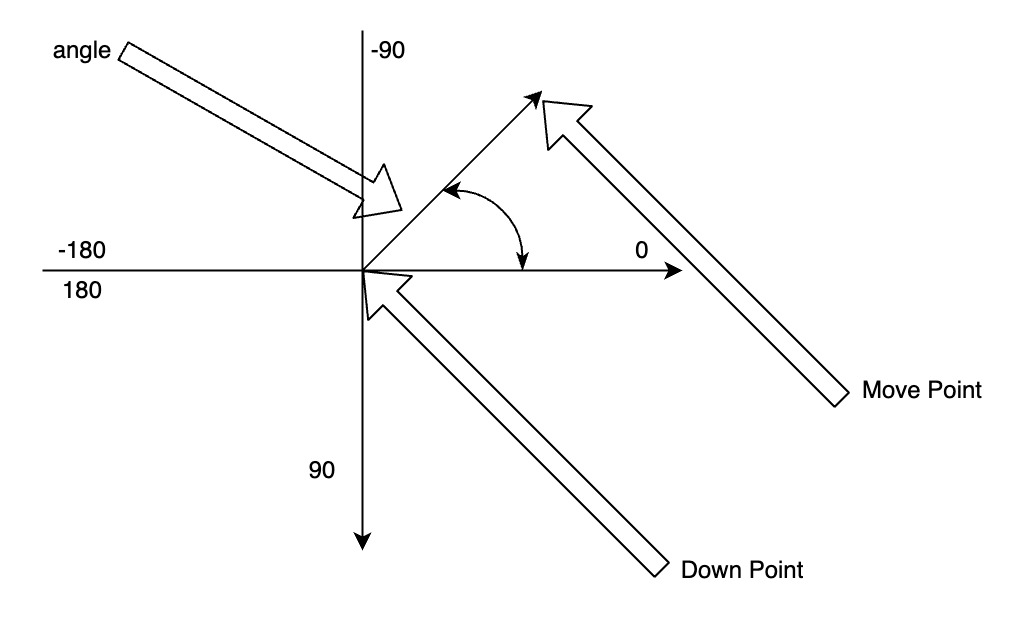
指定阻止所有平台层滑动手势生效的角度范围,当目标节点在事件响应链上并且滑动角度在角度范围内时,所有平台层滑动手势将被阻止,但 Lynx 的触摸事件依旧生效,可以实现消费指定方向滑动的前端滚动容器,此时基于平台层手势的原生滚动会被阻止。
该二维数组是若干个包含 2 个元素的数组,2 个元素依次为 start、end,表示起始角度和结束角度,滑动角度由手指按下的位置和手指移动的位置确定。
比如 [[-180, -135], [-45, 45], [135, 180]] 表示滑动方向为横向时,所有平台层滑动手势将被阻止,但滑动方向为纵向时,平台层滑动手势可以生效。
event-through
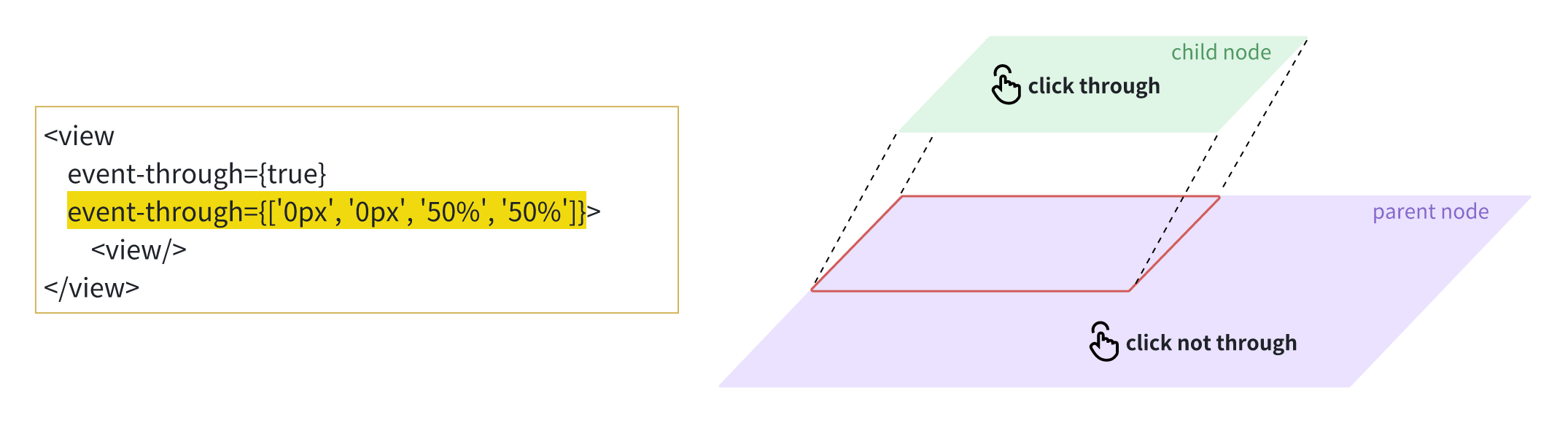
指定触摸在目标节点上时 Lynx 是否消费平台层的触摸事件,可以实现类似只展示不交互的效果。
对于非 <page> 节点,该属性支持继承:当实际命中的节点未设置 event-through 时,会继承祖先节点的 event-through 值,但不会继承 <page> 节点的 event-through 值。
对于 <page> 节点,事件穿透行为由其 event-through 属性和页面配置 Config.enableEventThrough 共同决定。当触摸命中 <page> 节点区域时,只要其中任意一项为 true,Lynx 就不会消费平台层的触摸事件。
event-through 的判定基于触摸命中的节点。user-interaction-enabled 和 pointer-events 会影响命中测试及最终命中的节点,因此也会间接影响 event-through 是否生效。命中节点确定后,若命中 <page>,则按上述 <page> 规则判断;否则,根据命中节点及其非 <page> 祖先节点的 event-through 值判断。
该属性的生效区域受 event-through-active-regions 的影响,未设置时默认为目标节点的所有区域。
event-through 只控制 Lynx 是否响应或消费平台层的触摸事件。若要将未消费的触摸事件继续传递给其他平台层节点,还需要客户端按平台完成以下适配:
-
Android:确保 Lynx 页面的父容器不消费触摸事件。Lynx 不消费事件后,系统事件分发可将事件传递给能够消费事件的兄弟节点,例如滚动容器。
-
iOS:LynxView 不响应触摸时,其
hitTest返回nil,Lynx 页面不会进入事件响应链。以下示例假设一个专用的 Lynx 包装容器包含 LynxView,并由该包装容器重写hitTest:withEvent:;目标响应视图是该包装容器在共同祖先视图下的兄弟视图:LynxView 不响应触摸时,该包装容器也返回
nil,使共同祖先视图继续命中包装容器的兄弟视图。如果目标响应视图位于包装容器内部并与 LynxView 同级,请勿直接使用此实现:它会将[super hitTest:withEvent:]返回的非 Lynx 子视图替换为nil。 -
HarmonyOS:在 Lynx 页面与目标响应节点的最近共同祖先节点下,找到包含 Lynx 页面的直接子节点;在该节点的
onTouchIntercept中调用容器的canConsumeTouchEvent(x, y)。Lynx 需要消费事件时返回HitTestMode.Default,否则返回HitTestMode.Transparent,使事件能够传递给兄弟节点。:::
event-through-active-regions
指定 event-through 的生效区域。
该二维数组内是若干个包含 4 个元素的数组,4 个元素依次为 x、y、width、height,单位为 px 或 %,表示触摸区域在目标节点中的位置和宽高。
比如 [['0px', '0px', '50%', '50%']] 表示触摸在节点的左上区域时,Lynx 不消费平台层的触摸事件。
enable-touch-pseudo-propagation
指定目标节点是否支持 :active 伪类在事件响应链上继续向上冒泡。
hit-slop
指定目标节点的触摸事件响应热区,不影响平台层手势。
比如 {top: '10px', left: '10px', right: '10px', bottom: '10px'} 或 10px 表示节点的触摸热区扩大 10px。
:::tip
其他更高优先级的因素可能导致热区修改失效,比如节点的视图层级(z-index、translateZ、fixed)比较高、父节点的 overflow 为 hidden 等。
ignore-focus
指定触摸在目标节点上时是否不抢占焦点,默认点击在节点上时节点会抢占焦点,可以实现类似点击其他区域时键盘不收起的效果。
该属性支持继承,即子节点未设置 ignore-focus 时,会继承父节点的 ignore-focus 值。
ios-enable-simultaneous-touch iOS
指定目标节点在事件响应链上时是否强制触发 touchend 事件,可以解决部分场景下 iOS 端不触发 touchend 事件但触发 touchcancel 事件(touchmove 事件也没有连续)的问题。
__lynx_timing_flag
标记并监控渲染该元件的 Lynx Pipeline。当 Lynx Pipeline 中出现 __lynx_timing_flag 变化,并且该 Lynx Pipeline 触发最终渲染时,将产生 PipelineEntry 性能事件,可通过 PerformanceObserver() 接收相关性能事件。
__lynx_timing_flag 可以设置为任意字符串:
- 设置为
undefined或空字符串时,无作用。 - 设置为
__lynx_timing_actual_fmp时,可用于统计ActualFmp指标,会产生MetricActualFmpEntry性能指标事件和PipelineEntry渲染流水线性能事件。 - 设置为其他字符串时,监控并产生
PipelineEntry性能事件。
事件
前端可以在元件上设置事件处理器属性来监听元件的运行时行为。
touchstart
属于触摸事件,手指开始接触触摸平面时触发。
touchmove
属于触摸事件,手指在触摸平面上移动时触发。
touchend
属于触摸事件,手指从触摸平面上离开时触发。
touchcancel
属于触摸事件,触摸事件被系统或 Lynx 外部手势中断时触发。
tap
属于触摸事件,手指在触摸平面上单击时触发。
longpress
属于触摸事件,手指在触摸平面上长按时触发,长按触发的时间间隔为 500 ms。
click
属于触摸事件,手指在触摸平面上单击时触发。
layoutchange
属于自定义事件,目标节点排版完成时触发,返回目标节点相对于 LynxView 视口坐标系的位置信息。
uiappear
属于自定义事件,目标节点在屏幕上出现时触发。
uidisappear
属于自定义事件,目标节点在屏幕上消失时触发。
animationstart
属于动画事件,在 Animation 动画开始时会触发。
animationend
属于动画事件,在 Animation 动画结束时会触发。
animationcancel
属于动画事件,在 Animation 动画取消时会触发。
animationiteration
属于动画事件,在 Animation 动画每次循环执行时会触发。
transitionstart
属于动画事件,在 Transition 动画开始时触发。
transitionend
属于动画事件,在 Transition 动画结束时触发。
transitioncancel
属于动画事件,在 Transition 动画取消时触发。
方法
前端可以通过 SelectorQuery API 执行元件的方法。
boundingClientRect
前端可以调用该方法来获取目标节点的宽高和位置信息。
takeScreenshot
前端可以调用该方法来获取目标节点的 base64 图片。
requestAccessibilityFocus
前端可以调用该方法将无障碍焦点聚焦到某个无障碍元件。
兼容性
LCD tables only load in the browser