<input>

<input> is used to create interactive input controls that allow users to input and edit single-line text.

TIP

This feature requires the client to add additional dependencies. Please refer to More Elements for the integration method.

Usage

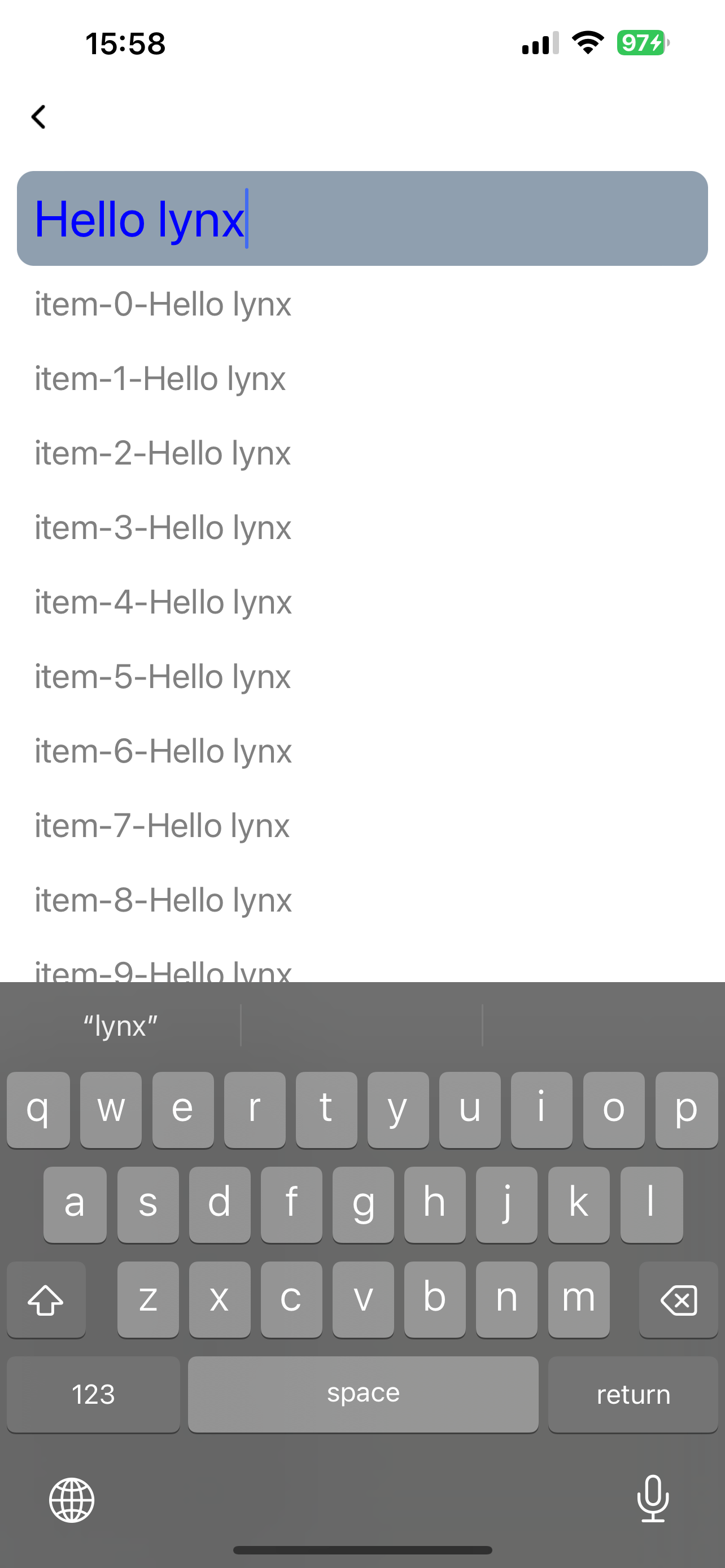
Basic

Below is a basic usage example of the <input> component:
Keyboard Avoidance

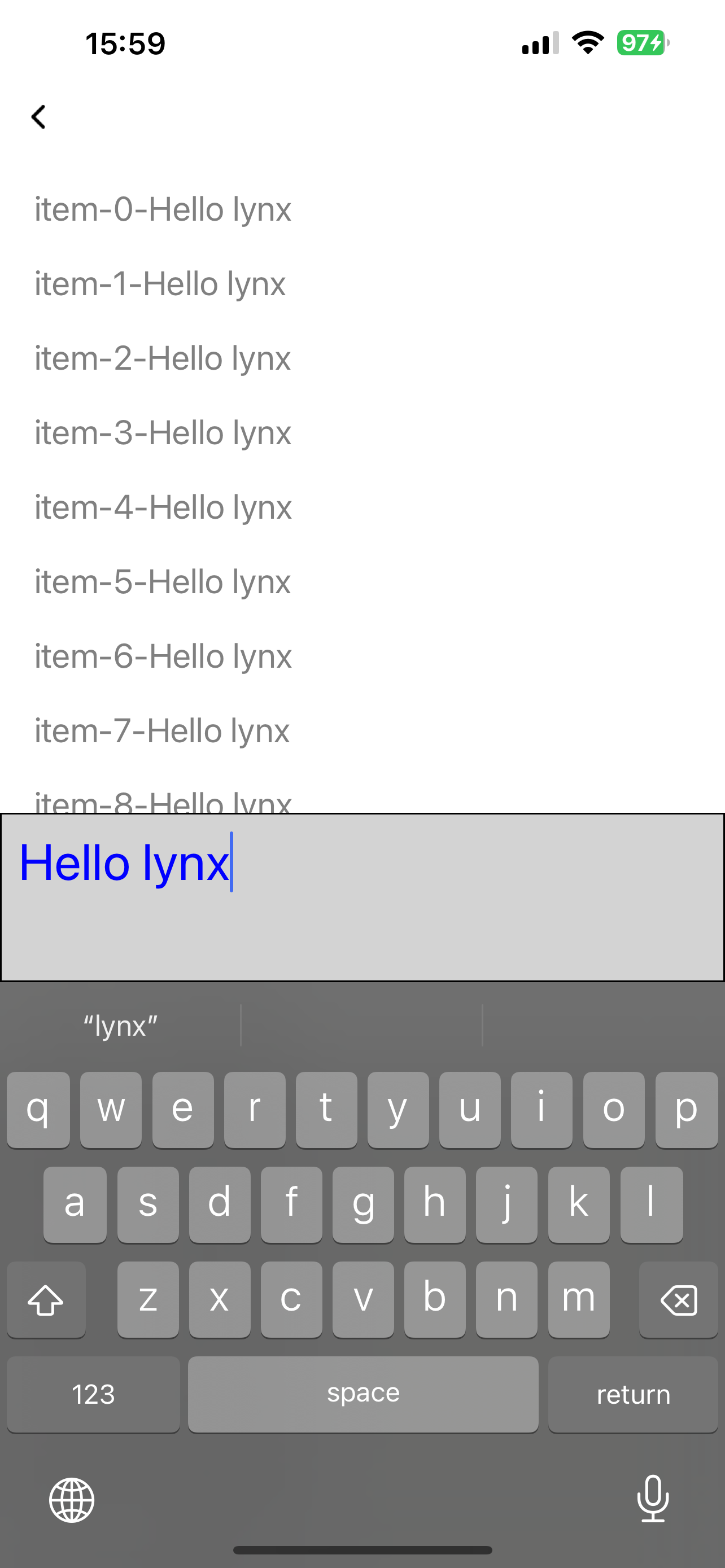
<input> doesn't automatically avoid keyboards, but you can adjust its position by listening to keyboard events and modifying its position accordingly:
Attributes

android-fullscreen-mode

Android
3.4
// @defaultValue: true
'android-fullscreen-mode'?: boolean;

Whether to enter the full-screen input mode when in landscape screen, in which the keyboard and input box will take up the entire screen

confirm-type

Android
iOS
Harmony
3.4
// @defaultValue: 'send'
'confirm-type'?: 'search' | 'send' | 'go' | 'done' | 'next';

The type of confirm button

disabled

Android
iOS
Harmony
3.5
// @defaultValue: false
disabled?: boolean;

Interaction enabled

input-filter

Android
iOS
Harmony
3.4
// @defaultValue: undefined
'input-filter'?: string;

Filter the input content and process it in the form of regular expressions

ios-auto-correct

iOS
3.4
// @defaultValue: true
'ios-auto-correct'?: boolean;

Auto correct input content on iOS

ios-spell-check

iOS
3.4
// @defaultValue: true
'ios-spell-check'?: boolean;

Check spelling issue on iOS

maxlength

Android
iOS
Harmony
3.4
// @defaultValue: 140
maxlength?: number;

Max input length

placeholder

Android
iOS
Harmony
3.4
placeholder?: string;

Placeholder

readonly

Android
iOS
Harmony
3.4
// @defaultValue: false
readonly?: boolean;

Readonly

show-soft-input-on-focus

Android
iOS
Harmony
3.4
// @defaultValue: true
'show-soft-input-on-focus'?: boolean;

Show soft input keyboard while focused

type

Android
iOS
Harmony
3.4
// @defaultValue: "text"
type?: 'number' | 'text' | 'digit' | 'password' | 'tel' | 'email';

Input content type

Events

Frontend can bind corresponding event callbacks to listen for runtime behaviors of the element, as shown below.

bindblur

Android
iOS
Harmony
3.4
bindblur = (e: InputBlurEvent) => {};
FieldTypeOptionalDefaultPlatformsSinceDescription
valuestringNo
Android
iOS
Harmony
3.4
3.4Input content

Blurred

bindconfirm

Android
iOS
Harmony
3.4
bindconfirm = (e: InputConfirmEvent) => {};
FieldTypeOptionalDefaultPlatformsSinceDescription
valuestringNo
Android
iOS
Harmony
3.4
3.4Input content

Confirm button clicked

bindfocus

Android
iOS
Harmony
3.4
bindfocus = (e: InputFocusEvent) => {};
FieldTypeOptionalDefaultPlatformsSinceDescription
valuestringNo
Android
iOS
Harmony
3.4
3.4Input content

Focused

bindinput

Android
iOS
Harmony
3.4
bindinput = (e: InputInputEvent) => {};
FieldTypeOptionalDefaultPlatformsSinceDescription
isComposingbooleanYes
Android
iOS
Harmony
3.4
3.4Is composing or not
selectionEndnumberNo
Android
iOS
Harmony
3.4
3.4The end position of the selection
selectionStartnumberNo
Android
iOS
Harmony
3.4
3.4The start position of the selection
valuestringNo
Android
iOS
Harmony
3.4
3.4Input content

Input content changed

bindselection

Android
iOS
Harmony
3.4
bindselection = (e: InputSelectionEvent) => {};
FieldTypeOptionalDefaultPlatformsSinceDescription
selectionEndnumberNo
Android
iOS
Harmony
3.4
3.4The end position of the selection
selectionStartnumberNo
Android
iOS
Harmony
3.4
3.4The start position of the selection

Input selection changed

Methods

Frontend can invoke component methods via the SelectorQuery API.

blur

Android
iOS
Harmony
3.4

lynx.createSelectorQuery()
.select('#id')
.invoke({
method: 'blur',
success: function (res) {},
fail: function (res) {},
})
.exec();

Release focus

focus

Android
iOS
Harmony
3.4

lynx.createSelectorQuery()
     .select('#id')
     .invoke({
      method: 'focus',
      success: function (res) {},
      fail: function (res) {},
    })
    .exec();

Require focus

getValue

Android
iOS
Harmony
3.4

lynx.createSelectorQuery()
.select('#id')
.invoke({
method: 'getValue',
success: Callback<{
/**
_ Is composing or not, iOS only
_ @Android
_ @iOS
_ @Harmony
_ @Web
_ @since 3.4
\*/
isComposing: boolean;
/**
_ End position of the selection
_ @Android
_ @iOS
_ @Harmony
_ @Web
_ @since 3.4
_/
selectionEnd: number;
/\*\*
_ Begin position of the selection
_ @Android
_ @iOS
_ @Harmony
_ @Web
_ @since 3.4
_/
selectionStart: number;
/\*\*
_ Input content
_ @Android
_ @iOS
_ @Harmony
_ @Web
_ @since 3.4
\*/
value: string;
}>;
fail: function (res) {},
})
.exec();

Get input content

setSelectionRange

Android
iOS
Harmony
3.4

lynx.createSelectorQuery()
     .select('#id')
     .invoke({
      method: 'setSelectionRange',
      params: {
        /**
         * End position of the selection
         * @Android
         * @iOS
         * @Harmony
         * @Web
         * @since 3.4
         */
        selectionEnd: number;
        /**
         * Start position of the selection
         * @Android
         * @iOS
         * @Harmony
         * @Web
         * @since 3.4
         */
        selectionStart: number;
      };
      success: function (res) {},
      fail: function (res) {},
    })
    .exec();

Set selection range

setValue

Android
iOS
Harmony
3.4

lynx.createSelectorQuery()
.select('#id')
.invoke({
method: 'setValue',
params: {
/\*\*
_ Input content
_ @Android
_ @iOS
_ @Harmony
_ @Web
_ @since 3.4
\*/
value: string;
};
success: function (res) {},
fail: function (res) {},
})
.exec();

Set input content

Compatibility

LCD tables only load in the browser

Except as otherwise noted, this work is licensed under a Creative Commons Attribution 4.0 International License, and code samples are licensed under the Apache License 2.0.